

Free HMI software: what you can use, and on what terms
FUXA, Rapid SCADA, Node-RED, Ignition Maker Edition and the free panel editors compared by licence, limits and hardware lock-in, from their own pages.
By the LADX engineering team
Short answer
Free HMI software comes in three kinds. Open-source packages such as FUXA (MIT) and Rapid SCADA (Apache 2.0) may be used for paid work. Panel makers' editors such as Weintek EasyBuilder Pro are free but only build projects for their own panels. Ignition Maker Edition is free for personal, non-commercial use only. Read the terms before drawing the first screen.
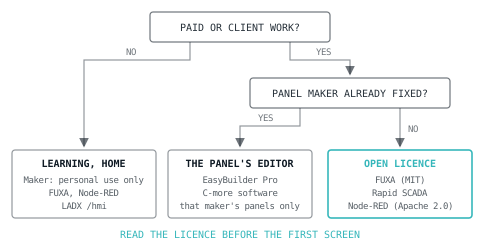
"Free HMI software" is three different offers under one label. Some packages are free because their licence lets anyone use, change and sell with them. Some are free because the panel they program is what you pay for. Some are free only while the work is not paid. Each is the right answer for somebody, and the wrong one costs a rebuild.
This article compares the options people actually find, using only what each vendor or project says on its own pages, checked in October 2026. Licences and limits change, so every claim links to the page that is authoritative for it.
Three kinds of free
- An open-source licence. The software is published under a licence such as MIT or Apache 2.0. Both permit commercial use, modification and redistribution, provided the licence notice goes with the software. FUXA, Rapid SCADA and Node-RED are in this group.
- A free editor for paid hardware. The design software costs nothing, but it only builds projects for one maker's panels. Weintek EasyBuilder Pro and AutomationDirect's C-more software work this way.
- Free for some uses. Most or all of a commercial product, free for personal or educational use, or for a time-limited trial. Ignition Maker Edition and Ignition's trial mode are the best-known examples.
The licence decides before the features do. A screen that is perfect but licensed for personal use only is not an option for a client, however good it looks.
The options side by side
| Software | Terms | What limits it | Runs on (as stated) |
|---|---|---|---|
| FUXA | MIT licence | Nothing in the licence. FUXA Pro is an optional paid tier, a one-time €100 on the project page, adding white-label branding, event logging and unlimited installations | Linux, Windows, macOS, Docker, Raspberry Pi |
| Rapid SCADA | Apache 2.0 for Rapid SCADA Standard | Add-on modules may be released under other licences, open or proprietary | Servers, embedded computers, the cloud |
| Node-RED with FlowFuse Dashboard | Apache 2.0 | A dashboard toolkit rather than an HMI package; PLC connections come from separate add-on nodes | Wherever Node-RED runs |
| Ignition Maker Edition | Free for individuals, personal and non-commercial use only | 10,000 tags, 10 concurrent sessions, no redundancy, Perspective only, community support | Your own computer |
| Ignition, trial mode | The full product, unlicensed | Runs two hours at a time; the trial can be reset from the Gateway | As Ignition |
| Weintek EasyBuilder Pro | Free download | Developed for Weintek HMIs only | Weintek panels |
| AutomationDirect C-more software | Free download since July 2020 | Programs C-more touch panels | C-more panels |
| AVEVA InTouch HMI | Free WindowMaker development environment, fully functional trial | Free to develop; deployment falls under AVEVA licensing, not priced on the page | Not stated on the trial page |
| LADX HMI builder | Free, no account, no tag limit | Runs against the LADX simulator, not plant equipment; no export to vendor panels | Any browser |
Open source: FUXA, Rapid SCADA and Node-RED
FUXA is the closest of the three to a conventional HMI package: a web editor where you draw the screens and a Node.js server that talks to the devices. Its README lists Modbus RTU and TCP, Siemens S7, OPC UA, BACnet IP, MQTT, EtherNet/IP for Allen-Bradley, MELSEC, ODBC and Redis, a built-in historian with SQLite or InfluxDB, and a GPIO driver for the Raspberry Pi. The latest release when this was written was v1.3.4, in August 2026. The quickest way to try it is the Docker image, exactly as the project documents it:
docker pull frangoteam/fuxa:latest
docker run -d -p 1881:1881 frangoteam/fuxa:latest
Then open http://localhost:1881 in a browser. One practical warning from the same README: on Linux, and on a Raspberry Pi in particular, the Siemens S7 library (node-snap7) may need extra build tools under Node.js 18. If you do not need S7, the README says you can remove it before installing.
Rapid SCADA comes from the other direction: a platform for larger, distributed monitoring and control systems. Rapid SCADA Standard is Apache 2.0; additional modules can be released under other licences, open or proprietary. Check the licence of every module you add, not only the core. Version 6.5.0 was released in September 2026.
Node-RED is a low-code tool for event-driven applications, under Apache 2.0, and the dashboard is an add-on to it. The original node-red-dashboard was declared deprecated on 27 June 2024, because it is built on Angular v1, which is no longer maintained. Its own README names FlowFuse Dashboard as the most direct replacement, installed as @flowfuse/node-red-dashboard (version 1.33.0 came out in October 2026). The deprecated package can still be installed, so check which one a tutorial uses.
Node-RED suits a team that already uses it to move data around. As an operator interface, check that the alarm handling, user access and navigation you need exist before committing: on a dashboard toolkit, some of that is yours to build.
Ignition Maker Edition: free for you, not for your employer
Maker Edition is the Ignition platform with the commercial uses taken out. The terms on the Maker Edition page are specific:
- Individuals only, for personal use. Businesses, non-profits and other organisations may not use it, and it may not be used for sales demonstrations.
- Up to 10,000 tags and 10 concurrent user sessions, with no redundancy.
- Visualisation through the Perspective module only. Vision is deliberately left out.
- Up to three active licences at once, and community support through the forum rather than phone or email.
- Drivers for Modbus, Allen-Bradley, Siemens, Omron and Opto 22, plus SQL Bridge, the historian, alarm notification and reporting modules.
That makes it the best free way to learn a platform many plants run, and the wrong tool for a client job. The same FAQ says projects built in Maker carry across to the full product unchanged.
The full product also runs unlicensed. The Ignition documentation says the trial runs for two hours at a time, after which the modules stop, and the timer can be restarted from the Gateway any number of times. That is good for evaluating Vision or a module Maker leaves out, and no use for anything that has to keep running.
Free editors that come with a panel
Panel makers give their configuration software away because the panel is the product. Weintek describes EasyBuilder Pro as developed exclusively for its own HMIs, with demo projects and more than 400 PLC drivers. AutomationDirect announced in July 2020 that its C-more programming software had become a free download. AVEVA's trial page offers a free WindowMaker development environment for InTouch HMI and a fully functional trial, and describes an Unlimited licence with unlimited clients and tags without publishing a price.
If the customer has already specified the panel, the decision is made: use that maker's editor. If not, remember that every screen built in a vendor editor stays with that vendor's hardware, and moving later means redrawing.
Four jobs, four answers
- A student learning HMI design at home. Ignition Maker Edition, because the skills carry over to a product used in industry. FUXA if you want to see how a web HMI works underneath. To practise against logic without any hardware, the LADX ladder editor and HMI builder run together in the browser.
- An integrator building a test-rig screen on a Raspberry Pi for a customer. Maker Edition is out, because the work is paid. FUXA's MIT licence allows it, the project lists the Pi and Docker, and it speaks Modbus TCP and S7. Ship the licence file with the software and record the FUXA version in the handover documents.
- A machine builder whose customer specifies Weintek panels. EasyBuilder Pro. The free choice was made when the hardware was chosen.
- A design review before the PLC exists. Draw the screens in the LADX HMI builder against logic in the ladder editor, prove the alarm behaviour and navigation with the people who will use them, then rebuild in the target package. The rebuild is a real cost; so is finding at FAT that the operator cannot see the permissive that is holding the machine.
Where the LADX HMI builder fits, and where it does not
The LADX HMI builder is free, in the browser, with no account and no tag limit. It has 87 symbols, alarms that follow the ISA-18.2 state model, and it binds to the tags of a program in the LADX ladder editor, so a start button on the screen starts the motor in the simulated logic. It exports one HTML file holding the screens, the program and the scan engine, which runs offline in any browser.
What it does not do matters as much:
- It does not talk to plant equipment. The runtime is the simulator.
- It does not produce a project for a Siemens, Allen-Bradley or any other vendor panel, so it cannot be deployed to one.
- It is not a historian. A run can be recorded and exported as CSV, but that is a record of a simulated test.
Use it to design screens, to prove alarm states against real logic before hardware exists, and to train people on a sequence. If you are deciding between a PLC simulator and a full plant model for that, the simulator comparison covers what each is for.
What goes wrong
- A personal licence used for work. The commonest one. Maker Edition on a laptop that ends up driving a client's machine is outside its terms, and the FAQ excludes non-profits as well as businesses.
- A project that has stopped. Check the last release date and the commit history before building on an open-source package. The original Node-RED dashboard is the example: deprecated, still installable, and still in tutorials.
- A driver that is not part of the core. Protocol drivers in open-source packages are often separate libraries with their own maintainers. The FUXA S7 build step on a Raspberry Pi is typical: it works, once the right tools are installed.
- A tag count found late. Count the tags from the I/O list and the concurrent clients before choosing, not when the last screen will not save.
- A web HMI exposed to the network. A browser HMI is a web server. Put it behind the same segmentation as the controller; an HMI reachable from the internet is one of the commonest audit findings, as the security basics explain.
- The demo's colours. Free packages ship with bright demo screens. Follow ISA-101 practice instead, grey process and colour only for abnormal, and rationalise the alarms before configuring them.
Before you draw the first screen
- Read the licence or terms, and write down which one the project relies on.
- Confirm the protocol to your PLC is supported, and by whom.
- Count tags and concurrent clients from the I/O list.
- Decide where it runs: a panel, a PC or a browser, and who will maintain that machine.
- Check the last release date.
- Decide whether you need an HMI or a SCADA system (the difference is about scope, not software), then read HMI screens that help at three in the morning before drawing anything.
Sources and further reading
- Ignition Maker Edition: terms, limits and FAQ (Inductive Automation)inductiveautomation.com
- Ignition licensing and the two-hour trial (Inductive Automation documentation)docs.inductiveautomation.com
- FUXA, web-based SCADA and HMI under the MIT licence (GitHub)github.com
- FlowFuse Dashboard for Node-RED, Apache 2.0 (GitHub)github.com
- EasyBuilder Pro HMI programming software (Weintek)weintek.com
Common questions
- Is Ignition free for personal use?
- Yes, through Ignition Maker Edition, which is free for individuals using it for personal projects, with up to 10,000 tags, 10 concurrent sessions and the Perspective visualisation module. Businesses, non-profits and sales demonstrations are excluded by its terms. The full product can also run in a two-hour trial mode that resets.
- Can I use open-source HMI software for a paying customer?
- Usually, yes. FUXA is released under the MIT licence, and Rapid SCADA Standard and Node-RED under Apache 2.0. Both licences permit commercial use, modification and redistribution provided the licence notice travels with the software. Check every add-on module separately, because modules can carry different licences, and record versions in the handover pack.
- Is Weintek EasyBuilder Pro free?
- Yes. EasyBuilder Pro is a free download from Weintek, with demo projects, image libraries and support for more than 400 PLC drivers. The condition is the hardware: Weintek develops it for its own HMIs only, so the projects you build run on Weintek panels. Choose it once the panel has been chosen, not before.
- Which free HMI software runs on a Raspberry Pi?
- FUXA lists the Raspberry Pi among its platforms, alongside Linux, Windows, macOS and Docker, and has a GPIO driver for the Pi. Its README warns that the Siemens S7 library may need extra build tools on a Pi running Node.js 18. Rapid SCADA describes itself as running on embedded computers as well as servers.
- Can the LADX HMI builder connect to a real PLC?
- No. Its runtime is the LADX simulator, so the screens run against logic written in the free ladder editor rather than against plant equipment, and it does not produce projects for vendor panels. It is for designing, proving and documenting screens and alarm behaviour before the target HMI package is built.
Keep reading
- HMI & SCADA
SCADA or HMI: what the words actually distinguish
Scope, architecture and history. Why the distinction blurred, and the questions that still separate them.
- Practice
HMI screens that help at three in the morning
The design question is not how it looks on the handover day but whether it helps somebody tired and under pressure.
- HMI & SCADA
ISA-101: the grey screen that finds faults faster
Why a high performance HMI is deliberately dull, what colour is reserved for, and the evidence behind it.