

Best AI for PLC programming in 2026: how to choose and test one
Vendor assistants, MCP servers, specialist apps and general models compared on what each can see and change, plus a test you can run on any of them.
By the LADX engineering team
Short answer
There is no single best tool; the right one works inside your platform, can see your project, and produces code you can compile and test. Siemens, Rockwell and Beckhoff ship assistants in their own engineering software, CODESYS sells an MCP server, and general models need a compile-and-test loop around them, especially for ladder logic.
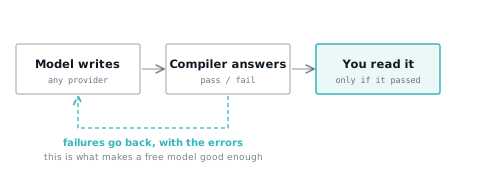
Ask which AI is best for PLC programming and most answers name a model. The model matters less than four other things: whether the tool works inside the engineering software you already use, whether it can see your project, what it is allowed to change, and whether its output is checked before you rely on it.
This guide compares the tools on those terms, using only what each vendor states on its own pages as read in October 2026, and ends with a test you can run on any of them in an afternoon.
Four kinds of tool
- Assistants built into vendor engineering software. Siemens' Eigen Engineering Agent for TIA Portal, the Copilot in Rockwell's FactoryTalk Design Studio, and Beckhoff's TwinCAT CoAgent. They know their own platform and can act on the open project.
- MCP servers. Add-ons that let any AI client speaking the Model Context Protocol read and edit a project in an engineering tool. CODESYS sells one; the TIA Portal servers are third-party projects. MCP servers for TIA Portal and CODESYS covers them in detail.
- Specialist third-party apps. Desktop or web tools built for PLC work that connect to one or more vendor environments.
- General models. ChatGPT, Claude, Gemini and others in a chat window, or open-weight models run locally. They know a great deal about PLCs in general and nothing about your project unless you paste it in.
What each vendor says its tool does
The table uses only what each vendor's own pages state. Where a page does not say something, the cell says so rather than guessing.
| Tool | Works in | Writes | Sees your project | Where the model runs | Stated limits and terms |
|---|---|---|---|---|---|
| Siemens Eigen Engineering Agent | TIA Portal V19, V20 or V21, licence required | SCL and LAD, test logic, JavaScript for WinCC Unified | Yes: function blocks, UDTs, HMI screens and how they relate | Not stated on the product page | Subscription through Siemens Digital Exchange; one-month free trial |
| Rockwell FactoryTalk Design Studio Copilot | FactoryTalk Design Studio, a cloud tool that runs in the browser | Ladder and Structured Text routines, Add-On Instructions | Yes, with the Core entitlement and Project Access enabled | Not stated directly; Rockwell says conversations are not used to train Azure OpenAI or Rockwell models | Can explain but not modify safety-related code or device configuration; may display inaccurate information |
| Beckhoff TwinCAT 3 CoAgent for Engineering, TE1700 | TwinCAT 3 XAE Shell | Structured Text suggestions, I/O configuration, HMI pages | Yes: libraries and existing project structure | Cloud or local models, the customer's choice | Specialists review, confirm and approve all AI-generated results |
| CODESYS Development System MCP Server | CODESYS V3.5.22.1 or later, with any MCP client | Structured Text only; graphical objects are read-only | Yes: reads and writes the open project | Whichever model the client uses | Professional Developer Edition subscription; limited undo, Git recommended |
| PLC Copilot, third-party | Desktop app with TIA Portal, Studio 5000 and Productivity Suite integrations | Reads LD, FBD and ST; generates logic | Yes | Online plans send parts of each request to its servers; offline and on-premises options on the enterprise plan | 30-day free trial |
| General chat model | A browser or chat app | Whatever you ask for | Only what you paste in | The provider's cloud, or your own machine for a local model | No compiler and no project context unless you add them |
Two things in that table matter more than they look. Rockwell and Beckhoff both draw lines around what the assistant may do on its own: Rockwell's Copilot cannot change safety-related code, and Beckhoff says its specialists approve every result. And the CODESYS help is unusually direct about data: when a cloud model such as Claude or ChatGPT is used, all project data the user can access goes to the provider, and a locally hosted model is recommended for sensitive projects.
Product pages also quote speed-ups and quality percentages. They are the vendors' own figures, published without a method, and are left out here.
What the research says about ladder logic
Independent research is thin but consistent on two points.
- Unchecked output often does not work. The LLM4PLC paper (arXiv 2401.05443, published at the 46th International Conference on Software Engineering) reported that GPT-4 and LLaMa2 failed to produce valid programs for PLC-based industrial control without help. Its pipeline, which feeds the results of grammar checkers, compilers and SMV verifiers back to the model, raised the generation success rate from 47 % to 72 %.
- Ladder is harder than Structured Text. A 2024 study by Zhang and de Sousa (arXiv 2410.15200) found that, given several examples, a model could produce a correct Sequential Function Chart for simple requirements, while generating Ladder Diagram automatically remained difficult even for very simple cases.
Two practical conclusions follow. Judge every tool on its own ladder output for your own tasks, including the vendor tools that list ladder generation, rather than on a Structured Text demo. And weigh the checking more heavily than the model: a tool that compiles its own output and shows you the errors is worth more than a cleverer model that does not. Why ChatGPT writes ladder logic that does not run goes through the usual failure modes.
How to test a tool in an afternoon
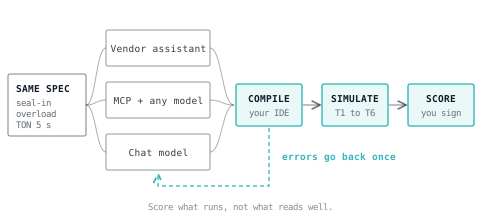
Give every candidate the same specification, put every answer through the same compiler and the same simulated test cases, and score what runs. A motor starter is small enough to finish and has enough traps to separate the tools.
The specification
Motor M1 starter. Rockwell-style ladder, or Structured Text if the tool only writes ST.
Inputs:  Start_PB (normally open), Stop_PB (wired NC, TRUE when healthy),
         OL_OK (overload contact, TRUE when healthy), Guard_OK (TRUE when closed).
Outputs: Horn_Out, M1_Run.
1. Start_PB requests a start only if Stop_PB, OL_OK and Guard_OK are all TRUE.
2. The request holds after Start_PB is released (seal-in).
3. Losing Stop_PB, OL_OK or Guard_OK drops the request and M1_Run at once.
4. After any stop, M1 must not restart until Start_PB is pressed again.
5. Horn_Out sounds for 5 s after a start request; M1_Run energises when it ends.
A correct answer is four rungs. In Rockwell neutral text:
XIC(Stop_PB)XIC(OL_OK)XIC(Guard_OK)[XIC(Start_PB),XIC(Start_Req)]OTE(Start_Req);
XIC(Start_Req)TON(Warn_Tmr,5000,0);
XIC(Start_Req)XIO(Warn_Tmr.DN)OTE(Horn_Out);
XIC(Start_Req)XIC(Warn_Tmr.DN)OTE(M1_Run);
And the same in Structured Text:
Start_Req := Stop_PB AND OL_OK AND Guard_OK AND (Start_PB OR Start_Req);
Warn_Tmr(IN := Start_Req, PT := T#5S);
Horn_Out := Start_Req AND NOT Warn_Tmr.Q;
M1_Run := Start_Req AND Warn_Tmr.Q;
The test cases
| Test | Action | Expected |
|---|---|---|
| T1 | All permissives TRUE; press and release Start_PB | Horn on for 5 s, then M1_Run on and staying on |
| T2 | M1 running; Stop_PB goes FALSE | M1_Run off in the same scan; horn stays off |
| T3 | Guard_OK FALSE; press Start_PB | Nothing energises |
| T4 | M1 running; drop OL_OK, then restore it | M1_Run off, and still off after OL_OK returns |
| T5 | Press Start_PB; drop Stop_PB 2 s into the warning, then restore it | Horn stops; M1 never starts |
| T6 | Press Start_PB again after T5 | A full 5 s warning, not the remaining 3 s |
Compile each answer in the target IDE first. Then build it in a simulator and step through T1 to T6. The free ladder editor runs Rockwell-style ladder with TON timing in milliseconds, so the warning behaves as it would on a controller. Convert reads Siemens SCL, Rockwell .L5X and PLCopen XML and writes Structured Text, SCL, Rockwell neutral text or PLCopen XML, with a report of anything that did not translate, so an answer in one dialect can be checked against the reference in another.
Scoring
| Criterion | How to score it |
|---|---|
| Compiles first time | Yes or no, in the target IDE |
| Compiles after one round of errors fed back | Yes or no |
| Uses only real instructions for the platform | Count invented or wrong-dialect instructions |
| Passes T1 to T6 | Number passed, out of six |
| States its assumptions | Did it ask, or say, how Stop_PB is wired? |
| Edits existing code correctly | Second test: give it a working routine and ask for one change |
The last row matters most for tools that see your project. Take a real routine, ask for one specific change, and check that nothing else moved. A tool that rewrites a whole routine to make a one-line change is a review burden however good its code is.
Questions to ask before you buy
- Where does my project go? Which model, which provider, which region, and is my code used for training? Rockwell states that Copilot conversations are not used for training; ask every vendor the same question and get the answer in writing.
- Can it run without internet access? Many OT networks have none. Beckhoff and CODESYS both describe local model options; see running a local model for PLC work.
- What can it change, and what can it not? Safety code, device configuration, downloads to a controller. Rockwell's documentation draws one line explicitly; ask the others where theirs is.
- Can I undo what it did? CODESYS notes that its IDE has limited undo and recommends Git. The same applies to any tool that writes to a project; where AI-written code stops being acceptable covers the policy side.
- Is there a record? Who asked for what, what the tool produced and what was accepted. On regulated work this is not optional.
- What does it cost to keep? Subscriptions, entitlement tiers, and which features sit in which tier.
Choosing by situation
| Your situation | Start with |
|---|---|
| Siemens shop on TIA Portal V19 to V21 | The one-month Eigen Engineering Agent trial, tested on your own projects |
| Rockwell team already working in FactoryTalk Design Studio | Its Copilot, with the Core entitlement if you want it working on the project rather than only answering questions |
| Beckhoff TwinCAT 3 | TE1700 CoAgent for Engineering, with a local model if the network requires it |
| CODESYS with a Professional Developer Edition subscription | The MCP Server with the client and model of your choice; a local model for sensitive projects |
| Air-gapped engineering network, any vendor | A local model with a compile-and-test loop around it |
| Mixed vendors, learning, or comparing tools | A general model, checked in a compiler and a simulator before anything reaches a controller |
Where LADX fits
LADX is not an add-in to TIA Portal or Studio 5000. It is a set of browser tools: a free ladder editor and simulator with 23 Rockwell-style instructions and scan-accurate behaviour (an output image, edge memory per instruction, timers in milliseconds), and Convert, which moves logic between Rockwell, Siemens and IEC formats and reports what did not translate.
LADX Studio, a free account, adds AI help that compiles and checks generated code before you see it. It runs on your own provider key, or on free models if you have none, so you can run the test above with several models and compare what passes.
What it does not do: it does not open .ACD or .ap project files (export .L5X or PLCopen XML instead), its simulator does not model I/O hardware or a particular vendor's instruction timings, it has no RTO, and it does not offer an MCP server. A generated program that passes its checks is a draft that compiles, not a reviewed design. The engineering, and anything in a safety function, stays with you.
What goes wrong
- Judging on the demo. Every vendor video uses a task the tool is good at. Your test should use your conventions, your tag names and your most awkward legacy routine.
- Accepting code because it compiles. Compiling proves syntax. T4, T5 and T6 test behaviour that a compiler cannot see.
- Dialect drift. General models mix Rockwell and Siemens vocabulary in one answer. A compiler catches it; reading does not.
- Pasting confidential code into a public chat. Check the data terms before the first prompt, not after.
- No record of what was generated. Six months later nobody can say which rungs came from a model. Log prompts and accepted output from the start.
Sources and further reading
- Eigen Engineering Agent for TIA Portal (Siemens)siemens.com
- FactoryTalk Design Studio Copilot documentation (Rockwell Automation)rockwellautomation.com
- TwinCAT CoAgent for engineering and operations (Beckhoff)beckhoff.com
- LLM4PLC: verifiable programming of PLCs with large language models (arXiv)arxiv.org
- Exploring LLM support for generating IEC 61131-3 graphic language programs (arXiv)arxiv.org
Common questions
- Can ChatGPT or Claude write PLC ladder logic?
- They can write ladder that looks right, and published research shows unchecked output often fails, with ladder harder for models than Structured Text. Used with a compiler, a simulator and test cases taken from your specification, a general model is a useful drafting tool. Used without them, it is a reliable source of plausible errors.
- Is there a free AI for PLC programming?
- General models have free tiers, and LADX Studio is a free account that can run on free models. The vendor tools are paid but offer trials: one month for Siemens' Eigen Engineering Agent, 30 days for PLC Copilot, and a 90-day software trial of Rockwell's FactoryTalk Design Studio. Check what each trial includes before relying on it.
- Does TIA Portal have a built-in AI assistant?
- Siemens sells the Eigen Engineering Agent, a generative AI assistant connected to TIA Portal that creates and adapts SCL and ladder, generates test logic, fixes compile errors and documents projects. It needs a licence for TIA Portal V19, V20 or V21 and an Industry Organization Account, and it is bought as a subscription on Siemens Digital Exchange.
- Which AI model is best for Structured Text?
- No independent benchmark is worth quoting yet. CODESYS states that in its internal tests Claude models gave the best Structured Text through its MCP Server, and that other MCP-compatible models may do less well. The reliable answer is your own test: the same specification, compiled and simulated, scored on what passes.
- Is AI-generated PLC code safe to use?
- For non-safety logic that a competent engineer reviews, compiles and tests, it is a drafting aid like any other. Rockwell's Copilot is documented as unable to modify safety-related code at all, and that is a sensible line for every tool: keep generated code out of safety functions, and keep a record of what was generated and accepted.
Keep reading
- AI
TIA Portal and CODESYS MCP servers: what they do, and the risks
What the Model Context Protocol is, what the CODESYS and TIA Portal MCP servers can read and change, and the controls to set before you connect one.
- AI
Agentic AI on the plant floor: what is actually running
Every vendor has announced one. A smaller number have deployed. Here is what is genuinely in production, and what the word is doing in those sentences.
- AI
Why ChatGPT writes ladder logic that does not run
General models are good at the shape of PLC code and bad at the parts that matter. Here is what they get wrong, and what has to sit around them.