

TIA Portal and CODESYS MCP servers: what they do, and the risks
What the Model Context Protocol is, what the CODESYS and TIA Portal MCP servers can read and change, and the controls to set before you connect one.
By the LADX engineering team
Short answer
An MCP server is a small program that exposes an engineering tool's functions, such as reading code, writing blocks or compiling, as tools an AI client can call through the open Model Context Protocol. CODESYS sells an official one for Structured Text; the TIA Portal ones are third-party. Use one only with version control, approval of each change and no route to a running controller.
Until recently an AI model could only see the PLC code you pasted into a chat window. An MCP server changes that. It lets the model browse the project, read blocks, write code, compile, and with some servers go online to a controller. That is useful, and it moves the question from 'is the code any good' to 'what is this thing allowed to do to my project'.
This guide explains the protocol from its official specification, lists what the PLC servers available in October 2026 expose according to their own documentation, and sets out the controls worth having before you connect one.
What MCP is
The Model Context Protocol (MCP) is an open-source standard for connecting AI applications to external systems such as files, databases and tools; its documentation likens it to a USB-C port for AI applications. The current specification, version 2026-07-28, defines it as JSON-RPC 2.0 messages between a few roles, and takes some inspiration from the Language Server Protocol that code editors use.
| MCP term | What the specification says | In a PLC setting |
|---|---|---|
| Host | The LLM application that starts connections | Claude Desktop, VS Code with Copilot, or another AI app |
| Client | The connector inside the host | One connection per server |
| Server | A service that provides context and capabilities | The add-on that drives TIA Portal or CODESYS |
| Tools | Functions for the AI model to execute | Read a block, write a POU, compile, download |
| Resources | Context and data for the user or the model | A dialect reference, a test case template |
| Prompts | Templated messages and workflows for users | A saved instruction such as 'review this block' |
| Transport | stdio for a local process the client starts, or Streamable HTTP | The CODESYS server and TiaCommander both use stdio |
Every tool call is a JSON-RPC request naming the tool and its arguments. Simplified from the specification's own example, with a CODESYS tool name in place of the example's (the arguments are whatever that tool's published input schema asks for, and are left empty here):
{
  "jsonrpc": "2.0",
  "id": 2,
  "method": "tools/call",
  "params": {
    "name": "check_for_errors",
    "arguments": {}
  }
}
The specification is direct about risk. It says tools represent arbitrary code execution and must be treated with caution, that hosts must obtain explicit user consent before invoking any tool, that tool descriptions and annotations should be treated as untrusted unless they come from a trusted server, and that there should always be a human in the loop able to deny a tool call. It also says MCP cannot enforce these principles at the protocol level. The client and the server have to.
How a PLC MCP server is put together
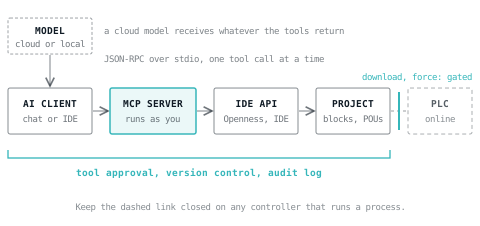
The PLC MCP servers covered here share the shape in the drawing at the top of this page:
- An AI client on the engineering PC, driven by a model in the cloud or running locally.
- The MCP server, a local process the client starts, exchanging JSON-RPC with it, over stdio in the servers that document their transport.
- The engineering tool's own automation interface: TIA Portal Openness for Siemens, the development environment itself for CODESYS.
- The open project, which the server reads and changes through that interface.
- Optionally, a controller, reached through the engineering tool's online functions.
Two consequences follow. The server acts with your rights: CODESYS says the access privileges of the user logged into the IDE apply, and the MCP security guidance warns that local servers run with the same privileges as the client. And everything a tool returns goes to the model, so if the model is in the cloud, so is whatever the tools read.
CODESYS's own demonstration above was recorded with a prototype of its server and a German-language interface, but it shows the loop clearly: the model builds a project from a prompt, the compiler reports errors, and the model corrects them until the project is ready.
What exists, and what each one exposes
CODESYS Development System MCP Server
This is the official one. The CODESYS Store page lists it as article 2101000023, version 1.0.0.0, requiring CODESYS Development System V3.5.22.1 or higher and a subscription to the CODESYS Professional Developer Edition. It is downloadable only through the CODESYS Installer, and technical support is not included; it is sold separately as a support ticket.
The online help says the server communicates locally over stdio, that any locally configured MCP client can use it to read and modify the currently open project, and that it supports Structured Text only: objects in graphical languages can be read but not created or modified. It recommends file-based project storage with Git because CODESYS V3 has limited undo, warns that a cloud model such as Claude or ChatGPT receives all project data the user can access, recommends a locally hosted model for sensitive projects, and states that in CODESYS's internal tests Claude models gave the best Structured Text.
Its published list has 20 tools and 2 resources, with each tool's effect stated:
| Effect | Tools and resources |
|---|---|
| Read only | browse_project_tree, get_active_app_as_path, get_active_path_and_selection, get_available_libraries_list, get_detailed_library_documentation, get_device_and_io_configuration, get_library_documentation, get_libraries_referenced_in_application, get_structured_text_content, search_in_files_by_regex, search_libraries_for_type, search_path_by_glob |
| Read only, can trigger a full compile | check_for_errors |
| Changes the project | create_or_replace_structured_text_object (overwrites an existing object at the same path), replace_text_in_structured_text, rename_object, create_folder, add_or_remove_library, add_or_remove_program_call_in_task |
| Deletes irrevocably | remove_object |
| Resources, read-only context | The CODESYS Structured Text dialect description; the CODESYS IEC UnitTest test case template |
Nothing in that list logs in to a controller, downloads, or writes live values. On the published list, getting changes into a PLC remains something you do yourself in CODESYS.
Beckhoff TwinCAT CoAgent
Beckhoff's assistant is not sold as an MCP server, but Beckhoff says its architecture relies on MCP, and that companies can provide their own knowledge bases, ERP systems or databases as MCP servers, which other MCP-compatible applications can also use. TE1700 CoAgent for Engineering works inside the TwinCAT 3 XAE Shell. TF1700 CoAgent for Operations goes further: it reads TwinCAT variables through ADS or the Analytics Logger, and Beckhoff says it can give recommendations, diagnostics or direct system commands based on live machine and process data. Beckhoff states that specialists review, confirm and approve all AI-generated results for execution.
TIA Portal: third-party servers
The Siemens Eigen Engineering Agent page does not describe an MCP interface. The TIA Portal servers below are independent projects built on TIA Portal Openness, Siemens' API for automating engineering workflows.
- TiaCommander: a proprietary free beta published by SIA A4 Studio, which states it is not affiliated with Siemens. Version 3.42.0 supports TIA Portal V17 to V20 through Openness, with only V19 fully tested. It lists 19 tools and 230 actions, among them reading blocks, creating and importing blocks in SCL, LAD, FBD and STL, hardware configuration, compiling, watch and force tables, live values read directly from a running CPU, and
download_to_device, which downloads to a live PLC after a compile check and a typed confirmation string. Its README says it collects limited telemetry (error reports, tool usage and the AI client's name) and no program data. - vscode-tiaportal-mcp: MIT licence. A Visual Studio Code extension for GitHub Copilot, also usable from Claude Desktop, that needs TIA Portal V20, Openness, and membership of the Windows group 'Siemens TIA Openness'. Its examples open a project, export blocks and types, and compile.
There is also a community CODESYS server, codesys-mcp-toolkit (MIT), which drives the CODESYS scripting engine to open, create and compile projects and to write POU code. It is published under an individual's GitHub account and is separate from the official CODESYS product despite its npm package name, and its code was last pushed in May 2025.
Rockwell's FactoryTalk Design Studio Copilot documentation does not describe an MCP interface either. Check each vendor's current pages before assuming anything; this area changes monthly. For how the vendor assistants compare as a whole, see the best AI for PLC programming.
What the model can change: five levels
| Level | Example tools | Worst realistic outcome | Controls |
|---|---|---|---|
| 1. Read | Browse, search, read code, cross-reference | Project content sent to a cloud model | A local model for sensitive projects; read the provider's data terms |
| 2. Check | Compile, check for errors | A long compile at a bad moment | As level 1 |
| 3. Edit code | Create or replace an object, replace text, rename | Working code silently overwritten | Version control, a reviewed diff before commit, tests |
| 4. Change structure | Delete objects, change libraries, task assignment, hardware | An object deleted irrevocably; a program removed from its task | Approve every call; keep these tools switched off by default |
| 5. Go online | Download, force, write live values | A machine does something nobody intended | Do not expose to an AI client on a controller that runs a process |
Most of the value is in levels 1 to 3: finding where a tag is used, explaining an unfamiliar block, drafting a function block and getting the compiler's opinion of it. Levels 4 and 5 are where the risk is, and level 5 is the only one where a mistake reaches the plant before anybody has read it.
Controls to set before you connect one
- Put the project under version control first. Commit before each session and review the diff afterwards as you would a colleague's change. Version control for PLC code covers what works when the project file is binary and what works when it is text.
- Approve every tool call that writes. The specification expects a human able to deny tool calls; keep the client's confirmation prompts on for anything beyond levels 1 and 2. Where the client lets you choose which tools to expose, switch off delete and online tools you do not need.
- Keep the AI session away from running controllers. Use an engineering PC with no online connection to a PLC that runs a process while the client is connected. An assistant that cannot reach a controller cannot download to one.
- Choose where the model runs. A cloud model receives everything the tools read. For confidential projects use a local model; see running a local model for PLC work.
- Vet the server like any other software. It runs with your rights. The MCP security guidance says a client offering one-click setup of a local server must show the exact command before running it, and recommends sandboxing and restricted access to files and network. Read a third-party server's licence and telemetry terms.
- Keep a record. Log prompts, tool calls and accepted changes, so that 'which parts came from a model' has an answer. A record can be this simple:
2026-10-12 14:03  user=eng01  client=Claude Desktop  model=local
tool=create_or_replace_structured_text_object  path=Application/FB_Pump
diff=git 3f2a91c compiled=yes tests=T1-T6 pass reviewed_by=eng02- Test before anything is downloaded. Compile, run the logic in a simulator, and have a person review it. Where AI-written code stops being acceptable sets out where that line sits for safety functions.
Should you use one?
| Situation | Recommendation |
|---|---|
| Understanding an inherited CODESYS or TIA Portal project | Yes, with read-only tools: the low-risk, high-value case |
| Drafting new Structured Text in CODESYS | Yes, with Git, approval of writes, and a compile and test step |
| Ladder or other graphical languages in CODESYS | Not through the official server: it can read them but not create or modify them |
| A confidential project with a cloud model | Only if the provider's data terms allow it; otherwise a local model |
| Any server that downloads or forces | Not on a controller that runs a process; at most on a bench PLC or a simulator |
| A safety program | No |
Anyone new to CODESYS itself should start with what CODESYS is before wiring an AI client to it, and agentic AI on the plant floor puts these servers in the wider picture of what is actually deployed.
Where LADX fits
LADX does not provide an MCP server. Its position on AI is the one this article argues for: in LADX Studio, generated code is compiled and checked before anyone sees it, on the user's own provider key or on free models. If you draft logic with an MCP-connected assistant, you can rebuild it in the free ladder editor and step through it scan by scan, and Convert reads SCL, .L5X and PLCopen XML exports and writes them out in another vendor's format with a report of what did not translate. Neither replaces the review.
What goes wrong
- Overwrite by replacement. A create-or-replace call rewrites a whole object, and anything the model left out of its version is gone. Review the diff, not the chat summary.
- Irrevocable deletes. CODESYS documents
remove_objectas deleting irrevocably. Without Git, that is final. - The project and the controller drift apart. The assistant edits the project, nobody downloads, and the next engineer goes online to a mismatch. Make the download a recorded human step.
- A cloud model reads more than you meant to share. Library configurations, customer names in comments, credentials in tag values. Decide what the model may see before the session, not after.
- Trusting a tool's description. The specification treats annotations from an untrusted server as untrusted; a tool that says it is read-only might not be. Try a new server on a copy of a project first.
- Running it on the plant engineering station. The convenience is the problem: that PC can usually reach the controllers.
Sources and further reading
- What is the Model Context Protocol? (official documentation)modelcontextprotocol.io
- Model Context Protocol specification, version 2026-07-28modelcontextprotocol.io
- CODESYS Development System MCP Server (CODESYS online help)content.helpme-codesys.com
- MCP Tools and Resources (CODESYS online help)content.helpme-codesys.com
- Security Best Practices (Model Context Protocol)modelcontextprotocol.io
Common questions
- Is there an official Siemens MCP server for TIA Portal?
- Not on the Siemens pages read for this article: the Eigen Engineering Agent page does not describe an MCP interface. The TIA Portal MCP servers available are independent projects built on TIA Portal Openness, such as TiaCommander and vscode-tiaportal-mcp. Check Siemens' current pages before deciding, because this area is changing quickly.
- Does the CODESYS MCP Server work with local models?
- Yes. It talks over stdio to any locally configured MCP-compatible client, and the client decides which model to use. CODESYS recommends a locally hosted model for sensitive projects, because a cloud model receives all the project data the user can access. It also says Claude models gave the best Structured Text in its internal tests.
- Can an MCP server download a program to a PLC?
- Some can. The official CODESYS server's published tool list has no download or online tool; it works on the project only. TiaCommander, a third-party TIA Portal server, includes a download to a live PLC behind a typed confirmation string. Read the tool list of any server before connecting it, and expose online tools only where nothing can be hurt.
- What is the difference between an MCP server and TIA Portal Openness?
- Openness is Siemens' programming interface for automating engineering work in TIA Portal from your own software. An MCP server for TIA Portal uses Openness underneath and presents selected functions as MCP tools, so any MCP-compatible AI client can call them without a custom integration. The server, not the model, decides what the AI can reach.
- Is it safe to use an MCP server on an OT network?
- It can be, with controls the protocol does not provide for you: the specification says MCP cannot enforce its security principles at the protocol level. Keep write tools behind approval, the project under version control, the model local if the data is sensitive, and the AI client away from any online connection to a running controller.
Keep reading
- AI
Best AI for PLC programming in 2026: how to choose and test one
Vendor assistants, MCP servers, specialist apps and general models compared on what each can see and change, plus a test you can run on any of them.
- AI
Agentic AI on the plant floor: what is actually running
Every vendor has announced one. A smaller number have deployed. Here is what is genuinely in production, and what the word is doing in those sentences.
- AI
Why ChatGPT writes ladder logic that does not run
General models are good at the shape of PLC code and bad at the parts that matter. Here is what they get wrong, and what has to sit around them.