

ControlLogix major fault codes: Type 4 Code 20 and the rest
What the common ControlLogix and CompactLogix major fault types and codes mean, how to find what caused one, and how to clear it without hiding the next one.
By the LADX engineering team
Short answer
A Logix major fault is reported as a type and a code, such as Type 4 Code 20 (T04:C20): an array subscript too large, or a CONTROL structure's POS or LEN invalid. Type 1 is power-up, 3 I/O, 4 a program instruction, 6 a task watchdog, 7 nonvolatile memory and 11 motion. Read it on the Major Faults tab, fix the cause, then clear it.
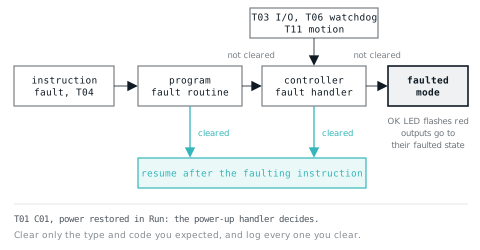
A Logix controller with its OK LED flashing red has a major fault. The display, or the Major Faults tab in Logix Designer, gives you two numbers: a type and a code, shown as T04:C20 or 'Type 4, Code 20'. This page is the reference for those numbers and the procedure that follows them.
Every type, code and corrective action below comes from Rockwell. The current Major, Minor, and I/O Faults manual (1756-PM014) no longer prints the code table; it refers to a spreadsheet, Logix 5000 Controller and I/O Fault Codes (1756-RD001, September 2025), which can be downloaded from Rockwell's literature library. Instruction-specific faults are in the general instructions reference, served at the 1756-RM003 address as 1756-RM018A.
What a major fault is
Rockwell's definition, from 1756-PM014: if a fault condition prevents an instruction from running, the instruction aborts and the controller reports a major fault. Logic execution halts and the controller switches to faulted mode. Outputs go to their configured state or value for faulted mode.
A fault routine can clear the fault and let the program continue, which Rockwell calls fault recovery. If it does, the faulted instruction does not run and execution resumes with the next instruction. That last detail matters: if the instruction was a JSR, the whole subroutine is skipped (more on how JSR and subroutines behave).
You can read the fault in three places: the Major Faults tab of Controller Properties, which shows the last three major faults and a count since the log was cleared; the controller's status display, as 'Major Fault TXX:CXX' followed by a message; and in logic, through the MajorFaultRecord attribute of the Program object.
The fault types
| Type | Category | Where a routine can handle it |
|---|---|---|
| 1 | Power-up | Power-Up Handler (Type 1 Code 1) |
| 3 | I/O | Controller Fault Handler |
| 4 | Program: an instruction faulted | The program's fault routine |
| 6 | Watchdog | Controller Fault Handler |
| 7 | Nonvolatile memory (store and load) | Not in that table: follow 1756-RD001 |
| 8 | Mode change | Not in that table: follow 1756-RD001 |
| 11 | Motion | Controller Fault Handler |
| 12, 14 | Safety, safety task | Not in that table: follow 1756-RD001 |
| 17 | Runtime diagnostics, such as temperature | Not in that table: follow 1756-RD001 |
| 18 | CIP Motion drive faults | Not in that table: follow 1756-RD001 |
| 20 | Licence | Not in that table: follow 1756-RD001 |
The placements for types 1, 3, 4, 6 and 11 are from the fault routine table in 1756-PM014, which covers only those five; the categories are from 1756-RD001.
Common major fault codes and what to do
| Fault | Rockwell's description | What to do |
|---|---|---|
| T01:C01 | Power lost and restored in Run mode | Expected if the controller powers up in Run; handle it in the Power-Up Handler, or leave that empty to stay faulted |
| T01:C40 | Energy storage module or battery failed during power-down | Replace the battery, or let the ESM charge fully; replace the ESM or controller if it persists |
| T01:C60, C61, C62 | Nonrecoverable fault | Insert a memory card and restart to capture diagnostics, clear the fault, download, and give Rockwell support the nine-character code from the display |
| T03:C16 | I/O module connection failed on a required module | Check the module is in the chassis, its electronic keying, and the Connection tab of its properties |
| T03:C20, C21 | Unable to read ControlBus chassis information | Not recoverable: replace the chassis |
| T03:C23 | A required connection was not established before going to Run | Wait for the controller's I/O indicator to go green before switching to Run |
| T04:C16 | Unknown instruction encountered | Remove it; Rockwell notes this probably came from a program conversion |
| T04:C20 | Array subscript too large, or CONTROL POS or LEN invalid | Keep indexes inside the array's dimensions |
| T04:C21 | CONTROL LEN or POS less than 0 | Find what wrote a negative value |
| T04:C31 | JSR or RET did not pass as many parameters as expected | Match the JSR parameters to the SBR and RET |
| T04:C34 | A timer had a negative PRE or ACC | Stop logic loading a negative preset or accumulator |
| T04:C42 | JMP to a label that did not exist or was deleted | Correct the JMP target or add the LBL |
| T04:C82 | Could not re-enter an executing SFC | Remove the jump back into the calling SFC |
| T04:C83 | Value out of range: subscripts on BOOL arrays and bit-level addressing | Same as C20, for BOOL arrays and bit numbers |
| T04:C84 | Stack overflow | Reduce subroutine nesting or the number of parameters passed |
| T04:C85 | Invalid routine type | Check SFP and SFR targets are SFC routines |
| T04:C89 | Target step does not exist in the routine | Correct the SFR target step |
| T04:C90 | A safety instruction outside a safety task | Move it into the safety task |
| T04:C94 | Nesting limits exceeded | Restructure to reduce subroutine nesting |
| T04:C990 to C999 | User-defined fault | Whatever your own logic defined |
| T06:C01 | Task watchdog expired | Find the long scan: an endless loop, too much code for the period, or a higher priority task hogging the processor |
| T07:C40 | Store to nonvolatile memory failed | Retry; replace the memory card if it keeps failing |
| T07:C41, C42 | Load from nonvolatile memory failed: controller type, or firmware revision, mismatch | Use the right controller type, or update firmware to the project's revision |
| T08:C01 | Mode change inhibited, download in progress | Wait for the download to finish, then clear |
| T17:C34 | Controller internal temperature exceeded the operating limit | Reduce ambient temperature and restore the required clearances |
| T20:C01 | Licence missing or invalid | Insert a CmCard with the licences the project needs |
Motion faults (Type 11) cover overtravel, position error tolerance, encoder loss and drive faults; Type 18 covers CIP Motion drive faults. 1756-RD001 lists each with its reset procedure.
Type 4 Code 20 in detail
This is the one most people search for. Rockwell's description in 1756-RD001 is 'Array subscript too large, or CONTROL data type POS or LEN invalid'. The Index through arrays section of 1756-RM003 puts it plainly: instructions that view arrays as a collection of elements generate a major fault (type 4, code 20) if a subscript exceeds its corresponding dimension.
So it comes from two places. A tag used as an index, Recipe[Recipe_No], holding a value past the end of the array, or negative. Or a file instruction whose CONTROL structure points past the end: 1756-RM003 lists Code 20 for FFL and FFU, LFL and LFU, BSL and BSR, SQL, SRT, STD, DDT and FBC, among others, and Code 21 when POS or LEN is negative. On a BOOL array or a bit number, the same mistake is Code 83 instead.
Prescan has its own rules. If a controller faults immediately after switching to Run, look at prescan. From revision 13.0 the controller clears out-of-range subscript faults during prescan automatically; at 11.x and earlier they fault, and for 12.x Rockwell refers you to the release notes. Logix Designer's internal handler that does this runs only during prescan and only clears array faults, type 4 codes 20 and 83. Array faults are not ignored in postscan.
The fix is a guard before the index is used. In neutral text:
GEQ(Recipe_No,0)LEQ(Recipe_No,19)OTE(Recipe_Valid);
XIC(Recipe_Valid)MOV(Recipe[Recipe_No],Active_Recipe);
XIO(Recipe_Valid)OTE(Recipe_Error);
Here Recipe is a DINT[20]. Every instruction that uses the index is conditioned on Recipe_Valid, and an out-of-range number raises an alarm instead of stopping the controller. The guard itself can be built and tested in the LADX ladder simulator with an integer tag. Why an index faults at all is covered in indirect addressing and arrays.
Add-On Instructions and faults
A fault inside an Add-On Instruction does not behave like one inside a subroutine. 1756-PM014 is explicit: the AOI is an instruction, so a fault inside it aborts the rest of it, and if the fault is cleared, execution resumes after the top-level AOI call. If myAoi calls myNested, which calls inner, and inner faults, none of the remainder of inner, myNested or myAoi runs. Design AOIs to check their own indexes; see Add-On Instructions.
Type 6: the task watchdog
Each task has a watchdog: 1 to 2,000,000 ms, 500 ms by default (1756-PM005). It starts when the task starts and stops when every program in the task has run, including time spent interrupted by other tasks. If the task overruns, the controller raises T06:C01.
The causes Rockwell lists are an infinite loop, a program too complex to run as quickly as specified, and a higher priority task keeping this one from finishing. In Structured Text, a FOR, WHILE or REPEAT loop that runs too long raises the same fault (1756-RM003). The controller fault handler can clear a watchdog fault, but if the same watchdog fault happens again in the same scan the controller faults regardless (1756-PM005). Raising the watchdog only hides the symptom; scan time optimisation addresses the cause.
Clearing a major fault
Fix the cause first. Then either:
- From the software: Controller Properties, Major Faults tab, Clear Majors. If the keyswitch is in Run, the controller starts running again immediately, which is worth knowing before you click.
- From the keyswitch: turn from RUN or REM to PROG, then to REM, then to RUN to restart, or back to PROG to stay stopped. This clears the fault but not the major fault log.
A Type 1 Code 1 at power-up is not an error in the usual sense. If the controller powers up in Run or Remote Run, the Power-Up Handler runs: leave it empty and the controller stays faulted, which is the safe default for many machines; clear the fault in it and the controller resumes.
Fault routines: clear one thing, on purpose
1756-PM014 describes the pattern. Create a user-defined type FAULTRECORD with Time_Low and Time_High (DINT), Type and Code (INT) and Info (DINT[8]). In the program's fault routine, a GSV reads the Program object's MajorFaultRecord into a tag of that type (naming the first member of the tag), EQU instructions test for the one type and code you expect, CLR zeroes Type and Code, and an SSV writes the record back, which clears the fault. In neutral text, for an out-of-range recipe index:
GSV(Program,THIS,MajorFaultRecord,Fault_Rec.Time_Low)EQU(Fault_Rec.Type,4)EQU(Fault_Rec.Code,20)CLR(Fault_Rec.Type)CLR(Fault_Rec.Code)MOV(0,Recipe_No)SSV(Program,THIS,MajorFaultRecord,Fault_Rec.Time_Low);The MOV puts the index back in range so the fault does not repeat on the next scan. Rockwell's prescan example adds a CPU_scanning bit, written by an unconditional OTE in the main routine, so that the routine can tell a prescan fault from one in normal running: the bit is off during prescan, because the controller resets OTE bits then, and always on once logic runs.
Rockwell is emphatic about the limits: do not use fault routines to continually clear all faults, and be selective in the types and number of faults cleared; the online help adds that you should log each occurrence. A routine that clears everything turns a stopped machine into one running with a skipped instruction nobody knows about.
Where to put it follows the type: Type 4 in the program's fault routine; Types 3, 6 and 11 in the Controller Fault Handler; Type 1 Code 1 in the Power-Up Handler. If a program's fault routine does not clear the fault, the controller runs the Controller Fault Handler; if that does not clear it either, the controller faults.
To test one without waiting for a real fault, use a JSR to the fault routine: 1756-RM003 lists a JSR into a fault routine as Type 4, code 990 or a code you supply, and 1756-PM014 reserves 990 to 999 for user-defined faults. Add the test to your commissioning checklist, and work through real faults with the troubleshooting method rather than by clearing and hoping.
Sources and further reading
- Rockwell Major, Minor, and I/O Faults Programming Manual (1756-PM014)literature.rockwellautomation.com
- Rockwell Logix 5000 Controller and I/O Fault Codes (1756-RD001, spreadsheet)literature.rockwellautomation.com
- Rockwell Logix 5000 General Instructions Reference (now 1756-RM018A)literature.rockwellautomation.com
- Rockwell Logix 5000 Tasks, Programs, and Routines Programming Manual (1756-PM005)literature.rockwellautomation.com
- Studio 5000 Logix Designer online help: Clear faultsrockwellautomation.com
Common questions
- What is the difference between a major and a minor fault on a Logix controller?
- A major fault stops logic execution and puts the controller in faulted mode, with outputs going to their configured fault state, unless a fault routine clears it. A minor fault is logged and the controller keeps running: examples are an arithmetic overflow (T04:C04), a periodic task overlap (T06:C02) and a low battery or energy storage warning.
- Where is the complete list of Logix fault codes?
- In Rockwell's reference data spreadsheet Logix 5000 Controller and I/O Fault Codes, publication 1756-RD001. The programming manuals 1756-PM014 and 1756-RM003 now point to it rather than printing the table. It lists controller fault types and codes with Rockwell's description and corrective action, and the I/O fault codes on a second sheet.
- What does Major Fault T01:C60 or C61 mean?
- The controller detected a nonrecoverable major fault. Rockwell's corrective action is to insert a memory card and restart so diagnostic information is written to it, then clear the fault and download the application, and to contact Rockwell support with the nine-character code shown on the controller's scrolling status display.
- Can I create my own major fault?
- Yes. A user-defined major fault uses fault type 4 with a code from 990 to 999, which Logix Designer reserves for the purpose. You raise it with a JSR to the program's fault routine, passing the code. The controller handles it like any other major fault, so use it for conditions where stopping is the right answer.
- Does clearing a major fault restart the machine?
- It can. Rockwell's help notes that if the keyswitch is in Run when you select Clear Majors, the controller immediately begins running again. Make sure the cause is fixed and the machine is safe to restart before clearing, or move the keyswitch to Program first and choose when to return to Run.
Keep reading
- Instructions
Studio 5000 MSG instruction: path, setup and error codes
How to set up a Studio 5000 MSG instruction: message types, the communication path, connected and cached messages, and what each .ERR and .EXERR code means.
- Migration
L5X file: what it is and how to open, edit or convert one
An L5X is Studio 5000's XML export. What is inside it, how it differs from L5K and ACD, and how to open, import, hand-edit or convert one safely.
- Instructions
Indirect addressing: one rung instead of forty
Indexed access, the loop that replaces copied logic, and the out of range fault that takes the controller down.