

Free control panel design software: electrical CAD compared
QElectroTech, ProfiCAD Home, the SEE Electrical trial and LADX CAD compared on licence, page limits, cross references, BOMs and DXF, from each vendor's pages.
By the LADX engineering team
Short answer
QElectroTech is the most complete free option: GPL-licensed, on Windows, macOS and Linux, with cross references, automatic conductor numbering and CSV export of the parts and wire lists. ProfiCAD's free Home licence is for hobby use and stops at three pages. SEE Electrical offers a 30-day trial. LADX CAD is free browser drafting with DXF export.
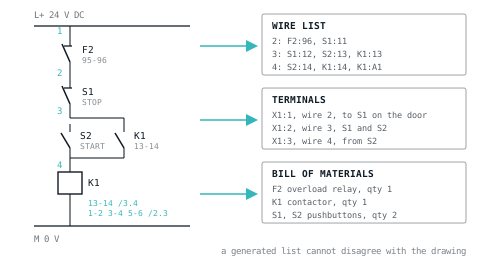
A control panel is documented as a set of drawings and the lists that come out of them: schematic sheets, a panel layout, a terminal plan, a wire list and a bill of materials. Free software that draws a tidy schematic but cannot produce the lists leaves you typing them by hand, and typed lists are where panel errors live.
This compares the free options on what decides whether a tool will carry a real panel. Every term below comes from the vendor's or project's own page, checked in October 2026.
What a panel package has to produce
- Schematics over many pages, with symbols to a recognised standard and a title block on every sheet.
- Cross references, so a contactor coil on one page shows where its contacts are drawn, and each contact shows where its coil is.
- Wire numbers, applied consistently, ideally by the software.
- A terminal list, for building the panel and for checking the field wiring against it.
- A bill of materials, generated from the devices on the drawings.
- Exchange formats: DXF for whoever uses another CAD package, PDF or images for everybody else.
- A panel layout to scale, for the layout itself and for the heat calculation.
The free options compared
| QElectroTech | ProfiCAD Home | SEE Electrical trial | LADX CAD | |
|---|---|---|---|---|
| Terms | GPL, any use | Hobby use only; commercial work needs the paid licence | 30 days from registration | Free, no account, no paid tier |
| Platform | Windows, macOS, Linux | Windows; Mac through Parallels | Windows 10 or 11 | Any browser |
| Page limit | None stated | 3 pages per drawing (paid: 600) | 3 pages per project | None stated |
| Symbols | Over 8,000 in the collection | Over 2,000 in the program | Included, with a part number database | Electrical symbols and 11 sheet templates |
| Cross references | Yes, master and slave elements | Paid licence only | All features during the trial | Written by hand |
| Wire numbering | Automatic numbering patterns for conductors | Not in the edition comparison | All features during the trial | Typed as text |
| Parts and wire lists | CSV export of both | Paid licence only | All features during the trial | Use the BOM template |
| DXF | Export | Paid licence; Home points to a free online converter | All features during the trial | Export and import |
QElectroTech: the free tool built for this
QElectroTech is free software for electrical diagrams under the GNU GPL, available for Windows, macOS and Linux. Version 0.100 was released in January 2026 and the source repository was still active in October 2026. The project says its symbol collection passed 8,000 symbols in that version, split between an official collection and a contributed one.
It works in folios, which are pages, each with an editable title block. The features that make it ECAD rather than drawing software are all in the documentation:
- Cross references. A device drawn several times, such as a contactor whose coil is on the control folio and whose contacts are on the power folio, is a master element with slave elements. The documentation notes they then appear as one item in the bill of materials.
- Auto numbering. Patterns for folios, elements and conductors, chosen from the Auto Numbering panel, so conductors are numbered by pattern rather than by hand.
- Terminal blocks as their own element type.
- Lists. Project, Export to CSV writes the nomenclature (the parts list), and a separate command writes the list of wires, both as CSV for a spreadsheet.
- Exports. Folios export to PNG, JPEG, bitmap and SVG, and to DXF; the export page lists the formats, and the project credits a contributing company with the DXF export code.
The cost is learning a dedicated tool. Check early that the symbols you need follow the standard your customer works to, because a large, partly contributed library varies in style.
ProfiCAD: free at home, paid at work
ProfiCAD's editions page sets out exactly what the free Home licence leaves out. Home is for hobby use. In a commercial environment it may only open, view and print documents that somebody else created; creating or modifying documents for commercial purposes needs the paid licence.
Home stops at 3 pages per drawing, against 600 for the paid licence, and it does not include the bill of materials, netlist, list of wires, list of cables, cross references, title block creation or DXF export. Image export and layers are in both. The paid version runs as a full 30-day trial without a credit card, on Windows, with Parallels suggested for a Mac. The product page describes the paid licence as perpetual rather than a subscription.
SEE Electrical: a trial, not a free edition
IGE+XAO sells SEE Electrical by subscription. Its product page offers a free 30-day working version with all features, counted from registration, limited to 3 pages of schematics per project. It runs on Windows 10 or 11. The product can be extended with additional modules, SEE Electrical 3D Panel among them. It is a fair way to evaluate the product and not a way to draw a panel for nothing.
LADX CAD: free drafting in the browser
LADX CAD is a two-dimensional drafting tool for electrical and panel drawings, free with no account, no download and no watermark. It draws lines, rectangles, circles, arcs, polylines, text and dimensions, with object snap, typed commands and named layers. Eleven templates are numbered the way a control package is read: cover, index, legend, power distribution, control supply, PLC digital and analogue cards, safety, panel general arrangement and terminal schedule. It imports and exports DXF and exports PDF.
It is a drafting tool, so cross references, wire numbers and lists are written by you, not generated. Use it for layouts, general arrangements and schematics of small panels, and keep the lists in the BOM template and the cable schedule template. Without an account, the drawing is stored in your browser; signed in to LADX Studio, drawings are kept with a project.
Worked example: one start/stop circuit in two tools
Take the circuit from motor control logic, hardwired. On the control sheet: a 24 V DC supply, overload contact F2 95-96, stop button S1 (normally closed, 11-12), start button S2 (normally open, 13-14) with contactor K1's auxiliary 13-14 in parallel as the seal-in, and coil K1. On the power sheet: the motor circuit breaker, K1's main contacts 1-2, 3-4 and 5-6, the overload and the motor. S1 and S2 are on the door, so wires 2, 3 and 4 leave the panel through terminals X1:1 to X1:3.
In QElectroTech, draw two folios. Place K1's coil as the master element and link the main contacts on the power folio and the 13-14 contact on the control folio to it as slaves; the master carries the device information for the parts list and the cross references to its contacts. Set a conductor numbering pattern so the wires are numbered by the software. Draw X1 as terminal block elements. Export the nomenclature and the wire list to CSV.
In LADX CAD, start from the control supply template, draw the circuit, type the wire numbers, write the contact references under the coil, draw X1 on the terminal schedule template, and export DXF for the panel builder. Then fill in the BOM template. Its first seven columns, with the four devices from this circuit, look like this:
Item,Category,Description,Manufacturer,Part Number,Qty,Unit
1,Motor control,Contactor with 24 V DC coil,,,1,ea
2,Motor control,Thermal overload relay,,,1,ea
3,Operator,Pushbutton NC (stop),,,1,ea
4,Operator,Pushbutton NO (start),,,1,ea
For four devices on two sheets the difference is minutes. For forty sheets it is the reason ECAD exists: rename a contactor in a drafting tool and every reference to it is a separate edit, each one a chance to leave the panel builder with two answers.
Where the free tools stop
- Pages. ProfiCAD Home at 3 per drawing, the SEE Electrical trial at 3 per project.
- Commercial use. ProfiCAD Home excludes it. QElectroTech and LADX CAD do not.
- Time. SEE Electrical's trial ends after 30 days.
- 3D layout. None of the free routes here gives you a 3D panel model; SEE Electrical offers one as an additional module, and LADX CAD is two-dimensional.
- Manufacturer data. Ordering codes, catalogues and accessories have to be typed in by you in all of them during free use.
When paying is worth it
Commercial packages such as EPLAN Electric P8 and AutoCAD Electrical earn their price in specific situations: the customer requires their project format, the job runs to hundreds of pages, several engineers edit the same project, or the parts data has to flow straight into purchasing. If none of those applies, a free tool and a disciplined documentation habit carry a surprising amount of work.
What goes wrong
- Typed lists drift from the drawings. The drawing is revised, the wire list is not, and the panel is built to the list. Generate lists where you can; where you cannot, check them against the drawing at every revision.
- A hobby licence on a paid job. ProfiCAD is explicit about this, and the drawing does not stop being commercial because it was small.
- The page cap halfway through. Count pages before choosing a capped tool: cover, index, legend, power, control, one per I/O card, safety, layout, terminals.
- Expecting DXF to carry meaning. A DXF carries geometry, layers and text. Device data and cross references arrive as text at best, in any tool.
- A drawing that lives in one browser. LADX CAD without an account stores the drawing in the browser, so clearing browser data clears the drawing. Export it, or sign in.
- No wire colour legend. Say which colour means what on the legend sheet, in line with the wire colour codes the panel is built to.
Sources and further reading
- QElectroTech: licence, platforms and symbol collection (official site)qelectrotech.org
- QElectroTech documentation: exporting foliosqelectrotech.github.io
- QElectroTech source and releases, GPL-2.0 (GitHub)github.com
- ProfiCAD: differences between the paid and the free editionproficad.com
- SEE Electrical: subscription options and trial limits (IGE+XAO)ige-xao.com
Common questions
- Is QElectroTech free for commercial work?
- QElectroTech is distributed under the GNU GPL, which places no restriction on running the program for any purpose, paid work included. The licence's conditions apply when you redistribute the software itself. Check separately the terms of any third-party symbol collection you add, and keep the version you used on record with the project.
- What is the free alternative to EPLAN?
- For multi-page schematics with cross references, automatic conductor numbering and exported parts and wire lists, QElectroTech is the closest free option. Whether it replaces EPLAN depends on what EPLAN is doing for you: if a customer requires EPLAN project files, or manufacturer part data across hundreds of pages, a free tool will not substitute.
- Can the free version of ProfiCAD be used at work?
- Only to open, view and print documents that other people created. ProfiCAD's editions page says the Home licence is for hobby use, and creating or modifying documents for commercial purposes needs the paid licence. Home also stops at three pages per drawing and leaves out the BOM, wire and cable lists, cross references and DXF export.
- Can I open a LADX CAD drawing in AutoCAD?
- Yes. Export DXF from the editor's File menu and open the file in AutoCAD or any other package that reads DXF. The geometry, layers and text come across. What does not travel in any DXF is electrical meaning: device data and cross references arrive as lines and text, which is true of every tool's DXF.
- Do I need electrical CAD for a small panel?
- Not always. A panel with a handful of devices on two or three sheets is drawn perfectly well in a drafting tool, with the parts list kept in a BOM template. The case for ECAD grows with page count: once a contactor's contacts sit on several sheets, generated cross references and lists save more time than they cost to learn.
Keep reading
- Panel & Electrical
Control panel wire colour codes: NFPA 79 vs IEC 60204-1
Which colour each conductor gets under NFPA 79 (2024) and IEC 60204-1, clause by clause, what is mandatory, and a legend for a panel built for both.
- Panel & Electrical
Laying out a control panel that can be worked on
Segregation, heat, access and the wiring that has to be traced at two in the morning by somebody who did not build it.
- Panel & Electrical
Sizing an enclosure for the heat inside it
Adding up the load, what an enclosure dissipates on its own, and the decision between a filter fan, a heat exchanger and a cooler.