

FB vs FC in TIA Portal: which block to use, and why
An FC has no memory; an FB keeps its data in an instance DB. What that means for timers, edges, outputs and retain, with SCL for S7-1200 and S7-1500.
By the LADX engineering team
Short answer
An FC (function) has no memory of its own: its Temp data lasts only for the call, so every parameter must be supplied each time. An FB (function block) keeps its inputs, outputs, in-outs and Static data in an instance data block, so values survive from one cycle to the next. Use an FB for anything that remembers, such as timers, edges and sequences, and an FC for calculations.
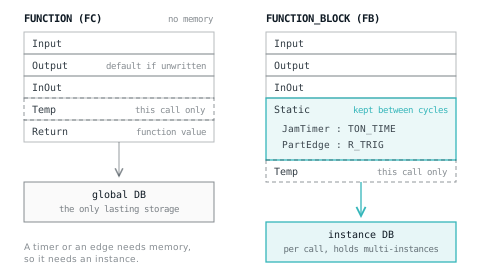
Siemens gives you two kinds of code block for your own logic, and the difference between them comes down to one word: memory. A function block (FB) has it. A function (FC) does not. Nearly every FB-or-FC question, from "why does my edge fire every scan" to "why does my output keep dropping out", comes back to that.
The rules below are taken from Siemens' TIA Portal V21 help, and the examples are in SCL. The same rules apply in LAD and FBD; only the notation changes. If SCL is new to you, Structured Text for ladder programmers covers the syntax.
The short answer
Use an FB when the block has to remember something between calls: a timer, an edge, a sequence step, a count, a latch. Use an FC when the result depends only on what you pass in this time: a scaling calculation, a conversion, a limit check.
| FC (function) | FB (function block) | |
|---|---|---|
| Memory of its own | None. Siemens calls FCs code blocks without memory | An instance data block for each call |
| Temp section | Valid for this call only | Valid for this call only |
| Static section | Not available | Kept in the instance between cycles |
| Parameters at the call | All of them must be supplied | Mostly optional: an unassigned one uses the value stored in the instance. In-outs are required on optimised blocks |
| An output you never write | Comes back as the data type's default (FALSE for Bool); structured outputs are not pre-assigned at all | Keeps its last value in the instance |
| Return value | Yes, and an SCL expression can use it | No |
| Timers and edges inside | Only with a separate instance DB or storage in a global DB | As multi-instances in Static |
| Retentive data | None of its own; keep it in a global DB | Per tag on optimised blocks, whole instance on standard ones |
Why an FC forgets
An FC has nowhere to put a value between calls. Its local working data lives in the Temp section, and Siemens' block interface reference is blunt about it: temporary local data is retained for only one cycle, so you must write it in the same cycle you read it.
What you get if you read Temp before writing it depends on the block's access setting. In a block with optimised access, an unwritten Temp tag reads as the default for its type: FALSE for a Bool, 0 for an Int. In a block with standard access it holds whatever happened to be there, which Siemens describes as random, so you must initialise it first.
Here is the classic mistake: a parts counter written as an FC, with its edge memory in Temp.
FUNCTION "Count_Parts" : Void
VAR_INPUT
  PartSensor : Bool;
END_VAR
VAR_IN_OUT
  Count : DInt;
END_VAR
VAR_TEMP
  LastSensor : Bool;   // lives for this call only
END_VAR
BEGIN
  IF #PartSensor AND NOT #LastSensor THEN
    #Count := #Count + 1;
  END_IF;
  #LastSensor := #PartSensor;   // written, then thrown away
END_FUNCTION
It compiles and it reads correctly. In an optimised block, #LastSensor is FALSE at the start of every call, so the condition is true on every scan the sensor is covered and the count climbs by one per scan rather than one per part. In a standard-access block the result depends on what was left on the stack. Either way the edge never works, because the previous state was never kept. A one-shot needs a storage bit for exactly this reason.
The fix is not a cleverer FC. It is giving the edge somewhere to live.
The same machine as an FB
Here is a conveyor with a start/stop latch, a part counter and a jam timer, written as an FB. The edge and the timer are declared in the Static section, which is VAR in the textual interface. That makes them multi-instances: their data sits inside this FB's own instance DB.
FUNCTION_BLOCK "Conveyor"
VAR_INPUT
  Start : Bool;        // momentary push button
  Stop : Bool;         // normally closed: TRUE while healthy
  PartSensor : Bool;
END_VAR
VAR_OUTPUT
  Run : Bool;
  Jammed : Bool;
  Parts : DInt;
END_VAR
VAR
  Running : Bool;
  JamLatch : Bool;
  Count : DInt;
  PartEdge : R_TRIG;     // multi-instance: edge memory in this instance
  JamTimer : TON_TIME;   // multi-instance IEC timer
END_VAR
BEGIN
  // a part sitting on the sensor for 5 s while running is a jam
  #JamTimer(IN := #Running AND #PartSensor, PT := T#5s);
  IF #JamTimer.Q THEN
    #JamLatch := TRUE;             // held until the next start
  ELSIF #Start THEN
    #JamLatch := FALSE;
  END_IF;

  #Running := (#Start OR #Running) AND #Stop AND NOT #JamLatch;

  // one count per part, not one per scan
  #PartEdge(CLK := #PartSensor);
  IF #PartEdge.Q THEN
    #Count := #Count + 1;
  END_IF;

  #Run := #Running;
  #Jammed := #JamLatch;
  #Parts := #Count;
END_FUNCTION_BLOCK
The latch and the jam flag are Static tags rather than outputs read back, because Siemens' general rule for block parameters is that inputs are only read and outputs are only written. Calling it twice from OB1 gives two independent conveyors:
"Conveyor_1_DB"(Start := "C1_Start", Stop := "C1_Stop", PartSensor := "C1_Part",
                Run => "C1_Motor", Jammed => "C1_Jam");
"Conveyor_2_DB"(Start := "C2_Start", Stop := "C2_Stop", PartSensor := "C2_Part",
                Run => "C2_Motor", Jammed => "C2_Jam");
Each call has its own instance DB, so conveyor 2's timer, edge and count are separate from conveyor 1's. Point both calls at the same DB and they fight over one timer and one count.
Single, multi and parameter instances
Siemens defines three places an FB's instance can live. You choose in the Call options dialog that appears when you drop an FB into a block, or by declaring the instance yourself.
| Instance | Where the data lives | Use it for |
|---|---|---|
| Single instance | Its own instance DB | Top-level units called from an OB |
| Multi-instance | The Static section of the calling FB | Timers, edges and sub-blocks inside an FB, with fewer DBs |
| ARRAY of multi-instances | An array in the caller's Static section, indexed by a variable | Identical units processed in a loop |
| Parameter instance | Passed in as an InOut at run time | Choosing which instance to process while the program runs |
Multi-instances are the normal way to put several units under one parent:
FUNCTION_BLOCK "Line"
VAR_INPUT
  Start : Bool;
  Stop : Bool;
END_VAR
VAR
  Conveyors : Array[1..4] of "Conveyor";   // four instances, one DB
END_VAR
VAR_TEMP
  i : Int;
END_VAR
BEGIN
  FOR #i := 1 TO 4 DO
    #Conveyors[#i](Start := #Start, Stop := #Stop,
                   PartSensor := "Line_IO".PartSensor[#i]);
  END_FOR;
END_FUNCTION_BLOCK
The loop counter is in Temp, which is fine: it is written before it is read on every call. Parameter instances have conditions worth knowing before you design around them. Passing an instance through a DB_ANY tag needs S7-1200 firmware V4.2 or S7-1500 V2.0 or later, and Siemens notes it does not work for instances of system blocks from the Instructions task card. NULL can never be passed.
Timers and edges always need an instance
IEC timers and R_TRIG are function blocks too. Siemens' TON reference says every call must be assigned an IEC timer in which its instance data is stored, and gives two places for it: an instance DB of type IEC_TIMER, or a tag of type TON_TIME in the Static section of a block. R_TRIG compares CLK with an edge memory bit kept in its instance in the same way. TON, TOF and RTO covers how the timers themselves behave.
That is why a timer inside an FC is awkward. An FC has no Static section, so each timer needs a single-instance DB of its own, or a timer held in a global DB; Siemens' programming recommendations show a global DB holding an ARRAY of TON. Both work, and both put the memory outside the block, which undoes much of the point of reusing it.
Two traps from the same Siemens pages:
- Do not drive a multi-instance timer's IN from outside the call. TON starts on a rising edge of IN compared against the value stored in its instance. Write IN somewhere else first and the call sees no new edge, so the timer never starts. Pass IN in the call.
- Do not reinitialise a running timer. Loading with reinitialisation, loading a snapshot, or forcing the instance's actual values disrupts the timer. Siemens marks this as a danger: put the plant in a safe state first.
The FC output trap
Siemens' parameter-assignment rules for FCs say that an output not written in the function returns the predefined value of its data type, and that structured outputs are not pre-assigned at all. They name two ways it happens: a jump that skips the assignment, and Set or Reset instructions, which write nothing when the RLO is 0.
So this does not latch anything:
FUNCTION "Level_Alarm" : Void
VAR_INPUT
  Level : Real;
  HighLimit : Real;
END_VAR
VAR_OUTPUT
  Alarm : Bool;
END_VAR
BEGIN
  IF #Level > #HighLimit THEN
    #Alarm := TRUE;     // only written on this path
  END_IF;
END_FUNCTION
On every call where the level is below the limit, Alarm is not written and comes back FALSE. If you wanted a latched alarm, an FC cannot hold it: the latch needs memory, so it belongs in an FB's Static section or a global DB. If you wanted a plain comparison, write the output on every path:
#Alarm := #Level > #HighLimit;In-outs behave differently. An in-out the FC does not write keeps its old value, because it is read before the call and written back after it. That is why the parts counter above passed Count as an in-out. It works, but the memory is now the caller's problem.
Retained state after a power cut
An FB's data can be made retentive; an FC has none of its own to retain. How you set it depends on the block's access mode, according to Siemens' retentivity pages:
- Optimised access. Each tag in the interface can be Retentive, Non-retentive or Set in IDB. Set in IDB leaves the choice to the instance DB, where one checkbox applies to every tag marked that way. A structure is retentive or not as a whole.
- Standard access. Retentivity is set for the whole instance in the instance DB, not tag by tag.
- Textual interface.
VAR RETAINmakes a section retentive andVAR DB_SPECIFICdefers the choice to the instance DB. Without an attribute the section is non-retentive.
In-outs of structured types such as ARRAY, STRUCT or STRING are always non-retentive. For an FC, keep anything that must survive a restart in a global DB and set retentivity there. Treat retain as a design decision rather than a default: a retained run latch can restart a motor at power-up, which is the trade-off retentive memory is about.
When an FC is the right choice
Siemens' own examples of what FCs are for are returning function values, such as mathematical functions, and technological functions built from bit logic. In practice that means:
- Scaling and unit conversion.
- Limit tests and validity checks that produce a result on every call.
- Packing and unpacking bits and words.
- Anything you want to use inside an SCL expression.
An FC with a return value can be called in an expression. The function value has the same name as the function:
FUNCTION "Scale" : Real
VAR_INPUT
  Raw : Int;
  RawLo : Int;
  RawHi : Int;
  EngLo : Real;
  EngHi : Real;
END_VAR
BEGIN
  IF #RawHi = #RawLo THEN
    #Scale := #EngLo;    // no span: avoid dividing by zero
    RETURN;
  END_IF;
  #Scale := #EngLo + INT_TO_REAL(#Raw - #RawLo) * (#EngHi - #EngLo)
            / INT_TO_REAL(#RawHi - #RawLo);
END_FUNCTION
And from any block:
"Tank".Level_m := "Scale"(Raw := "AI_Level", RawLo := "Cal".RawLo,
                           RawHi := "Cal".RawHi, EngLo := 0.0, EngHi := 4.0);
Two rules from Siemens' SCL call reference apply here: every parameter of an FC must be supplied, and in SCL you cannot use EN to call an FC conditionally, so wrap the call in an IF instead. Analog scaling covers the arithmetic itself.
Coming from Rockwell
If you think in Studio 5000, the closest match for an FB is an Add-On Instruction: each use carries its own data, a backing tag there and an instance here. An FC is closer to a subroutine called with parameters, except that it cannot keep anything between calls unless you hand it storage. The bigger adjustment is timers: a Rockwell timer is a tag whose bits you read, while an S7 IEC timer is a block call with an instance of its own. Siemens and Allen-Bradley thinking goes further into the differences.
What goes wrong, and how to recognise it
| Symptom | Likely cause | Fix |
|---|---|---|
| A count or one-shot fires on every scan the input is on | Edge memory kept in Temp, usually in an FC | R_TRIG as a multi-instance in an FB, or a bit in a global DB |
| Two machines interfere, counts double, one start runs both | Two calls share one instance DB | One instance per call |
| An FC output drops back to FALSE | Output not written on every path, or written with S/R while the RLO is 0 | Assign every output on every path; put latches in an FB |
| Temp values look random | Standard-access block reading Temp before writing it | Initialise Temp first, or use optimised access |
| A multi-instance timer never starts | IN written outside the call, so the timer sees no new edge | Pass IN in the call |
| Values reset after a power cycle | Tags non-retentive | Set retentivity in the interface or instance DB, deliberately |
| A timer misbehaves after a download | The download reinitialised the instance while it was timing | Download with reinitialisation only when the plant is safe |
Seeing the instance problem from the other side
LADX Convert shows the same rule when it turns ladder into Siemens SCL. Open one of its example programs that uses a timer and choose Siemens SCL as the output: the result declares the timer as a TON instance in a VAR section, and a one-shot becomes an R_TRIG instance, with a note in the report that this is state the ladder did not spell out. In a TIA Portal block's textual interface, VAR is the Static section, which only an FB has. So code with timers or one-shots lands in an FB, or needs instance DBs of its own. Treat the output as a starting point and read the report; you can also try the logic first in the free ladder editor.
Sources and further reading
- Siemens TIA Portal V21: Functions (FCs)docs.tia.siemens.cloud
- Siemens TIA Portal V21: Function blocks (FB)docs.tia.siemens.cloud
- Siemens TIA Portal V21: Multi-instancesdocs.tia.siemens.cloud
- Siemens TIA Portal V21: Parameter assignment to functionsdocs.tia.siemens.cloud
- Siemens TIA Portal V21: Overview of the block interface (Temp, Static, Return)docs.tia.siemens.cloud
Common questions
- Can an FC call an FB in TIA Portal?
- Yes, but the FB still needs somewhere to keep its data, and an FC has no Static section to hold a multi-instance. Give the call its own single-instance DB, or hand the FC an instance as a parameter. Siemens documents which parameter types an FC can forward to an FB for each CPU family.
- Does an FB use more memory than an FC?
- An FB uses an instance DB for each call, sized by the parameters and Static tags in its interface, and Siemens notes the maximum instance DB size depends on the CPU. An FC keeps nothing of its own between calls. Multi-instances cut the number of DBs, not the amount of data stored.
- What is the difference between a global DB and an instance DB?
- A global DB is a data area any block can read and write. An instance DB belongs to one FB call: its structure is derived from that FB's interface and can only be changed there. Use global DBs for data several blocks share, and instance DBs for a block's own working memory.
- Should I use optimised or standard block access?
- On S7-1200 and S7-1500, optimised access stores tags by symbolic name with no fixed address, while standard access keeps a fixed layout compatible with S7-300 and S7-400. Optimised blocks also let you set retentivity tag by tag. Standard access mainly matters when something reads the data by absolute offset.
- Can two calls share one instance DB?
- Nothing stops you, but both calls then read and write the same Static data, timers and edges, so one machine's state leaks into the other. Make one instance per controlled thing the rule. The exceptions are deliberate and documented, such as Siemens' MB_CLIENT examples that sequence several requests through one instance.
Keep reading
- Platforms
Siemens and Allen-Bradley do not just differ in syntax
Moving between the two platforms is less about learning new mnemonics and more about two genuinely different mental models of what a program is.
- Practice
PLC interview questions and answers: what interviewers listen for
Twenty-five PLC interview questions grouped by level, each with a model answer, the reasoning the interviewer is listening for, and the answer that loses marks.
- Networking
MB_CLIENT in TIA Portal: Modbus TCP setup and STATUS codes
Set up MB_CLIENT on an S7-1200 or S7-1500: the connection, MB_MODE and addressing, polling several blocks, and what every STATUS code means and how to fix it.