

MB_CLIENT in TIA Portal: Modbus TCP setup and STATUS codes
Set up MB_CLIENT on an S7-1200 or S7-1500: the connection, MB_MODE and addressing, polling several blocks, and what every STATUS code means and how to fix it.
By the LADX engineering team
Short answer
MB_CLIENT makes an S7-1200 or S7-1500 a Modbus TCP client. Give it a TCON_IP_v4 connection with a unique ID, the server's IP address and port 502, set MB_MODE, MB_DATA_ADDR and MB_DATA_LEN, and point MB_DATA_PTR at a buffer. STATUS 7000 to 7006 is progress, 80C8 means the server never answered, and 8381 to 8385 cover the server's exception replies.
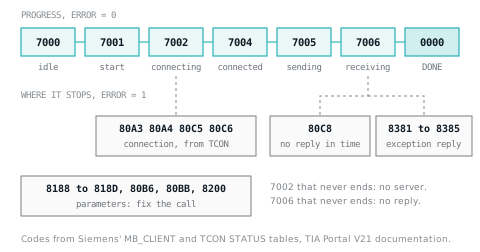
MB_CLIENT turns an S7-1200 or S7-1500 CPU into a Modbus TCP client. It opens the connection, sends the request, waits for the reply and reports through DONE, BUSY, ERROR and a 16-bit STATUS word. Most commissioning time goes on that word, so most of this article is about reading it.
Everything here follows Siemens' TIA Portal V21 documentation for the Modbus TCP library from V4.0, which the S7-1500 and current S7-1200 CPUs use; Siemens notes that an S7-1200 with firmware V4.0 is limited to library V3.1. If Modbus itself is new, Modbus explained covers the register areas and the 40001 numbering used below.
Before you start
Collect the server's IP address and port (502 unless its manual says otherwise), a connection ID from 1 to 4095 that nothing else in the CPU uses, and, for a device behind a TCP to serial gateway, its serial address. Above all, get the register map: addresses, whether they count from 0 or 1, data types and the word order of 32-bit values. Write it into an I/O list with the numbering convention stated.
The parameters
| Parameter | Type | What it does |
|---|---|---|
| REQ | Bool, input | Level-controlled: while TRUE, requests are sent. Changed inputs take effect only after the reply or an error |
| DISCONNECT | Bool, input | 0 establishes the connection; 1 closes it, and STATUS shows 0003 when closed |
| MB_MODE | USInt, input | Read, write or diagnostics, or a direct function code |
| MB_DATA_ADDR | UDInt, input | Start address; its meaning depends on MB_MODE |
| MB_DATA_LEN | UInt, input | Number of bits or registers |
| MB_DATA_PTR | Variant, in-out | The buffer read into or written from |
| CONNECT | Variant, in-out | The connection description, usually TCON_IP_v4 |
| DONE, BUSY, ERROR | Bool, outputs | Job finished without error; job in progress (not while connecting); error in STATUS |
| STATUS | Word, output | Detailed status, in the tables below |
Editable Static tags in the instance DB that matter on site:
| Static tag | Start value | Meaning |
|---|---|---|
| RCV_TIMEOUT | 2.0 s | How long to wait for a reply; 0.5 to 55 s |
| RETRIES | 0 | Send attempts made before 80C8 is reported |
| Blocked_Proc_Timeout | 3.0 s | Wait before a blocked instance is released; 0.5 to 55 s |
| MB_Unit_ID | 255 | Unit identifier; selects the serial device behind a gateway |
| MB_Transaction_ID | 1 | Change only if the server needs another value |
| Connected | 0 | 1 while connected |
The connection: TCON_IP_v4
Create one TCON_IP_v4 structure per MB_CLIENT instance, normally in a global DB:
| Field | Set it to | Notes |
|---|---|---|
| InterfaceId | The hardware identifier of the local interface | 0 to 65535. TCON reports 809B for a wrong value |
| ID | 1 to 4095 | Unique for each MB_CLIENT instance |
| ConnectionType | 11 | TCP. Anything else gives 80B6 |
| ActiveEstablished | TRUE | The client opens the connection. FALSE gives 80BB |
| RemoteAddress | The server's IP, for example 192, 168, 0, 20 | Array[1..4] of Byte |
| RemotePort | 502 | 1 to 49151 |
| LocalPort | 0 | 0 means any local port |
Siemens forbids the local TCP ports 20, 21, 25, 80, 102, 123, 5001, 34962, 34963 and 34964. Migrating from library V2.1, CONNECT_ID becomes ID, IP_PORT becomes RemotePort and the IP_OCTET parameters become RemoteAddress; moving from any version before V4.0 also means replacing the Open User Communication library.
MB_MODE and the address
Modes 0, 1 and 2 use the traditional numbering, from which MB_CLIENT works out the function code and the zero-based remote address. Modes 101 to 116 name the function and send the address as given.
| To do this | MB_MODE | MB_DATA_ADDR | MB_DATA_LEN | Function |
|---|---|---|---|---|
| Read coils | 0 | 1 to 9,999 | 1 to 2,000 | 01 |
| Read discrete inputs | 0 | 10,001 to 19,999 | 1 to 2,000 | 02 |
| Read holding registers | 0 | 40,001 to 49,999 or 400,001 to 465,535 | 1 to 125 | 03 |
| Read input registers | 0 | 30,001 to 39,999 | 1 to 125 | 04 |
| Write one coil | 1 | 1 to 9,999 | 1 | 05 |
| Write one holding register | 1 | 40,001 to 49,999 or 400,001 to 465,535 | 1 | 06 |
| Write several coils | 1 | 1 to 9,999 | 2 to 1,968 | 15 |
| Write several holding registers | 1 | 40,001 to 49,999 or 400,001 to 465,535 | 2 to 123 | 16 |
| Always use 15 or 16, even for one value | 2 | As for mode 1 | From 1 | 15 or 16 |
| Name the function directly | 101 to 106, 115, 116 | 0 to 65,535 | As for that function | The last two digits |
| Read and write in one job, V6.0 and later | 123 | Not used | Not used | 23 |
A worked example. A meter's manual lists a value at holding register 40101, two registers long. MB_MODE 0, MB_DATA_ADDR 40101, MB_DATA_LEN 2 sends function 03 for remote address 100, because 40001 maps to remote address 0. The same request in direct mode is MB_MODE 103, MB_DATA_ADDR 100. If the manual already numbers from zero, use the direct modes so nobody subtracts one twice.
MB_MODE 2 always sends the multiple-write functions. A server that only implements 06 answers that with exception 01, reported as 8381; use mode 1 or 106 for single registers on such devices.
The data buffer
In a global DB with optimised access, MB_DATA_PTR can point to one elementary tag or an array of elementary types such as Word, Int, DInt or Real. In bit memory or a standard-access DB it can also point to a PLC data type, using an ANY pointer such as P#M1000.0 WORD 500 for memory. A 32-bit value arrives as two registers; if a REAL reads as nonsense, suspect the word order (Modbus explained covers it, and PLC data types the types).
A working call
One read of ten holding registers in SCL. Siemens' rules for parameter lists allow any order, and expressions as actual parameters.
// "Meter" is a global DB holding Conn : TCON_IP_v4 and Regs : Array[0..9] of Word
"Meter_Client_DB"(REQ := "Meter".Poll,
                  DISCONNECT := FALSE,
                  MB_MODE := 103,          // read holding registers, direct address
                  MB_DATA_ADDR := 100,
                  MB_DATA_LEN := 10,
                  DONE => "Meter".Done,
                  BUSY => "Meter".Busy,
                  ERROR => "Meter".Error,
                  STATUS => "Meter".Status,
                  MB_DATA_PTR := "Meter".Regs,
                  CONNECT := "Meter".Conn);

IF "Meter".Error THEN
  "Meter".LastError := "Meter".Status;   // keep it for the HMI
END_IF;
Copy STATUS into your own tag, as Siemens' examples do; it changes with the next call.
Polling several register blocks
One instance can serve several requests on one connection. Siemens' rules: the same instance DB, connection ID and port; one request at a time, in an order your program sets; and no input changes while a request runs. Another instance with the same connection parameters sending while the first is busy gets 8200. Separate servers each need their own instance DB, connection ID and IP address.
A step pattern, each call with its own result tags:
// Step 0: read 10 registers from 100. Step 1: write 2 registers at 200.
"Meter_Client_DB"(REQ := #Step = 0, DISCONNECT := FALSE,
                  MB_MODE := 103, MB_DATA_ADDR := 100, MB_DATA_LEN := 10,
                  DONE => #Done0, ERROR => #Error0, STATUS => #Status0,
                  MB_DATA_PTR := "Meter".ReadRegs, CONNECT := "Meter".Conn);
IF #Step = 0 AND (#Done0 OR #Error0) THEN
  IF #Error0 THEN
    "Meter".ReadStatus := #Status0;
  END_IF;
  #Step := 1;
END_IF;

"Meter_Client_DB"(REQ := #Step = 1, DISCONNECT := FALSE,
                  MB_MODE := 116, MB_DATA_ADDR := 200, MB_DATA_LEN := 2,
                  DONE => #Done1, ERROR => #Error1, STATUS => #Status1,
                  MB_DATA_PTR := "Meter".WriteRegs, CONNECT := "Meter".Conn);
IF #Step = 1 AND (#Done1 OR #Error1) THEN
  IF #Error1 THEN
    "Meter".WriteStatus := #Status1;
  END_IF;
  #Step := 0;
END_IF;
STATUS: progress codes
These come with ERROR = 0. They are not faults; they say how far the current request got.
| STATUS | Siemens' meaning | On site |
|---|---|---|
| 0000 | Executed without errors | Data in the buffer, or the write accepted |
| 0001 | Connection established | |
| 0003 | Connection terminated | Expected after DISCONNECT = 1 |
| 7000 | No job active and no connection (REQ = 0, DISCONNECT = 1) | Idle |
| 7001 | Connection establishment triggered | |
| 7002 | Intermediate call: connection being established | Stuck here: the TCP connection never completes. IP address, subnet, port, cabling, or a server refusing another client |
| 7003 | Connection being terminated | Also appears just before a communication error is reported |
| 7004 | Connected and monitored, no job active | Healthy, with REQ off |
| 7005 | Data being sent | |
| 7006 | Data being received | Stuck here: the request went out and nothing came back. Ends in 80C8 |
STATUS: protocol errors
These come with ERROR = 1. Several are the server's exception reply, translated: the second column gives the Modbus exception for the remote case, and Modbus exception codes explains each.
| STATUS | Exception | Siemens' meaning | What to check |
|---|---|---|---|
| 80C8 | none | No response within the set time, after the configured retries; also when replies keep arriving with the wrong transaction ID | Reachability, the unit ID behind a gateway, RCV_TIMEOUT for slow gateways |
| 8380 | none | Received frame has the wrong format or is too short | The device's protocol on this port |
| 8381 | 01 | Function code not supported | Use a function the device lists, such as 106 rather than 116 for one register |
| 8382 | 03 | Remote: invalid length. Local: length, byte count, start address or word count in the reply does not match the request | MB_DATA_LEN against the device's limits |
| 8383 | 02 | Remote: outside the server's address area. Local: outside the MB_DATA_PTR buffer | Register numbering and block length; buffer size |
| 8384 | 03 | Remote: invalid data value for function 5. Local: invalid exception code, a changed echo (functions 5, 6, 8) or an invalid status (function 11) | The device's handling of single writes |
| 8385 | 03 | Diagnostics code not supported (function 8) | The device's diagnostic functions |
| 8386 | none | Function code in the reply does not match the request | Another client or a gateway answering out of turn |
| 8387 | none | Protocol ID in the received frame is not 0 | That the device speaks Modbus TCP |
| 8388 | none | Different data length returned (functions 5, 6, 15, 16) | The device's write limits |
STATUS: parameter errors
Also ERROR = 1, and all are fixed in the call, not on the network.
| STATUS | Siemens' meaning | Fix |
|---|---|---|
| 80B6 | Invalid connection type: only TCP | ConnectionType 11 |
| 80BB | Invalid ActiveEstablished | TRUE for a client |
| 8188 | Invalid MB_MODE | A value from the mode table |
| 8189 | Invalid MB_DATA_ADDR (or RD_ and WR_ addresses from V6.0) | An address inside the mode's range |
| 818A | Invalid MB_DATA_LEN (or RD_ and WR_ lengths from V6.0) | The function's limits, such as 125 registers per read |
| 818B | Invalid pointer at MB_DATA_PTR; check address and length too | Buffer type and size |
| 818C | BLOCKED_PROC_TIMEOUT or RCV_TIMEOUT outside 0.5 to 55 s | Correct the Static tags |
| 818D | Parameters the function does not use are not at their defaults | Zero RD_ and WR_ unless MB_MODE is 123; with 123, zero MB_DATA_ADDR and MB_DATA_LEN and leave MB_DATA_PTR empty |
| 8200 | Another MB_CLIENT instance with the same connection parameters is processing a request | Sequence the requests |
STATUS: connection codes from TCON and TDISCON
MB_CLIENT uses TCON, TDISCON, TSEND, TRCV, T_DIAG and TRESET internally, and Siemens says their error codes can appear too; each one's own STATUS sits in the Static section of the instance DB. After 80C4, 80C5 or 80A1 while sending or receiving, the connection is ended, so 7003 shows first and the cause once it has closed. Meanings from Siemens' TCON and TDISCON references:
| STATUS | Meaning | What to check |
|---|---|---|
| 809B | InterfaceId does not reference an interface of the CPU or a CM/CP | The hardware identifier in TCON_IP_v4 |
| 80A1 | The connection or the local port is already in use | A unique ID; LocalPort 0 |
| 80A3 | TCON: ID already used by a user-program connection with the same description. TDISCON: closing a connection that does not exist or is already closed | One ID and one TCON_IP_v4 per instance |
| 80A4 | Remote IP address invalid or equal to the local one | RemoteAddress |
| 80B7 | Remote port 0 for active TCP, or partner IP 0.0.0.0 | RemotePort and RemoteAddress |
| 80C4 | Temporary: cannot connect now, firewall ports closed, interface being reconfigured | Retry; firewalls on the path |
| 80C5 | The partner refused or closed the connection | The server's client limit or IP filtering |
| 80C6 | The partner cannot be reached (network error) | Cabling, switch, subnet, routing |
One overlap: TCON's own table uses 80C8 for an ID already used by a connection with different settings. At MB_CLIENT's STATUS output, 80C8 means no reply; inside the TCON status in the instance DB, it means the ID clash.
A commissioning order that saves time
- Prove the server from a PC first with any Modbus TCP test client, using the same IP address, port, unit ID and register. If that fails, the PLC will too.
- Start with one register: MB_MODE 103, MB_DATA_LEN 1. Set REQ and watch STATUS run 7001, 7002, 7005, 7006 and 0000 with DONE.
- Stuck at 7002 is a connection problem: read the TCON code. Stuck at 7006 and ending in 80C8 is a server that is not answering the Modbus request: unit ID, timeout or transaction ID.
- 8381 to 8385 means the server answered and refused. Fix the request, not the network.
- Then scale up, log STATUS on error for the HMI, and add the Modbus test to the commissioning checklist. For intermittent faults, follow a troubleshooting method rather than swapping parameters.
Sources and further reading
- Siemens TIA Portal V21: Description of MB_CLIENTdocs.tia.siemens.cloud
- Siemens TIA Portal V21: MB_CLIENT parameter STATUSdocs.tia.siemens.cloud
- Siemens TIA Portal V21: MB_MODE, MB_DATA_ADDR and MB_DATA_LEN parametersdocs.tia.siemens.cloud
- Siemens TIA Portal V21: MB_CLIENT CONNECT parameter (TCON_IP_v4)docs.tia.siemens.cloud
- Siemens TIA Portal V21: TCON, establishing a communication connection (connection STATUS codes)docs.tia.siemens.cloud
Common questions
- What is the difference between MB_CLIENT and MB_SERVER?
- MB_CLIENT makes the CPU the side that asks: it connects to a Modbus TCP server and sends requests. MB_SERVER makes it the side that answers, serving the data block or bit memory area set at MB_HOLD_REG. Siemens warns that every connected client can then read and write that area and the process image.
- Why does MB_CLIENT stay on STATUS 7002?
- 7002 means the connection is still being established, so the TCP connection to the server never completes. Check the server's IP address and port, that the two devices can reach each other's subnet, that nothing blocks port 502, and that the server will accept another client. The underlying TCON code, such as 80C6, narrows it down.
- How many MB_CLIENT connections can one CPU handle?
- Siemens does not give one figure: the limit is the CPU's maximum number of connections, and Modbus TCP client and server connections all count towards it. Check the connection resources in your CPU's technical data. Each separate server needs its own MB_CLIENT instance DB, its own connection ID and its own IP address.
- Can MB_CLIENT read a Modbus RTU device through a gateway?
- Yes. Address the gateway's IP address and port, and put the serial device's address in the MB_Unit_ID static tag of the MB_CLIENT instance DB, which starts at 255. A gateway that cannot reach the device either replies with exception 0A or 0B or stays silent, and silence ends in STATUS 80C8.
- Does MB_CLIENT support Modbus function 23?
- Yes, from instruction version V6.0. Set MB_MODE to 123 and use the RD_ and WR_ parameters for the read and write addresses, lengths and buffers, leaving MB_DATA_ADDR, MB_DATA_LEN and MB_DATA_PTR at their defaults. If any unused parameter is not at its default, the instruction returns STATUS 818D.
Keep reading
- Networking
Modbus exception codes: what 01 to 0B mean and how to fix each
Every exception code in the Modbus specification: what the server is telling you, the usual cause on site and what to change, with real frames.
- Networking
Modbus, still everywhere after forty years
The simplest industrial protocol, why it survives, and the three things that catch people out.
- Practice
PLC interview questions and answers: what interviewers listen for
Twenty-five PLC interview questions grouped by level, each with a model answer, the reasoning the interviewer is listening for, and the answer that loses marks.