

How to force a PLC input or output, and how force differs from modify
What forcing does in the I/O image, how it differs from a one-off modify, why forces persist, the safety discipline around them, and how to practise on a virtual PLC.
By the LADX engineering team
Short answer
Forcing holds an I/O point at a value you choose: a forced input overrides what the field sends, and a forced output overrides what the program writes. A modify writes a value once, and the program can overwrite it on the next scan. Forces stay on until released, often through a restart, so forcing on real plant needs authorisation, a log and a removal check.
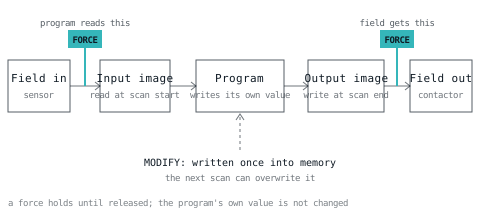
Forcing is the most useful and the most dangerous test tool in a PLC. This article explains what a force does, how it differs from a modify, how the main platforms show it, the discipline around it, and how to practise on a simulator. Nothing here is a procedure for your plant: follow your site's rules.
What a force does in the I/O image
A force replaces a value at the edge of the I/O image. A forced input replaces what the program reads, whatever the field sends. A forced output replaces what the field receives, whatever the program writes. The program's own value is left alone, which is what makes forcing confusing.
Recall the scan cycle: inputs are copied into an image at the start, the program works on the image, and the output image is copied out at the end. A force sits on those two copies, as the drawing shows.
Two consequences follow. With an input forced to 1, the real sensor can be off and every rung that depends on it behaves as if the part had arrived. With an output forced to 0, the program can set the coil all day and the contactor stays open, so online the coil shows on while the field is off. Check the field, not the screen.
CODESYS documents the order inside each cycle: read inputs, write forced values, run the program, write forced values again, write outputs. Code that changes a forced variable mid-cycle cannot make it stick.
Force versus modify
A modify (Siemens' term; "write values" in CODESYS) writes a value into memory once. The program is then free to change it again on the next scan, and a physical input is overwritten by the next input update. A force holds the value until it is released.
| Modify / write | Force | |
|---|---|---|
| How long it lasts | One write | Until released |
| Can the program change it? | Yes, next scan | No, the forced point stays |
| What it applies to | Most memory: variables, bits, data blocks, timers, counters | Inputs and outputs only (Siemens S7-1500), per the manual's force tag list |
| Survives a restart? | No | Often, which is why it is dangerous |
| Visible to the next person? | Not at all once overwritten | An indicator, if the platform has one |
The Siemens CPU 1517-3 manual lists status and modify tags covering inputs, outputs, bit memories, data blocks, timers and counters (up to 200 per job), and force tags covering inputs and outputs (up to 200). CODESYS puts it plainly: writing sets the value once and the program can overwrite it, while forcing sets it permanently.
Use modify to push a setpoint or reset a counter while testing. Use force only when a point must stay where you put it.
Why forces persist
A force is stored in the controller as a job, and a restart does not necessarily remove it. You have to release it.
- CODESYS. Forcing continues until you release it with the unforce command, release it in the prepare-value dialog, or log out. If forced variables remain at logout, CODESYS asks whether to lift forcing for all of them, and answering no reapplies the forced values at the next login.
- Siemens S7-1500. The CPU's LED table lists an active force job as MAINT lit yellow while RUN/STOP is green: a lamp on the front of the CPU, where someone at the cabinet will see it.
- Rockwell Logix. The Online bar in Studio 5000 shows whether forces exist and whether they are enabled or disabled, controller-wide, not per module or tag.
The safety discipline
Forcing can defeat the logic that protects people. These habits are general good practice, not a regulation, and your site's procedure overrides them.
- Get authorisation. Forcing on live plant is done under a permit to work or the site's equivalent, by someone competent for that machine.
- Know what can move. Before forcing an output, decide what it will start, open or release, and who is in reach. CODESYS warns that unusual changes on a running controller can endanger plant and people.
- Never force to bypass protection. A guard, light curtain or emergency stop input is not something to hold healthy so the machine will run. Follow your safety procedure for any test of safety I/O.
- Keep a force log. Write down the tag, the value, why, who, when. A force with no entry cannot be reviewed.
- Release outputs deliberately, one at a time, and expect the machine to react when you do: the program's real demand is applied the moment an output force is removed.
- Remove all forces before handover and check the indicator, then check the log against the controller.
- Treat a surprise as a force until proved otherwise. If an output ignores its coil or an input will not change, check for forces before you touch the wiring, as the troubleshooting method says. The commissioning checklist should include removal.
Vendor terms
| Platform | Hold a value | Write once | Where it is shown |
|---|---|---|---|
| Rockwell Logix | Force (on/off for BOOL), enable and disable | Edit the value online | Force status indicator on the Online bar |
| Siemens S7-1500 | Force table / force job | Modify variable, watch table | MAINT LED with RUN lit, per the CPU manual |
| CODESYS | Prepare value, then Force Values | Write Values | Forced-variable symbol; Watch All Forces view |
| LADV | Force 1 or 0, analog force | Watch table modify | MAINT lamp, W400, and a count in the I/O table |
Practising on LADV
The Wartens LADV virtual PLCs let you practise forcing with no hardware. The lab's I/O and forcing table lists every I/O point with buttons for force 1, force 0 and release, a numeric field for analog points, and Release all forces. The watch table offers modify: click a value and type a new one. LADV is a behavioural simulator for learning and testing logic, not for controlling machinery.
Download this motor station program, press RUN, and work through the exercises.
VAR_GLOBAL
  Start_PB AT %IX0.0  : BOOL; (* Start pushbutton, normally open *)
  Stop_PB  AT %IX0.1  : BOOL; (* Stop pushbutton, normally closed, 1 when healthy *)
  EStop_OK AT %IX0.2  : BOOL; (* Emergency stop, normally closed, 1 when healthy *)
  Motor    AT %QX0.0  : BOOL; (* Motor contactor *)
  Run_Lamp AT %QX0.1  : BOOL; (* Running indicator *)
END_VAR

PROGRAM Main
  (* Start with a seal-in. Stop_PB and EStop_OK are normally closed, *)
  (* TRUE while healthy, so a broken wire stops the motor too.       *)
  Motor := (Start_PB OR Motor) AND Stop_PB AND EStop_OK;
  Run_Lamp := Motor;
END_PROGRAM
Exercise 1: force an input
Set the stop and emergency stop inputs healthy, then force Start_PB to 1. Motor turns on and the MAINT lamp lights. Release the force: Motor stays on, because the seal-in held it. That is the kind of thing that surprises people on a real machine.
Exercise 2: hide a fault with a force
Press stop (set the Stop_PB input to 0): Motor drops. Now force Stop_PB to 1 and press start. The motor runs although stop is pressed, because the program is told everything is healthy. Release it and the motor stops.
Exercise 3: the program and the field disagree
With the motor running, force Motor to 0. The field output goes off, but the watch table still shows Motor as TRUE, because that is the program's value, and Run_Lamp stays on, because the lamp is a different, unforced output. Release the force and the motor comes back immediately, with nobody pressing start. Hold that thought next to the release rule above.
Exercise 4: modify is not force
Write Start_PB TRUE in the watch table. The field overwrites it on the next scan. Now write Motor TRUE with the motor off: it stays on, because Motor seals itself. A modify can start a seal-in but cannot hold an input.
Exercise 5: restarts
Force an output, press STOP, then RUN. The force and the MAINT lamp are still there. Restoring a saved controller brings them back too, in STOP, because a force that silently vanished would be worse.
Exact behaviour in LADV
These come from the controller source.
- Forces apply to I/O points only. A plain variable is refused with a message that it is not an I/O point; modify those in the watch table.
- A forced output applies only in RUN. In STOP or FAULT every output is off, force or not, and the force is kept for when you go to RUN.
- Analog forces are whole numbers from -32768 to 32767. Outside that range the force is refused. Digital forces are 1 or 0.
- Each action is logged: W400 when a force goes on (with the value), I401 when one is removed, I402 when all are removed, I410 when a value is modified.
- The MAINT lamp stays lit while anything is forced.
The tank level process has an analog level input to force too.
Removing forces and handing over
Before you leave a controller: release all forces, check the indicator is off, read the log against what the controller says, and note it. On LADV, Release all forces does it and writes I402. If you find a force you did not set, find out who did before you remove it.
For the memory side of restarts see PLC memory and retentivity. To practise the rest of testing in the same lab, the online PLC simulator and how a virtual PLC works are the next reads.
How we tested
On 2026-11-01 we ran the motor station reference program on the LADV controller model CPU 110 and drove the exercises through the controller's force, unforce and modify calls: a forced start sealing in, a forced stop input hiding a pressed stop, a forced output holding the field at 0 while the program value stays TRUE, outputs off in STOP with the force kept, forces restored after a save and restore, and a modify of Motor holding through the seal-in. Every Structured Text program on this page compiles on the LADV compiler, checked automatically in the site's test suite.
Not tested: forcing on any Siemens, Rockwell or CODESYS system, or the analog force on the tank level process. Siemens and CODESYS points come from the linked pages, which we read; the Siemens LED table is from a 2014 edition of the CPU 1517-3 manual, so check yours. Rockwell's pages could not be fetched automatically, so its points are summarised from their published description: check your version.
Sources and further reading
- CODESYS online help: forcing values (prepare, write, force, release, processing order)content.helpme-codesys.com
- Siemens S7-1500 CPU 1517-3 PN/DP manual: LED table (active force job), status/modify and force tag limitscache.industry.siemens.com
- Rockwell Studio 5000 Logix Designer: force (enable, disable, force status indicator)rockwellautomation.com
- LADV-QS: LADV quick start, step 6 watch, modify, force (Wartens)ladx.ai
- LADV-DC: diagnostic and fault codes, W400, I401, I402, I410 (Wartens)ladx.ai
Common questions
- What is the difference between forcing and modifying a PLC value?
- A modify writes a value once into memory, and the program can change it again on the next scan, and a field input overwrites it. A force holds the value: a forced input is what the program reads, a forced output is what the field gets, until someone releases the force. Force is persistent, modify is momentary.
- Is it safe to force a PLC output?
- Not casually. A forced output can start a motor, open a valve or defeat an interlock whatever the program says, and releasing it can make the machine move at once. Force only with authorisation, with the area clear and the consequence understood, record every force, and remove all of them before handover.
- Do forces survive a PLC restart?
- On many controllers yes, which is why they are dangerous. CODESYS keeps a force until it is released or you log out and agree to lift it. A Siemens S7-1500 shows an active force job on its MAINT LED. LADV keeps forces through STOP, RUN and a page reload. Check your own platform and look at the indicator.
- Why can I not force a variable on LADV?
- Because forcing there applies to I/O points only, inputs and outputs, as it does on Siemens for the force function. Internal variables are changed with a modify in the watch table. Trying to force one returns a message that it is not an I/O point. Outputs also take their forced value only while the controller is in RUN.
Keep reading
- Practice
A method for troubleshooting a PLC that will not run
An order of checks that finds the fault faster than staring at the ladder.
- Practice
Commissioning: the order that finds problems early
A sequence that surfaces the expensive faults while they are still cheap to fix.
- Fundamentals
How a virtual PLC works: inside one scan
The mechanism of a software PLC, from the input image to the watchdog: the scan clock, catch-up in a throttled browser tab, tasks, RETAIN, warm and cold restart, and fault codes, with the real numbers from the LADV runtime.