

Free online PLC simulator: what it should do and how to use one
A hands-on guide to simulating a PLC in the browser: what an honest simulator has to model, a step-by-step run through the LADV lab, and where a browser simulator stops being useful.
By the LADX engineering team
Short answer
A useful online PLC simulator runs your program scan by scan with an input image and an output image, times in real milliseconds, shows faults the way a controller does and gives you a process to test against. The LADV lab at /vplc/lab does this in a browser with no install: pick a model and a process, write ladder or Structured Text, download it, press RUN and force inputs. It is a learning and testing tool, not a runtime for machinery.
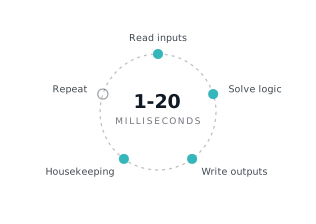
A PLC simulator earns its place if the program you test on it behaves the way it would on a controller. Looking right is not enough.
This is the hands-on guide. If you are still deciding between vendor simulators, virtual factories and browser tools, read PLC simulators: what each one is actually for first. This article assumes you have decided to use a browser tool and want to get something out of it.
What a browser PLC simulator should do
It should do six things, and the first four are what separate a simulator from a drawing of one.
- Scan. Solve the program in a fixed cycle: read inputs, run the logic, write outputs. See the scan cycle explained.
- Keep an I/O image. The program reads a snapshot of the inputs taken at the start of the scan and writes to an output image that is applied at the end. See the output image.
- Time in real milliseconds. A 5 second timer should take 5 seconds of simulated time, and still do so when the tab is in the background.
- Fail like a controller. A divide by zero, a loop that never ends or a program too big for the CPU should be refused or faulted with a code, not ignored.
- Give you a plant. Something to test against that can fail an objective: a tank that overflows, a belt that jams.
- Let you interfere. Force an input, change a value online, restart cold or warm, as you would while commissioning.
A simulator that has an infinite number of free inputs and outputs, scans as fast as the browser allows and never faults teaches habits that break on real hardware. The LADV controllers are deliberately sized the other way: a fixed number of channels, a fixed amount of memory, a minimum scan time and a watchdog.
What the LADV lab gives you
The lab at /vplc/lab puts a virtual controller next to a digital twin of a small process, in the browser.
- Six controller models in three live series, from 8 inputs and 6 outputs on the CPU 110 up to a modular CPU 350 with 16 slots. See the LADV series compared.
- Four processes: a motor start and stop station, a traffic light junction, a sorting conveyor and a tank level control. Each carries objectives that mark your program.
- Ladder, drawn in the LADX ladder editor, and IEC 61131-3 Structured Text, compiled on download.
- Online functions: a watch table, modify, force, a 64-entry diagnostic buffer and cold restart.
- No account, no install and no cost.
Using it, step by step
1. Choose the process
Open /vplc/lab and pick a twin from the process menu. Start with the motor station if you are new: five signals, a start button, a normally closed stop, a normally closed E-Stop, a motor and a lamp. You can link straight to a twin, for example /vplc/lab?twin=tank-level.
2. Choose the controller
Pick a CPU. The smallest that has the I/O for the process is the right default: CPU 110 for the motor station, the traffic junction and the conveyor, CPU 120 for the tank because it needs an analog input and output. If you pick one with too few channels, the download is refused with the reason.
3. Choose ladder or Structured Text
The language switch above the editor decides what you write. For Structured Text, the Reference and Starter buttons load a working solution or an empty program with the process's I/O already declared at the right addresses. For ladder, the program menu offers the reference solution, your program from the ladder editor, or the tags with no rungs.
4. Download, then RUN
Download compiles Structured Text or checks the ladder against the CPU's limits. Errors appear with line and column, and a program that does not fit is refused. A download leaves the controller in STOP. Press RUN and the lamps change, the scan counter starts and outputs go live. Nothing is driven while the controller is in STOP or FAULT.
Here is the whole motor station in Structured Text. Use the Run on LADV link to open it in the lab.
(* Motor start/stop station: reference solution in IEC 61131-3 Structured Text. *)

VAR_GLOBAL
  Start_PB AT %IX0.0  : BOOL; (* Start pushbutton, normally open *)
  Stop_PB  AT %IX0.1  : BOOL; (* Stop pushbutton, normally closed, 1 when healthy *)
  EStop_OK AT %IX0.2  : BOOL; (* Emergency stop, normally closed, 1 when healthy *)
  Motor    AT %QX0.0  : BOOL; (* Motor contactor *)
  Run_Lamp AT %QX0.1  : BOOL; (* Running indicator *)
END_VAR

PROGRAM Main
  (* Start with a seal-in. Stop_PB and EStop_OK are normally closed, *)
  (* TRUE while healthy, so a broken wire stops the motor too.       *)
  Motor := (Start_PB OR Motor) AND Stop_PB AND EStop_OK;
  Run_Lamp := Motor;
END_PROGRAM
This is the reference solution that ships with the lab. Read it before you copy it: Stop_PB and EStop_OK are normally closed, so they read TRUE while healthy and a broken wire stops the motor.
5. Watch
The panel shows each channel, and the stats show scans run, average and maximum solve time, the scan period and skipped scans. Structured Text adds a watch table of every variable. Ladder shows power flow along the rungs. The objectives list turns green as the process sees your program do the right thing.
6. Force and modify
Hold an input or output at a value with the force table. A forced input is what the program reads whatever the field does; a forced output is what the field gets whatever the program writes. The MAINT lamp stays lit while anything is forced, as it does on hardware, because a forgotten force is how machines surprise people. Modify writes a value once and lets the program overwrite it. The difference is covered in force and modify.
7. Break it on purpose
Press the E-Stop while the motor runs. Switch Auto off on the tank. Try a start with the stop held. Most of the learning is in the failures, and the objectives name the one you hit. Use Reset process to put the plant back, and Cold restart to clear memory.
A tank program to try next, which passes the tank twin when downloaded unchanged:
VAR_GLOBAL
  Auto_Mode   AT %IX0.0  : BOOL; (* Auto/manual selector, 1 is auto *)
  Level       AT %IW0    : INT; (* Level transmitter, 0 to 1000 is 0 to 100 percent *)
  LSH         AT %IX0.1  : BOOL; (* High level switch, 1 above 90 percent *)
  LSL         AT %IX0.2  : BOOL; (* Low level switch, 1 below 10 percent *)
  Fill_Valve  AT %QX0.0  : BOOL; (* Fill valve solenoid, 1 opens *)
  High_Alarm  AT %QX0.1  : BOOL; (* High level alarm lamp *)
  Level_Meter AT %QW0    : INT; (* Panel meter, 0 to 1000 *)
END_VAR

PROGRAM Main
  (* Fill from 40 percent up to 80, never past the high switch or out of auto. *)
  IF Auto_Mode AND Level < 400 THEN
    Fill_Valve := TRUE;
  END_IF;
  IF Level > 800 OR LSH OR NOT Auto_Mode THEN
    Fill_Valve := FALSE;
  END_IF;

  Level_Meter := LIMIT(0, Level, 1000);
  High_Alarm := LSH;
END_PROGRAM
Things to test that a screenshot cannot show
- Power loss. On a CPU with retentive memory, STOP then RUN is a warm restart. Does your latch survive when it should and clear when it should? The CPU 110 keeps nothing through STOP.
- Edge cases of timing. Press and release faster than the scan. A pulse shorter than a scan period is invisible to the program. This is why one-shots exist.
- A runaway. A loop that does not end faults the controller with F300 and drops the outputs. The lab shows this exactly as it would appear in the diagnostics.
- A larger program than the CPU allows. Try the same program on a CPU 110 and a CPU 210.
For a structured set of exercises, see ladder logic practice problems, and for an ordered path through them learn PLC programming free.
How good simulation differs from bad
Ask five questions of any simulator, including this one.
- Does it solve rungs in order, so duplicate coils and late writes bite? If everything happens at once, it is a drawing.
- Do timers use simulated time, not wall clock, so a throttled tab does not change the result?
- Is there a fixed channel and memory budget?
- Does it have faults, with codes and a diagnostic history?
- Is there something outside the program to fail it?
If the answer to the last question is no, you are checking your own work against your own expectations. A process with objectives tells you when your expectations were wrong.
Ladder or Structured Text first?
Start in the language you will read most. If you come from electrical work, ladder is the faster route to a first working program, and the lab will show you power flowing through each rung. If you come from software, Structured Text will feel natural, and the compiler will point to the line when you get it wrong.
Do both on the same twin. The I/O addresses are the same in both languages, so the first digital input is %IX0.0 whether it is wired to a ladder contact or read in a Structured Text statement. Writing the motor station in each and comparing them teaches more about the language than reading about the difference.
Honest limits
The LADV controllers are behavioural IEC 61131-3 controllers that run in a browser. They are for learning, for testing logic and for preparing for commissioning. They are not a machine controller.
- Not real time. The browser has no timing guarantees. Simulated time stays correct, but the wall clock does not.
- Not safety rated or certified. Nothing here is a safety function and nothing here may be used to protect a person.
- No fieldbus. There is no Profinet, EtherNet/IP or Modbus. Inputs come from the on-screen panel and the process model.
- Two languages. Ladder and Structured Text. Function Block Diagram, Sequential Function Chart and Instruction List are not implemented, and neither are classes or REF_TO.
- One program, one process at a time. It will not model your plant.
- Not a vendor. Your Siemens or Rockwell project will not load, and vendor specific behaviour, such as how a particular timer instruction handles its accumulator, is for the vendor's simulator.
The full list of what the Structured Text compiler implements is in the IEC 61131-3 compliance statement. Hands-on 3D machine scenes and guided courses are a different job, and EDWartens Lab (https://lab.edwartens.com) is one place to practise them.
Where to go next
- Read how the controller works inside in how a virtual PLC works.
- Choose a CPU with the LADV series compared.
- Learn Structured Text with Structured Text examples, or ask the AI chat to draft a program and then compile and run it, as described in AI PLC code: compile and run.
- See the manuals at /vplc/docs.
How we tested
On 2026-11-01 we downloaded and ran the motor station reference program on a CPU 110 and the tank program on a CPU 120, and followed the steps above on the lab page as it stands. Every Structured Text program on this page compiles on the LADV compiler, which the site's test suite checks automatically. The motor station and tank programs are the reference solutions that ship with the twins. We did not test the lab on every browser or on a phone, and we did not time the lab against any other simulator.
Sources and further reading
- Wikipedia: IEC 61131-3, the programming languages standarden.wikipedia.org
- Wikipedia: programmable logic controlleren.wikipedia.org
Common questions
- Is there a free online PLC simulator that needs no download?
- Yes. The Wartens LADV lab at /vplc/lab runs a virtual controller, a process to test against and a ladder or Structured Text editor entirely in the browser, with no installation and no account. Choose a CPU, choose a process, download your program and press RUN. It is free to use.
- Can an online PLC simulator run my Siemens or Rockwell project?
- Not as such. A browser simulator runs its own instruction set, so a TIA Portal or Studio 5000 project does not load directly. The logic and the habits transfer: scan order, seal-ins, timers, edges and state machines work the same way. For platform specifics, use the vendor's own simulator.
- What is the difference between simulating a PLC and simulating a plant?
- Simulating the PLC runs your program on a model of a controller. Simulating the plant models the machine or process the controller is wired to, such as a tank that fills or a belt that carries parts. Testing logic properly needs both, because a rung that looks right can still overfill a tank.
- Is an online PLC simulator real time?
- No. A browser runs on a general-purpose operating system with no timing guarantees. A good simulator advances simulated time in fixed scan periods so timers stay correct even when the tab is throttled, but it cannot promise the hard real time a machine needs. Use it to learn and to test logic, not to control equipment.
Keep reading
- Platforms
LADV100 vs LADV200 vs LADV300: which virtual PLC to learn on
The three live Wartens LADV series side by side: I/O, memory, scan time, modules and which twin each suits, with a plain rule for choosing and a note on the planned LADV400.
- Practice
PLC simulators: what each one is actually for
Vendor simulators, virtual factories and browser tools solve different problems, and picking the wrong one wastes weeks.
- Practice
Learn PLC programming free: a 30-day plan with no hardware
A 30-day plan to learn PLC programming at home for free: ladder fundamentals, four virtual PLC machines, Structured Text and a small project, all in a browser.