

How a virtual PLC works: inside one scan
The mechanism of a software PLC, from the input image to the watchdog: the scan clock, catch-up in a throttled browser tab, tasks, RETAIN, warm and cold restart, and fault codes, with the real numbers from the LADV runtime.
By the LADX engineering team
Short answer
A virtual PLC repeats one cycle on a clock: copy the inputs into an input image, run the program against that image, then write the output image to the outputs. A scan clock decides when each cycle is due, a watchdog times how long one took, and the controller keeps a mode (STOP, RUN or FAULT) and a diagnostic log. The LADV controllers do exactly this in a browser, in simulated time.
A virtual PLC is a PLC whose controller is software. The mechanism is the same as the hardware's, and what is different is where the clock comes from.
This article is about that mechanism. If you want the industrial products, such as a Siemens S7-1500V or CODESYS Virtual Control that run production logic in containers, read virtual PLCs: control logic without the controller. The numbers below are from the Wartens LADV virtual controllers, which run in a browser for learning and for testing logic. They are not a production runtime.
One scan, in four steps
One scan is four steps: read the inputs, run the program, write the outputs, do housekeeping. The program never touches a terminal directly. It reads an image of the inputs and writes an image of the outputs.
- Input phase. Whatever the field is doing, a sensor, a button or a process model, was stored when it changed. At the start of the scan those values are copied into the program's input variables. A value that changes halfway through a scan is not seen until the next one.
- Program phase. The logic runs against the images, in order. Ladder rungs are solved top to bottom. Structured Text statements run in sequence. A later statement sees what an earlier one wrote in this scan.
- Output phase. The output image is applied to the outputs. In LADV, the field sees zero on every output unless the controller is in RUN, and a forced output is held at its forced value.
- Housekeeping. Statistics are updated, the watchdog is checked and the diagnostic log gets any new entries.
This is why a rung can behave differently from how it reads, and why the output image matters when two places write one coil.
The scan clock
In a hardware PLC the cycle runs as fast as the CPU allows, or on a timer interrupt for a cyclic task. A browser cannot promise either, so a virtual controller separates two clocks.
- Simulated time advances by exactly one scan period per scan. Timers count it. A 5 second TON takes 100 scans of 50 ms, whatever the real clock is doing.
- Real time is used only to measure how long a scan took to solve, for the watchdog.
The caller feeds the controller elapsed time (a tick), and the controller runs one scan for each whole period that has elapsed. A leftover fraction is kept for the next tick.
The period is the larger of what the program asks for and what the CPU can do. A ladder program asks for 100 ms unless it says otherwise. A Structured Text program asks for the shortest interval among its cyclic tasks, or 100 ms when none is declared.
| CPU | Fastest scan | Watchdog |
|---|---|---|
| CPU 110, CPU 120 | 20 ms | 150 ms |
| CPU 210, CPU 230 | 10 ms | 150 ms |
| CPU 310, CPU 350 | 5 ms | 150 ms |
| CPU 410 (planned) | 1 ms | 100 ms |
The faster CPUs let you ask for a shorter period, and nothing more. The solve time of a program is the same on any of them, because the browser is doing the work.
Catch-up when the tab is throttled
A background browser tab may get one frame a second or less. A controller that ran every missed scan would freeze the page replaying minutes of logic, and one that ignored the gap would make timers wrong.
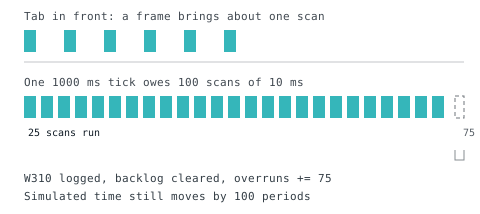
LADV does neither. A single tick runs at most 25 scans. If more are owed, it runs 25, drops the rest, counts them as overruns, advances the scan clock as though they had run and logs warning W310, "Fell behind and skipped N scans." Timers measured on that clock stay correct. Edges and any logic that depends on seeing every scan do not.
In the lab, each animation frame is clamped to 250 ms and multiplied by the speed button, 1x or 4x. So at 1x and a 50 ms period a frame owes at most 5 scans and you never see W310. At 4x with a 10 ms period a frame owes 100, and you do. The "skipped" counter in the stats panel is that number.
Tasks, priorities and overruns
A Structured Text program can declare tasks in a CONFIGURATION. Each task has a priority and either an interval or a trigger. At each scan, the tasks that are due run in priority order (0 is the highest), then in declaration order. Tasks do not preempt each other.
VAR_GLOBAL
  Heater AT %QX0.0 : BOOL;
  Temp   AT %IW0   : INT;
  ticks  : UDINT;
END_VAR

PROGRAM Control
  Heater := Temp < 650;
END_PROGRAM

PROGRAM Housekeeping
  ticks := ticks + 1;
END_PROGRAM

CONFIGURATION Cell
  RESOURCE Cpu ON LADV
    TASK Fast (INTERVAL := T#20ms, PRIORITY := 1);
    TASK Slow (INTERVAL := T#500ms, PRIORITY := 5);
    PROGRAM Loop WITH Fast : Control;
    PROGRAM Stats WITH Slow : Housekeeping;
  END_RESOURCE
END_CONFIGURATION
Here the controller scans every 20 ms, the shortest interval. Control runs every scan and Housekeeping every 25th. Timer resolution in a task is the task's interval, so a timer called from the slow task counts in steps of 500 ms.
An event task is declared with SINGLE := Name and runs once on each rising edge of a global BOOL. A task whose next run time has already passed when it comes to run counts a late task, shown in the lab as "late tasks". It is the sign that the work in a scan is longer than the period.
The longer treatment is in PLC tasks and the watchdog.
The watchdog
The watchdog is a limit on how long one scan may take to solve, measured on the real clock. On every live LADV CPU it is 150 ms. A scan that exceeds it raises fault F300, puts the controller in FAULT, turns the outputs off and records the reason.
A Structured Text scan is also checked every 1,024 statements, and stops at 5,000,000 statements however fast the clock moves, so a loop that never ends faults rather than hanging the tab. This program does exactly that, once downloaded and run:
(* Do not leave this running: it never finishes, so the watchdog faults it (F300). *)
PROGRAM Main
VAR
  n : UDINT;
END_VAR
  WHILE TRUE DO
    n := n + 1;
  END_WHILE;
END_PROGRAM
To get out of a fault, use Reset fault, which returns the controller to STOP with the cause still in the buffer. RUN refuses while the controller is faulted (E110). Downloading a program also clears the fault.
Modes
The controller is always in one of three modes.
- STOP. A program may be loaded and downloaded. Outputs are off.
- RUN. The scan clock is running and outputs follow the program.
- FAULT. A watchdog or runtime fault has stopped the program. Outputs are off and the ERROR lamp is lit.
A download is refused while it would not fit. Inputs, outputs, tags, rungs or program units beyond the CPU's capacity are rejected with the reason, rather than quietly running.
RETAIN, warm restart and cold restart
Memory has to survive a stop for some things and not for others. IEC 61131-3 defines three kinds of start.
- Warm restart. STOP to RUN on a retentive CPU. In Structured Text, RETAIN variables keep their values and every other variable takes its initial value. In ladder, all memory is kept.
- Cold restart. Everything, RETAIN included, takes its initial value. The Cold restart button does this on any CPU.
- Download. Always starts cold.
The CPU 110 is not retentive, so every start of it is cold. The other five live CPUs are.
Try this on a CPU 120 and then on a CPU 110:
(* Two counters, one kept through a warm restart and one not. *)
(* Press RUN, let both climb, press Stop, then RUN again.     *)

PROGRAM Main
VAR RETAIN
  kept : UDINT;
END_VAR
VAR
  lost : UDINT;
END_VAR
  kept := kept + 1;
  lost := lost + 1;
END_PROGRAM
Let both counters climb, press Stop, press RUN. On the CPU 120, kept carries on and lost restarts at zero. On the CPU 110, both restart. This is why a latched alarm that must survive a power cut belongs in a retained variable.
Faults and diagnostic codes
Every mode change, download, warning and fault is written to a diagnostic buffer of 64 entries, newest first, with a code and the time since power on. Codes begin with a letter for their level.
| Code | Level | Meaning |
|---|---|---|
| I001 | Information | Powered on in STOP |
| I020 | Information | RUN, warm or cold restart |
| E110 | Refused | Cannot RUN while faulted |
| E111 | Refused | Cannot RUN with no program |
| W310 | Warning | Scans were skipped |
| W400 | Warning | An I/O point is forced |
| F300 | Fault | Watchdog |
| F310 | Fault | Integer division or MOD by zero, with the line |
| F311 | Fault | Array index out of range, with the line |
The full list is in the diagnostic codes reference. Division by zero on integers faults the controller; on REAL it gives infinity or NaN as IEC 60559 defines, with no fault. That is an implementation choice the standard leaves open, and the compliance statement lists it.
What a virtual PLC cannot do
- It has no hard real time. The scan period is a promise about simulated time, not about when the electrons move.
- It has no fieldbus. Inputs come from an on-screen panel or a process model.
- It is not safety rated. Nothing in it is a safety function.
- It does not model a vendor. Instruction behaviour that differs between platforms is for the vendor's own tools.
What it does give you is the habit of thinking in scans, in images and in modes, with every number visible. To try the ideas, use the LADV lab. The hands-on guide is free online PLC simulator, and the choice of CPU is in the LADV series compared.
How we tested
On 2026-11-01 we read the numbers above from the LADV runtime source: the catalogue (minimum scan and watchdog per model), the controller (the 25 scan catch-up, W310, F300, the mode rules) and the Structured Text runtime (tasks, RETAIN, warm and cold start). Every Structured Text program on this page compiles on the LADV compiler, which the site's test suite checks automatically. We did not measure solve times in different browsers, run the programs on a throttled phone, or test the lab at speeds beyond 4x.
Sources and further reading
- Wikipedia: IEC 61131-3en.wikipedia.org
- Wikipedia: programmable logic controller, scan cycleen.wikipedia.org
- Wikipedia: watchdog timeren.wikipedia.org
Common questions
- What is the difference between a virtual PLC and a PLC simulator?
- In practice the terms overlap. A simulator usually means a tool that lets you test logic. A virtual PLC emphasises that the controller itself is software, with the same modes, memory limits, faults and scan behaviour as the hardware it stands in for. The LADV controllers are both: virtual controllers used as simulators.
- How long does one PLC scan take on a virtual PLC?
- It depends on the program and the period. On LADV the scan period is the program's requested period, 100 ms by default, but never less than the CPU's minimum: 20 ms on the CPU 110 and 120, 10 ms on the CPU 210 and 230, 5 ms on the CPU 310 and 350. Solving the logic itself usually takes well under a millisecond.
- What happens if my program takes too long to scan?
- The watchdog faults the controller. On every live LADV CPU, a scan that takes more than 150 ms of real time raises fault F300, the controller goes to FAULT, the outputs go off and the cause stays in the diagnostic buffer. In Structured Text the check also runs every 1,024 statements, so an endless loop faults rather than hanging the page.
- Does a virtual PLC keep its memory when it stops?
- That depends on the CPU and on how it restarts. On a retentive LADV CPU, STOP then RUN is a warm restart: RETAIN variables keep their values and everything else returns to its initial value. A cold restart clears everything, and the CPU 110 always starts cold. A new download always starts cold.
Keep reading
- Fundamentals
PLC tasks and the watchdog: cyclic, event and continuous, and what a fault does
How PLC tasks start (cyclic, event, continuous), how one CPU shares its time between them, and what a watchdog fault is, with a two-task program and the LADV behaviour as a worked example.
- Fundamentals
What actually happens in one PLC scan
Read inputs, solve logic, write outputs, repeat. Plus the three details in that sentence that cause most of the bugs beginners write.
- Practice
PLC simulators: what each one is actually for
Vendor simulators, virtual factories and browser tools solve different problems, and picking the wrong one wastes weeks.