

LADV100 vs LADV200 vs LADV300: which virtual PLC to learn on
The three live Wartens LADV series side by side: I/O, memory, scan time, modules and which twin each suits, with a plain rule for choosing and a note on the planned LADV400.
By the LADX engineering team
Short answer
Learn on the LADV100 if you are new to ladder logic: its CPU 110 has 8 inputs and 6 outputs and is enough for a motor station, traffic lights and a conveyor. Move to the LADV200 when you need analog and a program split into routines. Choose the LADV300 when you want to size a modular system from an I/O list. All three are free in the browser.
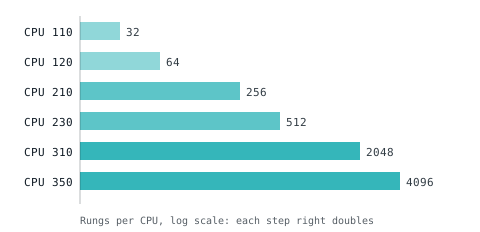
The LADV virtual PLCs are named and tiered like a hardware line, because choosing a controller is a skill: how many inputs, how many outputs, whether you need analog, how big the program will grow. A program that needs more than the controller has is refused at download, as it would not fit on the bench.
Everything below comes from the LADV catalogue. These are behavioural IEC 61131-3 controllers that run in a browser, for learning and for testing logic. They do not control machinery, they are not real time and they are not safety rated.
The short answer
- New to ladder logic: LADV100, CPU 110.
- Need analog, or learning routines and Structured Text at scale: LADV200, CPU 210.
- Sizing a modular system from an I/O list: LADV300, CPU 310.
- Need to connect other software to the controller: LADV400, which is planned and not yet built.
The comparison
| CPU | Series | Digital in | Digital out | Analog in | Analog out | Slots | Tags | Rungs | Routines | Fastest scan | Retentive |
|---|---|---|---|---|---|---|---|---|---|---|---|
| CPU 110 | LADV100 | 8 | 6 | 0 | 0 | 0 | 64 | 32 | 2 | 20 ms | No |
| CPU 120 | LADV100 | 12 | 8 | 2 | 1 | 0 | 128 | 64 | 4 | 20 ms | Yes |
| CPU 210 | LADV200 | 16 | 16 | 4 | 2 | 0 | 512 | 256 | 16 | 10 ms | Yes |
| CPU 230 | LADV200 | 24 | 16 | 8 | 4 | 0 | 1024 | 512 | 32 | 10 ms | Yes |
| CPU 310 | LADV300 | 8 | 8 | 0 | 0 | 8 | 4096 | 2048 | 64 | 5 ms | Yes |
| CPU 350 | LADV300 | 8 | 8 | 0 | 0 | 16 | 8192 | 4096 | 128 | 5 ms | Yes |
Every live CPU has a 150 ms watchdog. I/O is the channels on the controller itself. The LADV300 CPUs add channels through modules in their slots.
Structured Text uses the same budget, counted differently: a variable is a tag, eight statements are a rung and two program organisation units are a routine. So the CPU 110 holds 256 statements and the CPU 350 holds 32,768.
LADV100: Basic
Small, fixed-I/O controllers for the first programs: seal-ins, timers and counters. The CPU 110 has 14 digital channels and no analog. The CPU 120 adds 2 analog inputs and 1 analog output, which is the smallest controller that can run the tank twin.
Pick this if you are a student, an apprentice or a trainer, you are writing your first programs, or you want a controller small enough that every channel is on screen. Because the CPU 110 is not retentive, it also teaches the cold start the hard way: a latch does not survive STOP.
Details: /vplc/ladv100. Datasheets: CPU 110 and CPU 120.
LADV200: Compact
Compact controllers for a whole machine. The CPU 210 has 16 inputs, 16 outputs, 4 analog inputs and 2 analog outputs. The CPU 230 has 24, 16, 8 and 4. Memory is at least four times the LADV100's and the fastest scan is 10 ms.
Pick this if you are working on machine sequences with analog control, you want a program split into routines and subroutines, or you want to check logic against a digital twin before the panel is built. It is the first series with room to structure a program.
Details: /vplc/ladv200. Datasheets: CPU 210 and CPU 230.
LADV300: Advanced
Modular controllers on a virtual backplane. Both CPUs carry 8 digital inputs and 8 digital outputs on board; the CPU 310 has 8 module slots and the CPU 350 has 16. Four modules fit the slots:
| Module | Channels | Signal |
|---|---|---|
| LADV-DI16 | 16 digital inputs | 24 V DC sinking |
| LADV-DO16 | 16 digital outputs | 24 V DC sourcing |
| LADV-AI8 | 8 analog inputs | 0 to 10 V or 4 to 20 mA |
| LADV-AO4 | 4 analog outputs | 0 to 10 V or 4 to 20 mA |
A system is specified the way a line controller is: count the I/O, choose the CPU, fill the slots, check the memory. The controller has a fixed number of slots, and modules beyond them are ignored.
Pick this if you are an integrator or a student of sizing, you need large programs across many routines, or you are preparing logic for a line. The CPU 350 has the largest memory in the line: 8,192 tags, 4,096 rungs and 128 routines.
Details: /vplc/ladv300. Datasheets: CPU 310, CPU 350 and the I/O modules.
LADV400: planned
The LADV400 is designed and not built, and there is no date. The plan is the same runtime as a server process that other software reaches over Modbus TCP and OPC UA, so a 3D simulator or a SCADA can drive it for virtual commissioning. The catalogue lists one model, the CPU 410, with 256 digital inputs and outputs, 64 analog inputs and outputs and a 1 ms fastest scan, and marks it planned. Nothing in the lab runs on it today, and nothing here should be read as a promise of what it will do.
Which twin fits which CPU
Each twin names the smallest controller in the line with the I/O for it.
| Twin | Level | Smallest CPU |
|---|---|---|
| Motor start/stop station | Beginner | CPU 110 |
| Traffic light junction | Beginner | CPU 110 |
| Sorting conveyor | Intermediate | CPU 110 |
| Tank level control | Advanced | CPU 120 |
You can run any of them on a larger CPU. Opening the lab with ?model=CPU%20210 selects a model directly.
A way to choose
- List the inputs and outputs the process needs, digital and analog separately.
- Take the smallest CPU that covers them with a little spare. If a CPU 110 is enough, use it.
- Check memory. A long Structured Text program or many routines point to the LADV200 or LADV300.
- Does a latch have to survive STOP? Then not the CPU 110.
- Does the program have to scan faster than 20 ms? Then the LADV200 or LADV300.
The point is the exercise of fitting, not the biggest number. Where a controller is too small, the refusal at download tells you which limit you hit.
Where to go next
- Run one: the LADV lab, or a free online PLC simulator, step by step.
- See what happens inside a scan: how a virtual PLC works.
- Browse the manuals at /vplc/docs and the series overview at /vplc.
- For hands-on 3D machine scenes and guided courses, EDWartens Lab (https://lab.edwartens.com) is one place to practise.
How we tested
On 2026-11-01 we took every figure above from the LADV catalogue source and the datasheet slugs from the published manuals index. We did not run every CPU against every twin. The table shows what the catalogue sets, not what we measured. This page contains no Structured Text program. We did not test the planned LADV400, which does not run.
Sources and further reading
- Wikipedia: programmable logic controller, modular and fixed I/Oen.wikipedia.org
Common questions
- Which LADV virtual PLC is best for a beginner?
- The LADV100, and within it the CPU 110. It has 8 digital inputs and 6 digital outputs, so every channel is in view, and it is the smallest controller with enough I/O for the motor station, traffic junction and sorting conveyor twins. Move to the CPU 120 only when you need analog.
- Do the LADV virtual PLCs cost anything?
- No. The LADV controllers, the twins, the editors and the manuals are free to use in the browser. There is nothing to buy, and no account is needed to open the lab at /vplc/lab.
- What is the difference between LADV100 and LADV200?
- The LADV200 adds more channels, analog inputs and outputs on every model, much more program memory and a faster minimum scan. The CPU 210 has 16 inputs, 16 outputs, 4 analog inputs and 2 analog outputs with a 10 ms scan, against the CPU 110's 8 inputs, 6 outputs, no analog and a 20 ms scan.
- Is the LADV400 available?
- Not yet. The LADV400 is planned as the same runtime running as a server process that other software can reach over Modbus TCP and OPC UA, for virtual commissioning. It is designed and not built, and there is no release date.
Keep reading
- Platforms
Free online PLC simulator: what it should do and how to use one
A hands-on guide to simulating a PLC in the browser: what an honest simulator has to model, a step-by-step run through the LADV lab, and where a browser simulator stops being useful.
- Platforms
Virtual PLCs: control logic without the controller
Running the PLC as software on standard hardware is now a real product from major vendors, and the tradeoffs are clearer than the marketing suggests.
- Platforms
The future of virtual PLCs, 2026 to 2030
Where software-defined control is heading: vendor virtual controllers, IEC 61499 portability, O-PAS, containers, time-sensitive networking, virtual commissioning and AI-assisted programming, and what is unlikely to change.