

PLC tasks and the watchdog: cyclic, event and continuous, and what a fault does
How PLC tasks start (cyclic, event, continuous), how one CPU shares its time between them, and what a watchdog fault is, with a two-task program and the LADV behaviour as a worked example.
By the LADX engineering team
Short answer
A PLC task decides when a program runs: on a fixed interval (cyclic or periodic), on an event such as a rising edge, or as often as it can (continuous or freewheeling). One CPU runs them in priority order, so a slow task delays the others. The watchdog times the work and, if it overruns its limit, the controller faults, stops the program and turns outputs off.
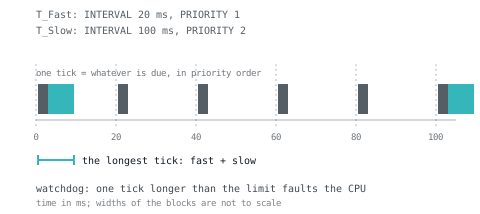
Every PLC program runs because a task starts it. This article covers the three kinds of task, how one CPU shares its time, how to size intervals and what a watchdog fault is. The worked example is the LADV virtual PLC, whose behaviour is documented line by line.
The three ways a task starts
A task starts a program in one of three ways: on a fixed interval (cyclic or periodic), on an event, or as soon as the last run finished (continuous or freewheeling). The vendors use different words for the same ideas.
| Start condition | IEC 61131-3 | Rockwell Logix | CODESYS | Siemens S7-1500 |
|---|---|---|---|---|
| Fixed interval | TASK with INTERVAL | Periodic task | Cyclic task | Cyclic interrupt OB (OB 30 to OB 38) |
| Event | TASK with SINGLE | Event task | Event task | Event-driven OBs, such as hardware interrupts |
| As often as possible | No keyword; implementation specific, and not offered by LADV | Continuous task | Freewheeling task | The main cycle, OB 1 |
The mapping is ours, a guide to what matches what, not a claim that they are identical. The CODESYS task page lists cyclic, freewheeling, event and status tasks; Rockwell describes continuous, periodic and event tasks; Siemens describes the cyclic program (OB 1) and cyclic interrupts OB 30 to OB 38.
Cyclic: the control loop
A cyclic task runs on a clock. Siemens describes a cyclic interrupt as a call at a defined cycle, independent of the cyclic program's execution time. Use it for anything with a sample time.
Event: do it when something happens
An event task waits for a trigger, often a rising edge on a variable, and runs once. It suits work that is not periodic: save a batch record, start a report. The IEC form is TASK T_Report (SINGLE := Batch_Done, PRIORITY := 2);, which runs the attached program once on each rising edge of the global BOOL Batch_Done.
Continuous: whatever is left
A continuous task restarts as soon as it ends, so its period is whatever the load leaves. It suits background work and is a poor place for anything timing-critical. On Siemens the main cycle behaves this way, with an optional minimum cycle time.
For the single-task view that most ladder programmers start with, see the PLC scan cycle explained.
Writing tasks in IEC 61131-3
The standard configures tasks in source, with CONFIGURATION, RESOURCE and TASK. A task names an INTERVAL or a SINGLE trigger and a PRIORITY; PROGRAM ... WITH then attaches a program to it. This program, which compiles on LADV, has a fast and a slow task.
VAR_GLOBAL
  Fast_Count : UDINT;
  Slow_Count : UDINT;
END_VAR

PROGRAM Fast
  Fast_Count := Fast_Count + 1;
END_PROGRAM

PROGRAM Slow
  Slow_Count := Slow_Count + 1;
END_PROGRAM

CONFIGURATION Cell
  RESOURCE Cpu ON LADV
    TASK T_Fast (INTERVAL := T#20ms, PRIORITY := 1);
    TASK T_Slow (INTERVAL := T#100ms, PRIORITY := 2);
    PROGRAM P_Fast WITH T_Fast : Fast;
    PROGRAM P_Slow WITH T_Slow : Slow;
  END_RESOURCE
END_CONFIGURATION
After one second of RUN, Fast_Count is 50 and Slow_Count is 10, which we checked on a CPU 310. Priority 1 is more urgent than 2. Other tools set tasks in a dialog, with the same three properties.
How one CPU shares its time
One CPU runs one thing at a time. When two tasks are due together, priority decides who goes first. Whether a higher-priority task may interrupt one already running is the scheduling model, and platforms differ.
- Siemens S7-1500. Cyclic interrupts have a priority from 2 to 24, higher than the cyclic program, and a cyclic interrupt increases the execution time of the cyclic program. Higher priority interrupts the lower.
- CODESYS. If several tasks are ready, the higher priority is processed first; among equals the one waiting longest goes first.
- LADV. Non-preemptive. At each tick the due tasks run one after another in priority order (0 is the highest), then in declaration order. A running task is never interrupted.
This matters for data. If a lower-priority task can be interrupted halfway through updating two values, a higher-priority task can read half an update. Non-preemptive systems avoid that at the cost of latency; preemptive ones need care.
Jitter and overruns
Jitter is the variation in when a task actually starts compared with when it was due. It comes from higher-priority work, communication load and the system's own timing accuracy; Siemens lists cyclic interrupt accuracy for the S7-1500 as plus or minus 25 to 90 microseconds across its tables, depending on the CPU.
An overrun is when a task is due again before its previous run has finished. Siemens queues the start events, up to a configurable 1 to 12, then discards further ones and counts them, passing the count to the next run in Event_Count. It can also call time error OB 80 so your program can react.
What a watchdog is and what it does
A watchdog is a timer that the controller keeps running against its own execution. If the work does not finish inside the limit, the controller treats it as a fault. The point is to catch an endless loop or a runaway scan before it freezes control, and to make the failure obvious and safe, not to give a performance score.
What each platform does when it trips:
- Siemens S7-1500. The maximum cycle time is 150 ms by default for non-redundant CPUs, adjustable from 1 ms to 6000 ms. If a cycle exceeds it, the CPU calls time error OB 80. Without an OB 80 the CPU goes to STOP on the first overrun; with one loaded it stays in RUN and stops the second time.
- Rockwell Logix. Each task has a watchdog. When a task's programs run past it, the controller runs the fault routine of the program that was executing when the timer expired.
- CODESYS. A watchdog can be activated per task in the task configuration. The page we read does not say what happens on expiry, so read your device's documentation.
The common thread: a watchdog fault is a stop, not a warning, and what outputs do then is a hardware property of the module. A watchdog is not a safety function. For Logix codes see ControlLogix major fault codes.
Worked example: the LADV controller
Every number below comes from the LADV source or its published manuals. LADV is a behavioural simulator of an IEC 61131-3 controller in your browser, for learning and for testing logic. It is not real time, not safety rated, and not for controlling machinery, which matters for how to read the watchdog.
Ticks and tasks
The controller runs on a tick. The tick period is the shortest cyclic task interval, never below the model's minimum scan time (20 ms on CPU 110 and 120, 10 ms on CPU 210 and 230, 5 ms on CPU 310 and 350, 1 ms on CPU 410). At each tick every task that is due runs, in priority order. A program with no CONFIGURATION gets one cyclic task at the program's scan time, 100 ms unless set.
Download checks the tasks. One faster than the CPU can scan is refused (code E101) with the reason, and an interval that is not a multiple of the tick gets a warning, because runs then start up to one tick late.
Late and skipped: the counters in the lab
The lab's diagnostics panel shows two numbers. Skipped counts scans dropped because the browser fell behind: LADV catches up at most 25 scans per tick and drops the rest, with warning W310. Late tasks counts task runs that were due and missed as a result.
The watchdog, F300
Each CPU has a watchdog time: 150 ms for every model except CPU 410, which has 100 ms. Two things trip it, and both raise F300:
- A tick that takes longer than the watchdog time, measured on the real clock of your browser.
- A loop that never ends. LADV checks the clock every 1,024 statements, and stops a scan that has run 5,000,000 statements, so an endless loop faults instead of hanging the page.
Both are measured on the whole tick, all due tasks together, as the drawing above shows. When it trips, the controller goes to FAULT mode, the program stops, outputs go off and the ERROR lamp lights. The text names the cause: Watchdog: one scan took N ms, over the 150 ms limit. Outputs are off., or for a loop, the scan ran for ... ms and ... statements without finishing ... Look for a loop that never ends. RUN is then refused with E110 until you reset the fault (I024, to STOP). The cause stays in the diagnostic buffer.
This program trips it on purpose. Download it, press RUN, and watch the lamps.
PROGRAM Main
VAR
  i : DINT;
END_VAR
  WHILE TRUE DO
    i := i + 1;
  END_WHILE;
END_PROGRAM
The honest limit: program time in LADV is simulated, so timers stay right on a slow tab, but the watchdog is measured on your computer's real clock. A slow machine can trip a watchdog that a fast one would not, which a real controller would not do. Treat F300 as a lesson about structure, not a timing measurement.
Other faults (F310 division by zero, F311 array index, F314 call depth) stop the program the same way; the full list is LADV-DC.
Sizing scan and task intervals
Five rules, in the order to apply them. They are practice, not requirements of the standard.
- Start from the process. A loop must run several times faster than the process moves: a temperature loop with a time constant of minutes does not need 10 ms.
- Measure the longest run, not the average. The lab's diagnostics show both. A rare slow path is what trips a watchdog.
- Keep margin. Leave the longest tick well under the interval and the watchdog. We use under half as a rule of thumb; it is not from any manual.
- Make intervals multiples of the fastest. 20 ms and 100 ms line up every fifth tick; 20 ms and 30 ms do not.
- Put slow work in a slow task. Alarms, averaging and reports rarely need the fast loop, see scan time optimisation.
On LADV the resolution of a timer is the interval of the task that calls it, so a 10 ms timer in a 100 ms task cannot time better than 100 ms.
How we tested
On 2026-11-01 we compiled and ran both task forms (cyclic and SINGLE) and the endless-loop program on the LADV controller model CPU 310 and checked the counts and the F300 fault. Tick, watchdog and fault behaviour is from the LADV source and its published manuals. Every Structured Text program on this page compiles on the LADV compiler, checked automatically in the site's test suite.
Not tested: any Siemens, Rockwell or CODESYS controller. The Siemens and CODESYS pages were read for the points above. Rockwell's pages could not be fetched automatically, so its points are summarised from their published description: check your version. LADV is not real time and not safety rated.
Sources and further reading
- Siemens S7-1500 Cycle and response times function manual (maximum cycle time, OB 80, cyclic interrupts, event queuing)support.industry.siemens.com
- CODESYS online help: task configuration (cyclic, freewheeling, event, status; priority)content.helpme-codesys.com
- Rockwell Studio 5000 Logix Designer: tasks (continuous, periodic, event; watchdog)rockwellautomation.com
- IEC 61131-3:2013, which defines CONFIGURATION, RESOURCE and TASK (IEC webstore)webstore.iec.ch
- LADV-DC: diagnostic and fault codes (Wartens)ladx.ai
- LADV-CS: IEC 61131-3 compliance statement, task scheduling and watchdog (Wartens)ladx.ai
Common questions
- What is the difference between a cyclic task and a continuous task?
- A cyclic (periodic) task starts on a fixed interval, for example every 20 ms, so its timing is regular and it leaves the CPU free between runs. A continuous or freewheeling task starts again as soon as it finishes, so its period varies with the load. Use cyclic for control loops and continuous for background work.
- What is a watchdog fault in a PLC?
- A watchdog fault is the controller stopping itself because a task or scan ran longer than its allowed time. It exists to catch an endless loop or overload that would otherwise freeze control. The usual result is a fault state with the program stopped and outputs off, and a diagnostic code that names the cause.
- How do I set a PLC task interval?
- Pick the slowest interval that still meets the process: the loop must run several times faster than the process changes. Then measure the longest execution time, not the average, and keep the interval comfortably above it. Make slower task intervals multiples of the fastest, so runs line up on the same tick.
- Can a PLC task interrupt another task?
- On many controllers a higher priority task preempts a lower one. Siemens cyclic interrupt OBs have higher priority than the main cycle and extend its run time. Not every system does: the LADV virtual PLCs are non-preemptive and run due tasks one after another, highest priority first. Check how your platform schedules.
- Does a longer scan time always cause a watchdog fault?
- No. A fault happens only when time exceeds the configured limit, which is a separate setting from the scan itself. A scan can be long and still legal. The danger is margin: a rare slow path, a heavy communication load or a loop can push one scan over, so the longest observed time matters more than the average.
Keep reading
- Fundamentals
How a virtual PLC works: inside one scan
The mechanism of a software PLC, from the input image to the watchdog: the scan clock, catch-up in a throttled browser tab, tasks, RETAIN, warm and cold restart, and fault codes, with the real numbers from the LADV runtime.
- Languages
Structured Text examples: 12 complete IEC 61131-3 programs you can run
Twelve complete Structured Text programs from a seal-in to a two-task program, each with its purpose, what to watch when it runs and the classic mistake.
- Practice
When scan time matters, and what to do about it
Most programs do not need optimising. Recognising the ones that do, and knowing where the time actually goes.