

Structured Text examples: 12 complete IEC 61131-3 programs you can run
Twelve complete Structured Text programs from a seal-in to a two-task program, each with its purpose, what to watch when it runs and the classic mistake.
By the LADX engineering team
Short answer
Learn Structured Text from complete programs, not fragments: a seal-in, TON, TOF and CTU, a CASE state machine, analog scaling with LIMIT, a FOR loop over an array, your own FUNCTION_BLOCK, RETAIN memory, two tasks, and a tank fill with hysteresis. All twelve below compile on the LADV IEC 61131-3 compiler, and each opens in a browser lab with one click.
Twelve programs follow, from a one-line seal-in to a program with two tasks. Every one is complete: paste it into a Structured Text editor and it compiles. Each has a line on its purpose, the program, and a short note on what to watch when it runs and the mistake most people make first.
This page is a set of programs. If you want the translation rules from ladder, read Structured Text for ladder programmers, and for converting existing rungs, ladder logic to Structured Text. The language itself is covered in the five IEC 61131-3 languages.
How to run these
Every block has a Run on LADV link. It opens the program in the VPLC lab, where you press download, then RUN. Programs labelled with a process (motor station, traffic junction, tank level) declare that process's I/O at the addresses the lab wires up, so you can drive the inputs from the I/O table. The others use plain variables: click a value in the watch table to write it.
Plain-variable programs are driven by writing inputs in the watch table, which is a modify: the program keeps what you wrote until its own logic changes it. That is fine for learning. The force and modify article covers the difference.
| # | Program | Key construct | Process |
|---|---|---|---|
| 1 | Start and stop seal-in | := with AND and OR | Motor station |
| 2 | Delay on | TON | Plain |
| 3 | Run-on | TOF | Plain |
| 4 | Parts counter | CTU, R_TRIG | Plain |
| 5 | One-button toggle | R_TRIG, NOT | Plain |
| 6 | Traffic lights | CASE, enumeration | Traffic junction |
| 7 | Analog scaling | LIMIT, INT_TO_REAL | Plain |
| 8 | Average of readings | FOR, ARRAY | Plain |
| 9 | Motor block with feedback alarm | FUNCTION_BLOCK | Plain |
| 10 | Counter that survives a restart | RETAIN | Plain, CPU 120 or above |
| 11 | Two tasks | TASK, INTERVAL | Plain |
| 12 | Tank fill with hysteresis | IF, comparison | Tank level |
1. Start and stop with a seal-in
Purpose. Run a motor from a normally open start button and a normally closed stop, so a broken wire stops the motor too. This is the reference solution for the motor station process.
VAR_GLOBAL
  Start_PB AT %IX0.0  : BOOL; (* Start pushbutton, normally open *)
  Stop_PB  AT %IX0.1  : BOOL; (* Stop pushbutton, normally closed, 1 when healthy *)
  EStop_OK AT %IX0.2  : BOOL; (* Emergency stop, normally closed, 1 when healthy *)
  Motor    AT %QX0.0  : BOOL; (* Motor contactor *)
  Run_Lamp AT %QX0.1  : BOOL; (* Running indicator *)
END_VAR

PROGRAM Main
  (* Start with a seal-in. Stop_PB and EStop_OK are normally closed, *)
  (* TRUE while healthy, so a broken wire stops the motor too.       *)
  Motor := (Start_PB OR Motor) AND Stop_PB AND EStop_OK;
  Run_Lamp := Motor;
END_PROGRAM
Watch. Press start and release it: Motor stays TRUE because the right-hand Motor is last scan's value. Drop Stop_PB and the AND breaks the loop. Classic mistake. Testing the stop as NOT Stop_PB. With a normally closed button that runs the motor only while someone holds stop. See latching versus seal-in and normally open versus normally closed.
2. Delay on with TON
Purpose. Light a lamp three seconds after a switch is turned on, and drop it the moment the switch goes off.
PROGRAM Main
VAR
  Switch_On : BOOL;
  Warm_Up : TON;
  Lamp : BOOL;
END_VAR
  Warm_Up(IN := Switch_On, PT := T#3s);
  Lamp := Warm_Up.Q;
END_PROGRAM
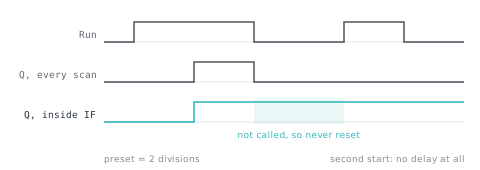
Watch. Write Main.Switch_On to TRUE and watch Main.Warm_Up.ET count up to T#3s, then Q go TRUE. Write it back to FALSE and ET and Q clear at once. Classic mistake. Calling the timer only inside IF Switch_On THEN. When the condition is false the timer is not called, so it never sees IN fall, and its output can stay TRUE. Call it every scan and pass the condition as IN. See TON, TOF and RTO.
3. Run-on with TOF
Purpose. A fan that starts with the heat request and keeps running for five seconds after it drops.
PROGRAM Main
VAR
  Heat_Req : BOOL;
  Run_On : TOF;
  Fan : BOOL;
END_VAR
  Run_On(IN := Heat_Req, PT := T#5s);
  Fan := Run_On.Q;
END_PROGRAM
Watch. Q follows IN up immediately and falls only after PT has elapsed with IN false. If the request returns inside the five seconds, the timer clears and the fan simply carries on. Classic mistake. Building a run-on from a TON and an inverted condition, which starts timing at power-up with no request and runs the fan for time nobody asked for.
4. Parts counter with CTU and R_TRIG
Purpose. Count parts past an eye, flag a full batch of ten, and count batches. R_TRIG turns the counter's level output into one event.
PROGRAM Main
VAR
  Eye : BOOL;
  Reset_PB : BOOL;
  Parts : CTU;
  Full : R_TRIG;
  Batches : UDINT;
  Gate : BOOL;
END_VAR
  Parts(CU := Eye, R := Reset_PB, PV := 10);

  (* Parts.Q stays TRUE from the tenth part to the reset. One edge counts one batch. *)
  Full(CLK := Parts.Q);
  IF Full.Q THEN
    Batches := Batches + 1;
  END_IF;

  Gate := Parts.Q;
END_PROGRAM
Watch. Toggle Eye on and off twelve times. Parts.CV reaches 12, not 10: a CTU keeps counting past its preset. Parts.Q has been TRUE since the tenth part, but Batches is 1, because the edge detector fired once. Classic mistake. Writing Batches := Batches + 1 under IF Parts.Q, which adds one every scan. The counter itself needs no edge detector on CU, because it counts rising edges already. See counters and the reset everyone forgets and one-shot instructions.
5. One button toggles a light
Purpose. The first press turns the light on, the second turns it off, holding changes nothing.
PROGRAM Main
VAR
  PB : BOOL;
  Press : R_TRIG;
  Light : BOOL;
END_VAR
  Press(CLK := PB);
  IF Press.Q THEN
    Light := NOT Light;
  END_IF;
END_PROGRAM
Watch. Write PB TRUE and leave it: Light flips once. Write it FALSE and TRUE again and it flips back. Press.Q is TRUE for one scan per press. Classic mistake. Toggling without the edge, Light := NOT Light on every scan while PB is held, so the light flickers at the scan rate and ends up in whatever state the release found it.
6. Traffic lights with a CASE state machine
Purpose. Two directions, four phases, one timer. The lamps are decided only by the current stage, so two greens cannot happen. This is the reference solution for the traffic junction process.
VAR_GLOBAL
  NS_Red   AT %QX0.0  : BOOL; (* North-south red lamp *)
  NS_Amber AT %QX0.1  : BOOL; (* North-south amber lamp *)
  NS_Green AT %QX0.2  : BOOL; (* North-south green lamp *)
  EW_Red   AT %QX0.3  : BOOL; (* East-west red lamp *)
  EW_Amber AT %QX0.4  : BOOL; (* East-west amber lamp *)
  EW_Green AT %QX0.5  : BOOL; (* East-west green lamp *)
END_VAR

TYPE Stage : (NS_GO, NS_WAIT, EW_GO, EW_WAIT); END_TYPE

PROGRAM Main
VAR
  stage : Stage := NS_GO;
  timer : TON;
  hold : TIME;
END_VAR
  (* How long each phase lasts. *)
  CASE stage OF
    NS_GO, EW_GO: hold := T#5s;
    NS_WAIT, EW_WAIT: hold := T#2s;
  END_CASE;

  timer(IN := TRUE, PT := hold);
  IF timer.Q THEN
    timer(IN := FALSE);
    CASE stage OF
      NS_GO: stage := NS_WAIT;
      NS_WAIT: stage := EW_GO;
      EW_GO: stage := EW_WAIT;
      EW_WAIT: stage := NS_GO;
    END_CASE;
  END_IF;

  (* One lamp per head, decided only by the stage, so two greens cannot happen. *)
  NS_Green := stage = NS_GO;
  NS_Amber := stage = NS_WAIT;
  NS_Red := stage = EW_GO OR stage = EW_WAIT;
  EW_Green := stage = EW_GO;
  EW_Amber := stage = EW_WAIT;
  EW_Red := stage = NS_GO OR stage = NS_WAIT;
END_PROGRAM
Watch. Add Main.stage to the watch table and follow it round. The timer is reset by calling it with IN := FALSE on the scan it finishes, then called with IN := TRUE on the next. Classic mistake. Deriving each lamp from its own timer so that two can overlap. A single state variable drives all six outputs, which is why this pattern is safe. The state machine pattern and the ladder traffic light go further.
7. Analog scaling with LIMIT
Purpose. Turn raw counts from a 4 to 20 mA card into 0 to 100 percent and raise an alarm above 90.
PROGRAM Main
VAR
  Raw : INT := 13824;
  Pct : REAL;
  Hi_Alarm : BOOL;
END_VAR
  (* 4 to 20 mA arrives as 0 to 27648 counts: a typical card, check yours. *)
  Pct := LIMIT(0.0, INT_TO_REAL(Raw) * 100.0 / 27648.0, 100.0);
  Hi_Alarm := Pct > 90.0;
END_PROGRAM
Watch. The starting value 13824 gives Pct of 50.0. Write 27000 and the alarm sets; write 30000 and LIMIT holds Pct at 100.0 rather than letting it run past the span. Classic mistake. Integer arithmetic: Raw * 100 / 27648 in an INT wraps above 327, because an INT holds 16 bits. Convert to REAL first, as here. The full method, including live zero and wire-break detection, is in analog scaling for 4 to 20 mA.
8. Average of readings with a FOR loop and an ARRAY
Purpose. Average five readings held in an array.
PROGRAM Main
VAR
  Readings : ARRAY[1..5] OF REAL := [20.1, 19.8, 20.4, 20.0, 19.7];
  Average : REAL;
  Sum : REAL;
  i : INT;
END_VAR
  Sum := 0.0;
  FOR i := 1 TO 5 DO
    Sum := Sum + Readings[i];
  END_FOR;
  Average := Sum / 5.0;
END_PROGRAM
Watch. Main.Average settles at 20.0. Add Main.Readings[3] to the watch table and change it to see the average follow. Classic mistake. An index outside the bounds. Change the loop to TO 6 and the controller faults with F311 and the line number rather than reading someone else's memory. What your own controller does with an out-of-range index is vendor specific, so check, and guard the index. Arrays are covered in indirect addressing and arrays.
9. A FUNCTION_BLOCK of your own: motor with feedback alarm
Purpose. Wrap the pattern you repeat for every motor. The block faults if the contactor feedback does not agree with the command within a settling time, latches the fault, and clears it when the command is dropped and the feedback has followed.
FUNCTION_BLOCK MotorCtl
VAR_INPUT
  Cmd : BOOL;
  Feedback : BOOL;
  Settle : TIME := T#2s;
END_VAR
VAR_OUTPUT
  Run : BOOL;
  Fault : BOOL;
END_VAR
VAR
  Check : TON;
  Latched : BOOL;
END_VAR
  (* Feedback must agree with the command within Settle, or the block faults. *)
  Check(IN := Cmd <> Feedback, PT := Settle);
  IF Check.Q THEN
    Latched := TRUE;
  END_IF;
  IF NOT Cmd THEN
    (* Dropping the command is the reset, once the contactor has followed. *)
    IF NOT Feedback THEN
      Latched := FALSE;
    END_IF;
  END_IF;
  Fault := Latched;
  Run := Cmd AND NOT Latched;
END_FUNCTION_BLOCK

PROGRAM Main
VAR
  Pump_Cmd : BOOL;
  Pump_Fb : BOOL;
  Pump : MotorCtl;
  Contactor : BOOL;
  Alarm : BOOL;
END_VAR
  Pump(Cmd := Pump_Cmd, Feedback := Pump_Fb);
  Contactor := Pump.Run;
  Alarm := Pump.Fault;
END_PROGRAM
Watch. Write Pump_Cmd TRUE with Pump_Fb left FALSE: Contactor is TRUE for two seconds, then Alarm sets and Contactor drops. Now write Pump_Fb TRUE as well and the alarm stays, because it is latched, until you drop Pump_Cmd with Pump_Fb low. Write both TRUE from the start and nothing faults. Classic mistake. Forgetting that each instance has its own memory: two motors need two instances (Pump and Fan), not one block called twice. The same idea is called an add-on instruction on Rockwell, see add-on instructions.
10. A counter that survives a restart with RETAIN
Purpose. Count starts, keeping the total across a STOP to RUN, and show the difference from an ordinary variable.
PROGRAM Main
VAR RETAIN
  Starts : UDINT;
END_VAR
VAR
  Run : BOOL;
  Edge : R_TRIG;
  Since_Restart : UDINT;
END_VAR
  Edge(CLK := Run);
  IF Edge.Q THEN
    Starts := Starts + 1;
    Since_Restart := Since_Restart + 1;
  END_IF;
END_PROGRAM
Watch. Pulse Run three times, so both counters read 3. Press STOP, then RUN. Starts is still 3 and Since_Restart is 0, because a warm restart keeps RETAIN variables and re-initialises the rest. A cold restart clears both. Classic mistake. Expecting retention on a controller that has none. Choose a CPU 120 or above in the lab: the CPU 110 is not retentive, so on it both counters return to 0. See PLC memory and retentivity.
11. Two tasks at different rates
Purpose. Run a fast routine every 20 ms and a slow one every 100 ms, from one source file, with the fast one given priority.
VAR_GLOBAL
  Fast_Count : UDINT;
  Slow_Count : UDINT;
END_VAR

PROGRAM Fast
  Fast_Count := Fast_Count + 1;
END_PROGRAM

PROGRAM Slow
  Slow_Count := Slow_Count + 1;
END_PROGRAM

CONFIGURATION Cell
  RESOURCE Cpu ON LADV
    TASK T_Fast (INTERVAL := T#20ms, PRIORITY := 1);
    TASK T_Slow (INTERVAL := T#100ms, PRIORITY := 2);
    PROGRAM P_Fast WITH T_Fast : Fast;
    PROGRAM P_Slow WITH T_Slow : Slow;
  END_RESOURCE
END_CONFIGURATION
Watch. After one second of RUN, Fast_Count is 50 and Slow_Count is 10. Priority 1 beats priority 2 when both are due on the same tick. Classic mistake. Asking for an interval the CPU cannot scan. On a CPU 110 or 120 the fastest task is 20 ms, and a 10 ms task is refused at download with the reason. The tasks and watchdog article explains why.
12. Tank fill with hysteresis
Purpose. Start filling below 40 percent, stop at 80, hold in between, and never run past the high switch or out of auto. This is the reference solution for the tank level process.
VAR_GLOBAL
  Auto_Mode   AT %IX0.0  : BOOL; (* Auto/manual selector, 1 is auto *)
  Level       AT %IW0    : INT; (* Level transmitter, 0 to 1000 is 0 to 100 percent *)
  LSH         AT %IX0.1  : BOOL; (* High level switch, 1 above 90 percent *)
  LSL         AT %IX0.2  : BOOL; (* Low level switch, 1 below 10 percent *)
  Fill_Valve  AT %QX0.0  : BOOL; (* Fill valve solenoid, 1 opens *)
  High_Alarm  AT %QX0.1  : BOOL; (* High level alarm lamp *)
  Level_Meter AT %QW0    : INT; (* Panel meter, 0 to 1000 *)
END_VAR

PROGRAM Main
  (* Level reads 0 to 1000 for 0 to 100 percent. Fill from 40 percent up to 80, *)
  (* and never past the high switch or out of auto.                          *)
  IF Auto_Mode AND Level < 400 THEN
    Fill_Valve := TRUE;
  END_IF;
  IF Level > 800 OR LSH OR NOT Auto_Mode THEN
    Fill_Valve := FALSE;
  END_IF;

  Level_Meter := LIMIT(0, Level, 1000);
  High_Alarm := LSH;
END_PROGRAM
Watch. The valve opens below 400, stays open through the band, and closes above 800. Because the stop test comes second, it wins if both conditions are true in one scan. Classic mistake. A single comparison, Fill_Valve := Level < 800, which chatters around the setpoint on a noisy signal. The deadband is the point, and the last assignment in the scan decides the output.
Reading these programs as a set
Three habits recur. Call every timer and counter on every scan. Let one variable (a state, a latch) decide a group of outputs. And be explicit about types: the integer wrap in example 7 is the same fault on every controller, only the width of the type changes. If you want the next level, the LADV programming manual and standard library reference list every function and block, and how AI-written PLC code is compiled and run shows how generated Structured Text is checked against the same compiler.
How we tested
All twelve programs were compiled with the LADV Structured Text compiler on 2026-11-01. Every Structured Text program on this page is compiled automatically in the site's test suite, so a program that stops compiling fails the build. We also ran examples 2, 3, 4, 5, 7, 8, 9, 10 and 11 on the LADV controller model CPU 310 (CPU 120 and CPU 110 for example 10) and checked the values quoted in the notes. The three process programs are the reference solutions shipped with the lab's motor station, traffic junction and tank level twins; we did not re-run their objectives for this article.
Not tested: these programs on Siemens, Rockwell or CODESYS controllers. LADV is a behavioural simulator in a browser for learning and for testing logic, not a real-time or safety-rated controller, and it must not be used to control machinery.
Sources and further reading
Common questions
- What is the simplest Structured Text program?
- One assignment inside a PROGRAM: Motor := (Start_PB OR Motor) AND Stop_PB; is a complete start and stop circuit. It runs once per scan, top to bottom, and the output holds itself on through its own value. Everything else in Structured Text, timers, counters, loops and your own blocks, is built on that one idea.
- Can I run Structured Text without a PLC?
- Yes. A simulator that implements IEC 61131-3 runs the same source. The Wartens LADV virtual PLCs run in a browser at /vplc/lab with no install or account: paste a program, press download, then RUN, and watch every variable live. It is a behavioural simulator for learning and testing logic, not a controller for machinery.
- Will these programs run unchanged on my PLC?
- Most of the logic will, but not the wrapper. They use standard IEC syntax, which CODESYS-based controllers follow closely. Siemens SCL and Rockwell structured text differ in declarations, how timers are instantiated and whether CONFIGURATION and TASK are written in source at all. Treat each as a worked pattern, then adapt it.
- What is the difference between := and = in Structured Text?
- The := operator assigns a value, and = compares two values and returns TRUE or FALSE. Writing Motor = Start_PB; as a statement is therefore an error, not an assignment. Mixing them up is the most common first mistake for ladder programmers, and the LADV compiler reports it with the line number.
- Why does my timer never finish in Structured Text?
- Usually because the timer instance is called only when its condition is true, so it never sees IN go false and cannot reset. A timer must be called on every scan, with the condition passed in as IN. Keeping the call inside an IF is the classic cause, and example 2 shows the fix.
Keep reading
- Languages
Structured Text for people who think in ladder
The translation is mostly mechanical, and four constructs cover the majority of real code.
- Languages
What does IEC 61131-3 compliant mean? Editions, statements and PLCopen
What an IEC 61131-3 compliance statement is, how the editions and PLCopen levels differ, why two compliant products still behave differently, and how to read a vendor's table.
- Languages
Ladder logic to Structured Text: converters, rules and pitfalls
How a rung becomes Structured Text, the rules a converter must follow for timers, edges and latches, and the rungs that convert wrongly unless you test them.