

Can AI write PLC code that works? Compile it, run it, then review it
AI writes plausible PLC code; checking makes it usable. How LADX validates Structured Text, loops errors back, runs it on a virtual PLC, and what still needs a human.
By the LADX engineering team
Short answer
AI can write PLC code that works, but the model is not what makes it work. It writes plausible code, and the checking makes it usable: a compiler, a structural checker, a loop that sends errors back, a run on a virtual PLC and a human review against the specification. Compiling and running still do not prove that the specification was right, that safety functions are sound or that timing holds on real hardware.
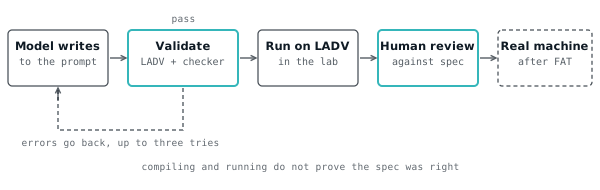
AI can write PLC code that works, but the model writing it is not what makes it work. A model writes plausible code, and plausible is not the same as correct. What makes the code usable is the checking that happens after it is written: a compiler, a structural check, a loop that sends errors back, a run against a simulated machine, and a human who reads it against the specification.
This article describes the pipeline LADX actually runs, what each stage proves, what none of them proves, and a checklist for the human review that remains.
The honest answer: plausible is not correct
A language model produces text that looks like the code it has seen. For Structured Text that often means a program that reads well and does not download: an undeclared variable, a vendor library call, a timer preset of the wrong type. Why ChatGPT ladder logic fails covers the failure modes, and the best AI for PLC programming compares tools.
So the useful question is not "which model is best" but "what checks the output before a person trusts it". An answer that has been compiled, run and reviewed is worth more than a better-sounding answer that has not. We make no accuracy claim for any model, because the checks matter more than the model and the checks are the part you can inspect.
LADX runs free models through OpenRouter by default, with rate limits per account. If you connect your own provider key, your chats use that provider and any model it offers, including paid ones. The pipeline below is the same either way.
Stage 1: the system prompt sets the conventions
The first stage is a short system prompt that tells the model what code will be checked against. Without it a general model answers an automation question the way it answers anything else. With it, the answer aims at the thing that can be checked.
The prompt in base-prompt.ts asks, for Structured Text, for:
- One complete program in a single fenced block, with every variable declared.
- Field I/O in a
VAR_GLOBALblock with direct addresses: digital inputs%IX0.0onwards, digital outputs%QX0.0onwards, analog values asINTon%IWand%QW, scaled 0 to 1000 for 0 to 100 percent. - The logic in
PROGRAM Main, using standard IEC 61131-3 and the standard function blocks (TON,TOF,CTU,R_TRIGand the rest), with time literals likeT#5s. - No classes, pointers or vendor library blocks, and normally closed stop buttons read TRUE when healthy.
It also tells the model to answer first, state assumptions, say when it is unsure, and never present standard PLC code as a safety function. When you ask for a vendor dialect such as Siemens SCL, the model writes that dialect and says it will need changes to run on LADV.
The prompt improves the odds. It does not guarantee anything, which is why there are further stages.
Stage 2: the compiler and the structural checker
Before an answer is shown as passing, its Structured Text goes to a validator that combines two checks: the LADV compiler and a structural checker. The report is shown next to the code, as the site's rule requires, whether it passes or not.
The LADV compiler is the one a program meets when it is downloaded to a virtual controller. It checks that every name is declared, types are compatible, literals are in range and blocks are called with inputs they have. A program that passes it is a program that downloads.
The structural checker is a separate tool, written in Rust, that the web app runs as a subprocess. The route merges both reports. The result is OK only if both pass, and the backend is labelled "LADV" plus the second checker's name. If the second checker is not built on a machine, the LADV compiler stands alone, so there is never a case of no check at all.
The merged report lists diagnostics with a severity, a line and column, a message and which checker raised it. That is what you see under the code block in chat.
Stage 3: errors go back to the model
When validation fails, the diagnostics are sent back to the model and it is asked to fix them. The auto-fix route does this up to three times: it builds a prompt listing up to 30 diagnostics with their lines, asks for the corrected program only, validates the result, and repeats.
The loop ends when the program passes or the attempts run out. In both cases you get the final attempt and the full history, so a failed fix is visible rather than hidden. The route uses your own provider first and the free tier behind it, like the rest of the site.
This works because a compiler error is precise feedback. "Line 12: the name is not declared" is something a model can act on. It does not make the program correct; it makes it compile.
Every prompt and every accepted output is also written to an audit log, so there is a record of what was asked and what was kept. That matters when code goes into regulated work. AI-generated code safety discusses what to ask of any AI tool in that setting.
Stage 4: run it on a virtual PLC
A program that compiles can be run, and running shows behaviour that reading cannot. A Structured Text answer that passes validation gets a "Run on LADV" button. It opens the VPLC lab with the program already in the editor, ready to download to a virtual controller and run.
The program travels in the fragment of the link, the part after the #, compressed. Browsers do not send the fragment to the server, so the code is not stored and does not reach LADX when you open the lab. The link is the whole program, and you can share it.
A program written against a twin's I/O can be opened on that twin to watch its objectives. A short example of what a model might produce, and that compiles, is a pump with a dry-run trip. It reads well, and it embodies several decisions the model made without being asked.
VAR_GLOBAL
  Start_PB AT %IX0.0 : BOOL; (* Start, normally open *)
  Stop_PB  AT %IX0.1 : BOOL; (* Stop, normally closed, TRUE when healthy *)
  Flow_OK  AT %IX0.2 : BOOL; (* Flow switch, TRUE when there is flow *)
  Reset_PB AT %IX0.3 : BOOL; (* Reset, normally open *)
  Pump     AT %QX0.0 : BOOL; (* Pump contactor *)
  Fault_Lamp AT %QX0.1 : BOOL; (* Dry-run fault lamp *)
END_VAR

PROGRAM Main
VAR
  proving : TON;
  tripped : BOOL;
END_VAR
  (* No flow for 5 seconds with the pump on trips it. *)
  proving(IN := Pump AND NOT Flow_OK, PT := T#5s);
  IF proving.Q THEN
    tripped := TRUE;
  END_IF;
  IF Reset_PB THEN
    tripped := FALSE;
  END_IF;

  Pump := (Start_PB OR Pump) AND Stop_PB AND NOT tripped;
  Fault_Lamp := tripped;
END_PROGRAM
We have checked that it compiles. We have not checked that it does what any particular specification says, and that gap is the next section.
What compiling and running still do not prove
Compiling proves the code is well formed. Running proves it does something on a model. Neither proves it is the right thing for your machine. Taking the pump program as the example:
- The specification was right. Is five seconds the right delay for this pump? Should a reset work while the flow is still missing? Should the fault survive a power cycle? The model chose answers; nobody asked you.
- The I/O mapping is real. Is the stop button actually normally closed, and is
%IX0.2actually the flow switch? The compiler accepts any assignment. - Safety functions. A dry-run trip that protects a pump is a process protection. A function that protects a person is a safety function and is designed to ISO 13849 or IEC 62061 with safety-rated parts. Standard PLC code is never that. Safety PLC programming patterns shows what is involved.
- Timing on real hardware. LADV is a behavioural simulator. It is not real time, and its scan is a simulated period. Scan time, jitter and I/O update on a real controller are not tested here.
- Behaviour you did not specify. Power-up, restart after a fault, manual and auto modes, and what an output does while the controller is in STOP.
- Dialect differences. Code that runs on LADV still needs porting to Siemens, Rockwell or CODESYS. IEC 61131-3 compliance explained shows what the controller implements.
Running against a twin is stronger than running alone, because a twin's objectives check the process. But the twins are simple behavioural models of four machines. They are not a plant emulation, and passing one does not show a program is right for another machine.
A human review checklist
Review AI-written code as you would a colleague's first draft: against the specification, line by line, with the machine in mind. Use this list before any of it goes near real equipment.
- Read the spec back. Write what the program must do and must never do, then check each line against it.
- Check every I/O assignment. Name, address, polarity (normally open or closed), and scaling, against the I/O list.
- Check the stop path. Stops and trips must work with a broken wire, so they read TRUE when healthy. Confirm that nothing overrides them.
- Check start-up and restart. What happens at power-up, after a fault and after a mode change?
- Check every timer and number. Preset values, units and limits come from the process, not from the model.
- Test the failures. Force inputs, break a stop wire, stop the flow. Force and modify is the safe way to practise.
- Keep safety out. Anything that protects a person goes to a properly designed safety function.
- Port and retest. Rebuild in the target IDE, and test again on the real hardware, on a test bench first.
- Record it. Keep the prompt, the output, the checks and the reviewer's name, in line with your quality system.
You can try the whole loop in LADX Chat, which is free to use: ask for a program, read the validator's report under it, press Run on LADV, and then work through the checklist before you believe a word of it.
How we tested
We read the pipeline from its source on 2026-11-01: the system prompt, the LADV validator and its merge with the structural checker, the validate and auto-fix routes, and the link encoder that carries a program in the URL fragment. We did not run a model for this article, so the example program is illustrative of what a model might write, not the output of a particular run.
Every Structured Text program on this page compiles on the LADV compiler, checked automatically in the site's test suite. We did not run the example against any twin objective, on a real PLC, or in another vendor's software, and we make no claim about any model's accuracy.
Sources and further reading
- IEC 61131-3: Programmable controllers, Part 3: Programming languageswebstore.iec.ch
- ISO 13849-1: Safety of machinery, safety-related parts of control systemsiso.org
- IEC 62061: Safety of machinery, functional safety of safety-related control systemswebstore.iec.ch
- OpenRouter FAQ: free models and bring your own provider keysopenrouter.ai
Common questions
- Can ChatGPT or another AI write working PLC code?
- It can write code that looks right and sometimes is. What decides whether it works is the checking afterwards: does it compile, does it run correctly against the process, and does a person agree it matches the specification. Treat any AI output as a first draft to be validated and reviewed.
- How does LADX check AI-generated PLC code?
- Structured Text is validated by the LADV compiler together with a structural checker, and the merged report is shown beside the code. If it fails, the errors can be sent back to the model for up to three fixes. A passing program can be opened on a virtual PLC.
- Does the code I run on LADV get sent to your server?
- The Run on LADV link carries the program in the part of the address after the hash, compressed. Browsers do not send that part to a server when a page loads, so opening the lab with it does not transmit the program. Validation in chat is a separate step.
- Is AI-written code safe to put on a real machine?
- Not without review and testing on the real system. Compiling and running on a simulator do not prove the specification was right, the I/O mapping is correct or the timing holds on hardware, and standard PLC code is never a safety function. Review it like a colleague's first draft.
Keep reading
- Languages
Structured Text for people who think in ladder
The translation is mostly mechanical, and four constructs cover the majority of real code.
- Languages
Structured Text examples: 12 complete IEC 61131-3 programs you can run
Twelve complete Structured Text programs from a seal-in to a two-task program, each with its purpose, what to watch when it runs and the classic mistake.
- Languages
What does IEC 61131-3 compliant mean? Editions, statements and PLCopen
What an IEC 61131-3 compliance statement is, how the editions and PLCopen levels differ, why two compliant products still behave differently, and how to read a vendor's table.