

Teaching PLC programming with digital twins: objectives, faults and a lesson plan
How instructors can teach PLC programming with digital twins that mark the program themselves, with how objectives work, a module structure, assessment advice and a lesson plan.
By the LADX engineering team
Short answer
Give each student a small simulated machine that checks their program against stated objectives, and build the lesson around those objectives. In the LADV twins each objective moves from pending to pass or fail as the process runs, a failure carries a reason, and the same exercise works in ladder and Structured Text. Assess the reasoning and test record as well, because reference solutions are visible.
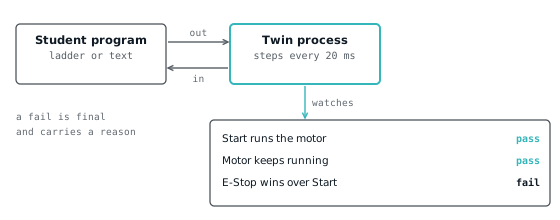
Teach PLC programming with a digital twin by giving each student a small simulated machine that checks their program for them, and building the lesson around the objectives it reports. The Wartens LADV twins do this for four machines, in ladder and in Structured Text, in a browser with nothing to install. The instructor's time goes on fault finding and review instead of on marking whether the lamp came on.
This article is for instructors, college lecturers and training managers. It explains what a twin's objective is, how to structure a module around one, how to assess fairly, and where the approach stops.
Why a twin that marks itself changes teaching
A twin that marks itself gives every student immediate, specific feedback on whether the machine did its job, which a lamp on a screen cannot. In a plain simulator a student can make the outputs look right while the process is wrong. In a twin, the process is modelled, and the objectives watch the process.
Three things change in practice.
Objectives are checked automatically. Each twin carries a list of statements about what the process must do. As the machine runs, each one moves from pending to pass or fail, and a failure carries a reason. The student sees "Start ran the motor with E-Stop pressed", not just a red mark.
Faults can be injected. The controller lets a student, or you, force an input or output to a value the program and the field cannot change, and a normally closed stop button can be set to 0 to simulate a broken wire. Fault finding stops being a lecture topic and becomes an exercise. See PLC force and modify.
One exercise, two languages. All four twins have a ladder starter and a Structured Text starter wired to the same terminals, so the first digital input is %IX0.0 in both. A module can teach the same machine in ladder in week one and in text in week two, which is the clearest way to show what a language changes and what it does not.
How a twin defines an objective
An objective is a record with an identifier, a sentence, a status of pending, pass or fail, and an optional detail. The twin's objectives function reads the process state and returns one per statement. It never looks at the program, only at the process.
The twin steps its process in slices of at most 20 milliseconds of simulated time, and each slice may record a verdict. The rules are small and worth knowing, because they explain what a pass means:
- A pass is recorded the first time its condition is met.
- A fail is final. Once recorded it stays, and it overrides an earlier pass, so breaking something later still counts.
- Many objectives need a time to hold. A seal-in counts only once the motor has run for a second with Start released, so a program cannot pass by flickering.
- Some objectives fail only after a tolerance. The motor station allows 300 milliseconds for the motor to drop after Stop, which is longer than a normal scan and shorter than a human notices.
The motor station has five objectives:
| Objective | What the process checks |
|---|---|
| Pressing Start runs the motor | Start pressed with both stops healthy, and the motor then runs |
| The motor keeps running after Start is released | The motor stays on for a second with Start released |
| Pressing Stop stops the motor | Stop held and the motor stays on for more than 300 ms is a fail |
| E-Stop stops the motor and Start cannot override it | Motor on with E-Stop pressed for more than 300 ms is a fail, with a reason that says whether Start was held |
| The Running lamp is lit while the motor runs | The lamp agrees with the motor for a second |
The other three are in the same spirit. The traffic junction forbids two greens, requires amber after every green and at least four seconds of green per direction. The conveyor sorter wants every metal part rejected and every plastic part passed, ten in a row. The tank twin wants no overflow, no running dry, and the level held between 35 and 85 percent for a full minute.
The twins are rated Beginner, Beginner, Intermediate and Advanced in that order: motor, traffic, conveyor, tank. The recommended controller for the first three is the CPU 110, and for the tank it is the CPU 120.
Structuring a module around one twin
A module works best as a short cycle repeated with a harder twin each time: brief, predict, build, test, break, reflect. The brief for each twin is already written as an exercise sheet and is shown in the lab.
- Brief. Read the twin's brief aloud and have students list inputs and outputs from it, before opening the lab. This is where functional design specification habits start.
- Predict. Each student writes down what they expect each objective to do. A short written prediction before a run is a strong habit.
- Build. In the ladder editor or in Structured Text in the lab. Use the starter, which declares the I/O.
- Test. Run it, read the objectives, fix what fails. A failing objective with a reason is the feedback.
- Break. Ask students to introduce a bug and predict which objective catches it. This is useful for thinking about test coverage.
- Reflect. Compare with a reference, and discuss what the objectives did not check.
A sequence across a term might be motor station (seal-in and stop wiring), traffic junction (timers), conveyor (sensors and counting), tank (analog and hysteresis), with the same machines repeated in Structured Text. Pair it with the self-study 30-day plan for students who want more practice, and the practice problems for homework.
A sample lesson plan: the motor station
This is a 90-minute lesson for students who have seen a contact and a coil but not a seal-in. The materials are the motor station twin and a screen each.
| Minutes | Activity |
|---|---|
| 0 to 10 | Demonstrate a start-stop circuit on a real or drawn panel. Explain why the stop is wired normally closed. Read normally open versus normally closed. |
| 10 to 20 | Students read the brief, list the inputs and outputs, and predict the five objectives. |
| 20 to 40 | Students build the ladder program. Run it; fix failures. Early finishers read latching versus seal-in. |
| 40 to 55 | Break it: move the stop contact into the start branch only. Which objective fails, and what does the detail say? |
| 55 to 70 | Fault finding. Set the Stop input to 0 to simulate a broken wire, then force the Motor output. What does the FORCE lamp say? |
| 70 to 85 | Translate to Structured Text. The whole solution is one assignment, shown below. Discuss what the text version hides. |
| 85 to 90 | Exit question: what does this program do when power returns after a cut? |
The Structured Text version for the translation step is the reference for this twin.
(* Motor start/stop station: reference solution in IEC 61131-3 Structured Text. *)

VAR_GLOBAL
  Start_PB AT %IX0.0  : BOOL; (* Start pushbutton, normally open *)
  Stop_PB  AT %IX0.1  : BOOL; (* Stop pushbutton, normally closed, 1 when healthy *)
  EStop_OK AT %IX0.2  : BOOL; (* Emergency stop, normally closed, 1 when healthy *)
  Motor    AT %QX0.0  : BOOL; (* Motor contactor *)
  Run_Lamp AT %QX0.1  : BOOL; (* Running indicator *)
END_VAR

PROGRAM Main
  (* Start with a seal-in. Stop_PB and EStop_OK are normally closed, *)
  (* TRUE while healthy, so a broken wire stops the motor too.       *)
  Motor := (Start_PB OR Motor) AND Stop_PB AND EStop_OK;
  Run_Lamp := Motor;
END_PROGRAM
The exit question is deliberate. The objectives do not test restart behaviour, and the answer opens a real commissioning question. The scan cycle gives students the model.
Assessment and academic honesty
Assess the reasoning around the objectives, not the objectives alone. The reference solutions for every twin can be loaded in the lab by anyone, so a passing run proves the student can reach a solution, not that they wrote it.
Practical ways to handle that:
- Vary the task. Ask for a changed spec: a longer green, a second stop station, a different hysteresis. A twin's objectives will still check the base behaviour, and your change is checked by you.
- Ask for a test record. For each objective, the test run, the expected result and the actual result. This is commissioning practice and is harder to copy.
- Ask for the bug. Submit a deliberately broken program and the objective that catches it.
- Use a short viva. Two minutes at the screen, change one thing, predict the result.
- Collect the program, not a screenshot. For Structured Text the lab's Copy link button puts the whole program in the link's fragment, so a student can submit a link. That fragment is not sent to our server when the page loads.
A pass is evidence of a working program against a stated set of checks. It is not a grade by itself.
Limits
The twins are simple behavioural models, not plant emulations. They teach logic, sequencing and testing. They are not a substitute for hardware.
- No gradebook. The lab does not report results to an instructor. Progress lives in the student's browser session, and anything an instructor needs has to be submitted by the student.
- Four machines. A student who has done all four has seen a small slice of industrial control.
- Objectives are a floor. A program can pass and still be poor: no restart handling, no fault output, no alarm. Teach students that passing is the start of review.
- No hardware skills. No wiring, drives, or networks, and no safety circuits. The E-Stop in the motor twin is an input, not a safety function.
- Not real time. LADV is not real time, is not safety rated and cannot control machinery. Time is simulated, so timing behaviour on real hardware needs checking on real hardware.
Courses that need ready-made 3D machine scenes and guided course material can look at EDWartens Lab, which is a separate site from this one.
Before teaching with them, read how a virtual PLC works and the LADV manuals.
How we tested
We read the twin definitions for the motor station, traffic junction, conveyor sort and tank level from the LADV source on 2026-11-01, including their objectives, their signals and their ladder and Structured Text references. The LADV test suite runs the references through each twin's scenario and checks the objectives pass.
Every Structured Text program on this page compiles on the LADV compiler, checked automatically in the site's test suite. The lesson plan has not been taught to a class, and the timings are a planning estimate, not a measurement. We did not test the approach with students, or any external learning platform.
Sources and further reading
Common questions
- What is a digital twin in PLC training?
- It is a small simulated process, such as a motor station or a tank, wired to a controller through named signals. In LADV each twin also has objectives that watch the process and report pass or fail, so the exercise is checked without an instructor reading the program.
- How does a twin check that a student's program works?
- The twin steps its process in slices of at most 20 milliseconds and records a verdict when an objective's condition is met or broken. A pass needs the condition to hold for its stated time, and a fail is final, so a program cannot pass by flickering.
- Can students copy the solution?
- Yes, the reference solutions can be loaded in the lab by anyone. Set varied specifications, ask for a test record and a deliberately broken program with the objective that catches it, and use a short viva. A passing run shows a working program, not who wrote it.
- Does the lab report results to the instructor?
- No. Progress lives in the student's browser, and the lab has no gradebook. Ask students to submit the program, using the Copy link button for Structured Text, together with a test record or a short explanation of what they tested.
Keep reading
- Practice
Learn PLC programming free: a 30-day plan with no hardware
A 30-day plan to learn PLC programming at home for free: ladder fundamentals, four virtual PLC machines, Structured Text and a small project, all in a browser.
- Languages
Ladder logic to Structured Text: converters, rules and pitfalls
How a rung becomes Structured Text, the rules a converter must follow for timers, edges and latches, and the rungs that convert wrongly unless you test them.
- Fundamentals
Logic gates in ladder logic: AND, OR, NOT, NAND, NOR, XOR, XNOR
Every logic gate as a ladder rung with its truth table, why NAND and NOR are drawn the way they are, and how XOR on bits differs from XOR on words.