

Learn PLC programming free: a 30-day plan with no hardware
A 30-day plan to learn PLC programming at home for free: ladder fundamentals, four virtual PLC machines, Structured Text and a small project, all in a browser.
By the LADX engineering team
Short answer
You can learn PLC programming for free with no hardware by practising on a simulator that behaves like a controller and following a plan. This 30-day plan spends a week on ladder fundamentals, a week on four virtual machines in ladder, a week on Structured Text and nine days on a small project. A browser cannot teach wiring, real drives, safety circuits or vendor software, so the article says how to cover those.
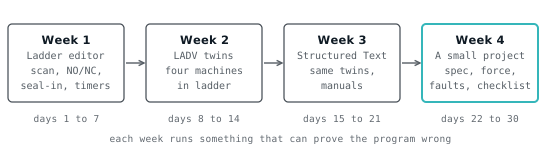
You can learn PLC programming for free, at home, with no hardware, if you practise on a simulator that behaves like a controller and you follow a plan instead of browsing. The plan below is 30 days: one week of ladder fundamentals, one week of the Wartens LADV virtual PLCs in ladder, one week of Structured Text on the same machines, and nine days on a small project. Everything it uses is free and runs in a browser.
The honest limit comes first, so you can plan around it. A browser teaches logic, sequencing, testing and fault finding. It does not teach wiring, real drives, safety circuits or a vendor's software. The last section says what to do about each.
How the 30 days work
The plan is built on one idea: a program is only learned when it has been run against something that can prove it wrong. Reading about a seal-in teaches you the picture. Watching a motor keep running after you release Start, and then watching it refuse to stop because you put the stop contact in the wrong branch, teaches you the circuit.
So every day is a task with a result you can see. Budget about an hour. If a day takes two, take two; the order matters more than the pace.
You will use three places:
- The ladder editor, a free browser editor and simulator with no account needed, for the first week and for ladder in the second.
- The LADV virtual PLC lab, where four small machines (called twins) are wired to a virtual controller and mark your program against stated objectives.
- The LADV manuals, the same kind of datasheet and programming manual you would be given for real hardware.
Nothing here needs a sign-in to read or to run. The lab works from a link and keeps your program in the browser. If you later want an AI assistant to explain or check code, LADX Chat is free too, but do the exercises yourself first.
Week 1, days 1 to 7: fundamentals in the ladder editor
The first week answers one question: what does a controller actually do? It reads inputs, solves the program in order, writes outputs, and repeats. Every later week assumes you can predict what the next scan will do.
- Day 1. Read what a PLC is, then open the ladder editor and build one rung: a normally open contact on an input driving a coil. Toggle the input and watch the coil. Write down what you expected before you toggled it.
- Day 2. Read the scan cycle explained. Build two rungs where the second reads a bit the first writes, then swap their order. Note that the result changes. This is the single most useful thing in the course.
- Day 3. Read normally open versus normally closed. Make a stop button that is wired normally closed, so it reads 1 when healthy, and show that unplugging it stops the motor. That is why stops are wired that way.
- Day 4. Build the seal-in from latching versus seal-in. Then break it on purpose: put the stop contact on the start branch only, and see why nothing stops the motor.
- Day 5. Timers, from TON, TOF and RTO. Build an on-delay and an off-delay and watch the accumulated time. Then make a flasher from two timers.
- Day 6. Counters, from CTU and CTD, with one-shot instructions. Count ten pulses and stop. Then count with and without a one-shot, and see that a held input counts every scan.
- Day 7. Do three problems from ladder logic practice problems without looking at the solutions. Compare, and read the wrong answer for each.
By the end of the week you should be able to look at a rung and say what it will do on the next scan. If you cannot, repeat days 2 and 4 before moving on.
Week 2, days 8 to 14: the four twins in ladder
Week 2 moves from a toggle on a screen to a machine that pushes back. A twin is a small simulated process wired to a virtual controller through named signals. Each one lists objectives, and each objective turns from pending to pass or fail as the process runs. Nobody marks your work; the process does.
There are four, in rising difficulty. Open each with its link, write the ladder program in the editor, download it to the controller and press RUN.
- Day 8. Open the lab and read the layout: the controller, the operator panel, the objectives, the diagnostic buffer. Load the motor station reference solution and read it rung by rung. Then clear it and write your own.
- Day 9. Finish the motor station: all five objectives passing, including the one that checks Start cannot override a pressed E-Stop. If one fails, the objective tells you why.
- Day 10. The traffic junction. Build it as a timer cascade. The objectives forbid two greens, require amber between green and red, and require at least four seconds of green. Compare with traffic light ladder logic.
- Day 11. Break the junction on purpose. Make one phase a second too short, or let two heads go green together for a scan, and see which objective fails and what it says.
- Day 12. The sorting conveyor. Start and stop with a seal-in, and a pusher that rejects metal parts only. Ten parts in a row without a mistake passes.
- Day 13. The tank level, the hardest of the four. It uses an analog input scaled 0 to 1000, hysteresis between 40 and 80 percent, and an Auto selector that must close the valve when switched off.
- Day 14. Rest day for the keyboard. Read the ladder instruction reference and the system manual sections on RUN, STOP and FAULT modes.
The twins are deliberately simple behavioural models, not plant emulations. The motor has inertia, the tank fills and drains, the belt carries parts. That is enough to make a wrong program visibly wrong, which is the point.
Week 3, days 15 to 21: Structured Text on the same machines
Week 3 repeats three of the same machines in Structured Text, the IEC 61131-3 text language. Doing the same exercise a second way is the fastest route to understanding both. The same signals use the same terminals in ladder and in text, so the first digital input is %IX0.0 in both.
Start with Structured Text for ladder programmers, and keep ladder to Structured Text open for translating.
- Day 15. Open the motor station in Structured Text. It loads a starter with the I/O already declared. Read the declarations:
AT %IX0.0ties a name to a terminal. - Day 16. Write the seal-in as one assignment, then compare with the reference. The program below is the reference for the motor station, and it is the entire solution.
(* Motor start/stop station: reference solution in IEC 61131-3 Structured Text. *)

VAR_GLOBAL
  Start_PB AT %IX0.0  : BOOL; (* Start pushbutton, normally open *)
  Stop_PB  AT %IX0.1  : BOOL; (* Stop pushbutton, normally closed, 1 when healthy *)
  EStop_OK AT %IX0.2  : BOOL; (* Emergency stop, normally closed, 1 when healthy *)
  Motor    AT %QX0.0  : BOOL; (* Motor contactor *)
  Run_Lamp AT %QX0.1  : BOOL; (* Running indicator *)
END_VAR

PROGRAM Main
  (* Start with a seal-in. Stop_PB and EStop_OK are normally closed, *)
  (* TRUE while healthy, so a broken wire stops the motor too.       *)
  Motor := (Start_PB OR Motor) AND Stop_PB AND EStop_OK;
  Run_Lamp := Motor;
END_PROGRAM- Day 17. The traffic junction in Structured Text. Use
TONfunction blocks and aCASEstatement on an enumerated stage. The reference uses exactly one timer for all four phases. - Day 18. The conveyor in Structured Text. Add an
R_TRIGand count parts at the entry in aUDINT. - Day 19. The tank in Structured Text. Use
LIMITfor the meter, and twoIFstatements for the hysteresis. - Day 20. Read the programming manual for Structured Text and the standard library. Pick five blocks you have not used and write a line about each.
- Day 21. Read Structured Text examples and pick two to run in the lab, adapting the declarations to a twin.
By now you should be able to move a small program between ladder and text and say what each is better at. The IEC 61131-3 languages article places both among the five standard languages.
Week 4, days 22 to 30: a small project
The last nine days are one project, done the way a job is done: specification first, then the program, then testing, then handover. Use the tank or the conveyor as the machine, or write your own spec for a motor with two speeds or a pump pair.
- Day 22. Write a one-page functional specification: what the machine does, its inputs and outputs, its modes, its faults, and what must never happen. Functional design specification shows the shape. Write the objectives you will test against.
- Day 23. Draw the I/O list and the states. Decide which outputs are off in each state and what happens on a restart. State machine pattern helps.
- Day 24. Write the program in the language you find harder. Keep it small.
- Day 25. Run it and test against the spec, one line at a time. Do not stop when the twin's objectives pass; they are a floor, not the spec.
- Day 26. Use forcing and the watch table. Force an input to a value the field would not produce, and read the program's response. Force and modify covers the habits and the danger of a forgotten force.
- Day 27. Inject faults. A stuck sensor, a broken stop wire (a normally closed input at 0), a power cycle in the middle of a sequence, a loop that trips the watchdog. Read the diagnostic buffer and the diagnostic codes. PLC troubleshooting method gives the order to look in.
- Day 28. Write a commissioning checklist for your program, from the commissioning checklist. Include what you would check on the real machine that you could not check here.
- Day 29. Run the whole checklist, and record each result with the date. This is a small version of what virtual commissioning does before a factory acceptance test.
- Day 30. Write a short handover: spec, I/O list, program, test record, known limits. Keep it. It is the first item for a portfolio, and it is what PLC career path says to show.
What a browser cannot teach
A simulator is good at logic and poor at everything physical. Be clear about the gaps, and close them deliberately.
Wiring. Nothing in a browser teaches terminals, cable sizes, sinking and sourcing, or shielding. Read PLC I/O wiring basics and sinking versus sourcing, then wire a real 24 V start-stop circuit with a relay and a lamp on a bench. A kit with a cheap relay and a power supply is enough, and the work should be supervised if you are new to mains.
Real drives and field devices. A virtual motor has inertia but no current, no overload, no fieldbus fault. Drives have parameters, ramps and trips that no twin models. Work through VFD commissioning mistakes and, if you can, get time on a real one.
Safety circuits. The twins have an E-Stop input, but a program reading an E-Stop is not a safety function. Real ones are designed to ISO 13849 or IEC 62061, with hardwired or safety-rated devices. Read emergency stop categories and safety relay versus safety PLC, and do not treat browser practice as safety training.
Vendor tools. Siemens TIA Portal, Rockwell Studio 5000 and CODESYS each have their own project structure, addressing and quirks. LADV follows IEC 61131-3, so the logic transfers, but the software does not. Most vendors offer a free or trial version of their IDE, and CODESYS runs on a PC; install one and rebuild your day-22 project there.
Real time and scale. LADV is a behavioural simulator for learning and for testing logic. It is not real time, it is not safety rated and it cannot control machinery. Real scans have jitter, real networks drop packets, and real plants have hundreds of I/O points.
If you want 3D machine scenes and guided courses beyond these four twins, EDWartens Lab is a separate site that offers them.
Where to go after day 30
Repeat the project with a harder machine, then widen. Work through the rest of the practice problems, try the online simulator comparison to see what other free tools offer, and read about how a virtual PLC works if you want to understand the tool you have been using.
For a career, PLC interview questions shows what you will be asked, and the career path article lists what employers look for. The honest summary is that a portfolio of tested small projects plus time on real hardware beats a long list of courses.
How we tested
We checked every link in the plan against the site as it stands on 2026-11-01. The twin objectives, signal names, the starter and the reference programs were read from the LADV source for the motor station, traffic junction, conveyor sort and tank level twins, and the controller models quoted (CPU 110 for the first three, CPU 120 for the tank) are the ones the twins recommend.
The one Structured Text program on this page compiles on the LADV compiler; the site's test suite checks that automatically, and it is the motor station reference that the twin's objectives are tested against in the LADV test suite.
We did not complete the 30 days with a cohort of learners, so the hour-a-day budget is an estimate, not a measurement. We did not test the plan on real hardware, in vendor software, or with any safety device.
Sources and further reading
Common questions
- Can I really learn PLC programming without a physical PLC?
- You can learn the logic: scan behaviour, interlocks, timers, counters, sequencing and testing. You cannot learn wiring, real drives, safety circuits or a vendor's software without hardware or its IDE. Plan to add a bench wiring exercise and a vendor trial IDE once the logic is solid.
- How long does it take to learn PLC programming?
- This plan assumes about an hour a day for 30 days, which is an estimate rather than a measurement. It gets you from a first rung to a tested small project. Competence on real machines takes much longer and comes from hardware, standards and working with experienced engineers.
- Should I learn ladder logic or Structured Text first?
- Start with ladder, because it shows the scan and the state of every contact, then learn Structured Text on the same machines in week three. Doing one exercise in both languages shows what each is better at, and most jobs expect you to read both.
- Is a browser simulator enough to get a PLC job?
- On its own, no. A portfolio of small tested projects with a specification and test record helps, but employers also want hardware time and familiarity with a vendor tool. Use the plan to build the logic skills, then add a vendor IDE and a bench wiring exercise.
- What does the plan cost?
- Nothing. The ladder editor, the LADV virtual PLC lab and the manuals are free to use in a browser, and the lab does not need an account. A vendor IDE trial and a bench kit for wiring practice are optional extras that are outside this plan.
Keep reading
- Practice
Teaching PLC programming with digital twins: objectives, faults and a lesson plan
How instructors can teach PLC programming with digital twins that mark the program themselves, with how objectives work, a module structure, assessment advice and a lesson plan.
- Languages
Ladder logic to Structured Text: converters, rules and pitfalls
How a rung becomes Structured Text, the rules a converter must follow for timers, edges and latches, and the rungs that convert wrongly unless you test them.
- Practice
PLC interview questions and answers: what interviewers listen for
Twenty-five PLC interview questions grouped by level, each with a model answer, the reasoning the interviewer is listening for, and the answer that loses marks.