

Virtual commissioning explained: testing PLC code before the machine exists
What virtual commissioning is, the model, software and hardware in the loop levels, what a plant model needs, the tools used and a small version you can run today.
By the LADX engineering team
Short answer
Virtual commissioning is testing a control program against a simulated machine before the real machine is available, so logic errors are found at a desk instead of on site. The program runs on a model, a PC emulation of a PLC or real PLC hardware, while a plant model returns sensor values. It reduces site work but does not replace wiring checks, real device behaviour or safety validation.
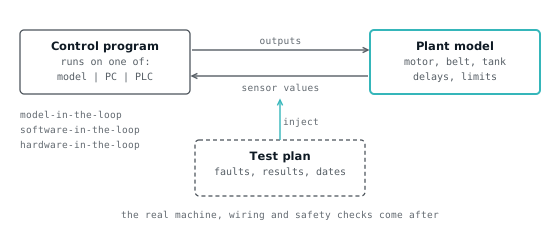
Virtual commissioning is testing a control program against a simulated machine before the real machine exists or is available, so that logic errors are found at a desk instead of on site. The control code runs for real, either on a PC emulation of a PLC or on the actual PLC hardware, and the machine it would control is replaced by a model that responds to its outputs and feeds back sensor signals.
Industry does this with expensive 3D tools and detailed plant models. You can do a small, honest version of the same discipline today with the free Wartens LADV virtual PLCs, and this article shows how, and where the comparison stops.
What virtual commissioning is
Virtual commissioning means running the real control logic against a model of the plant, then using that to verify sequences, interlocks and timing before physical commissioning. Descriptions vary between vendors and papers, but they agree on the shape: a controller in the loop, a simulated machine on the other side of it, and a test plan run against the pair.
Siemens describes it as testing the control software in simulation before physical commissioning, with the program running in a virtual PLC connected to a 3D model of the line. Emulate3D's maker describes it as completing most of the commissioning phase in a virtual environment rather than on physical equipment, by combining mechanical CAD data with real control logic.
The word "commissioning" matters: the aim is the checks you would otherwise run on site, so the result is a test record, not a demo.
The levels: model, software and hardware in the loop
The levels differ in where the control code runs. The loop is always the same: the controller writes outputs, the plant model moves, and the model returns sensor values.
- Model-in-the-loop. The control logic is itself a model, for example a block diagram or a state chart in a simulation tool, running against a plant model. It tests the design before there is any PLC code. Definitions of this level are used less consistently than the other two, so check how a given vendor or paper uses the term.
- Software-in-the-loop. The control code runs on an emulation of the PLC on a PC, such as a vendor's virtual controller. It is cheap and fast and needs no hardware, but it does not test the real controller's timing, I/O modules or network.
- Hardware-in-the-loop. The real PLC hardware runs the real program and is connected to the simulated plant, often over the same fieldbus the machine will use. This tests the controller and its network, at the cost of needing the hardware.
The LADV setup described below is software-in-the-loop in shape: a virtual controller running a program against a model.
What a plant model must contain
A plant model has to contain enough physics and behaviour for the control logic to be wrong in a way you can see. It does not need to look like the machine. It needs the right signals, the right delays and the right ways to fail.
For a useful model, list at least:
- Actuator response. A motor takes time to reach speed. A valve strokes. A cylinder takes a second to extend. Control logic that assumes instant response fails on the real machine.
- Sensor behaviour. A photo-eye sees a part for a limited time. A limit switch bounces. An analog level lags the real level.
- Process dynamics. The tank fills at a rate, the belt carries parts at a speed, the temperature rises over minutes.
- Interlocks and limits. Hard stops, overtravel, full and empty conditions, so a wrong program can crash the model rather than pass silently.
- Faults. Stuck sensors, a broken wire on a normally closed input, a jammed actuator. These are what turn a model from a demo into a test.
- The I/O map. Names and addresses that match the control program. A model wired to different signals tests nothing.
The more of this a model has, the better it finds mistakes, and the more effort it takes to build. Most of the cost of virtual commissioning is the model, not the PLC.
The tools industry uses
Several commercial and open tools cover this ground. This is a short list of well-known ones, with what their makers say about them, not a ranking.
| Tool | What its maker or a source says |
|---|---|
| Siemens NX MCD with PLCSIM Advanced | PLCSIM Advanced is Siemens' virtual PLC; NX Mechatronics Concept Designer supplies the mechanical design data |
| Siemens Process Simulate | In a Siemens demonstration, a kitting line's control program runs in a virtual PLC connected to its 3D model |
| Rockwell Emulate3D | Digital twin software that combines mechanical CAD data with real control logic |
| Factory I/O | A training factory that connects to PLCs, soft PLCs and simulators over Ethernet, OPC UA or Modbus TCP |
Emulate3D is described by its vendor as a way to verify logic sequences and timing, and Factory I/O's features page says instructors can inject always-on and always-off sensor failures, which is a typical fault test. Read each vendor's current documentation for versions and licensing; those details change and we have not verified them.
Whatever the tool, ask the same two questions: which signals does it model, and how do you inject faults?
What it saves and what it does not
Virtual commissioning saves time on site by moving logic errors to before the site visit. It does not remove site work, and we do not quote a percentage because the figures in vendor material are vendor claims, and we have not found one we could check.
What it plausibly saves:
- Logic bugs found early. A wrong interlock or a missing timeout is cheaper to fix at a desk.
- Parallel work. Programming and testing do not wait for the machine to be built.
- Repeatable tests. The same test can be rerun after each change.
- Safer fault testing. You can force a failure that you would not stage on a real machine.
What it does not remove:
- Wiring and I/O errors. A model cannot find a swapped terminal on the real panel.
- Real device behaviour. Drives, sensors and actuators differ from their models.
- Real timing. Network jitter and scan time on the real hardware.
- Safety validation. Safety functions need their own validation on the real system.
- Model errors. If the model is wrong, a passing test proves little. A model is also a program with bugs.
The best use is as the first stage of a test sequence that still ends on the machine. The FAT checklist for a PLC control panel and the commissioning checklist are what the later stages look like.
A small version you can do now
You can practise the discipline, at small scale, on four simple machines with no software to install. The method is the same as the real one: write to a specification, run against a model, inject faults, and keep a record.
The Wartens LADV virtual controllers run IEC 61131-3 programs, in ladder or Structured Text, in a browser. Each twin is a small process wired to the controller through named signals, with objectives that watch the process and report pass or fail. They are simple behavioural models: a motor station, a traffic junction, a conveyor sorter and a tank level. They are not plant emulations, and they model a handful of behaviours each. They are for learning and for testing logic, not for validating a machine.
- Write the specification. For the motor station, the brief says Start runs the motor and it keeps running after release, Stop and E-Stop both stop it, Start must do nothing while E-Stop is pressed, and the Running lamp follows the motor.
- Write the program. In ladder in the lab or in Structured Text. The program below is the reference for this twin, and it passes all five of its objectives.
(* Motor start/stop station: reference solution in IEC 61131-3 Structured Text. *)

VAR_GLOBAL
  Start_PB AT %IX0.0  : BOOL; (* Start pushbutton, normally open *)
  Stop_PB  AT %IX0.1  : BOOL; (* Stop pushbutton, normally closed, 1 when healthy *)
  EStop_OK AT %IX0.2  : BOOL; (* Emergency stop, normally closed, 1 when healthy *)
  Motor    AT %QX0.0  : BOOL; (* Motor contactor *)
  Run_Lamp AT %QX0.1  : BOOL; (* Running indicator *)
END_VAR

PROGRAM Main
  (* Start with a seal-in. Stop_PB and EStop_OK are normally closed, *)
  (* TRUE while healthy, so a broken wire stops the motor too.       *)
  Motor := (Start_PB OR Motor) AND Stop_PB AND EStop_OK;
  Run_Lamp := Motor;
END_PROGRAM- Download and run. Use the "Run on LADV" link under the program or open the lab. The controller must be in STOP to download, and outputs are off unless it is in RUN, like a real one.
- Run the test cases. Press Start, release, press Stop, press E-Stop, press Start with E-Stop held. Each objective turns to pass as its condition is met.
- Force faults. Force an input to a value the field would not give, and break the normally closed stop wire by setting it to 0. Read what the program does. PLC force and modify covers the practice and the risk of leaving a force on.
- Cause a controller fault. Write a loop that never ends and watch the controller fault, then read the code in the diagnostic codes. PLC tasks and watchdog explains why.
- Record the results. For each test, the date, the program version, the input, the expected result and the actual result. For Structured Text, the lab's Copy link button puts the whole program in the address; keep it with the record.
For something with more to it, the tank level twin has analog scaling, hysteresis, and an Auto selector; the conveyor has sensors and a pusher; the traffic junction is all timers.
This does not replace a plant model, a real controller or a FAT. It builds the habit that makes them useful: no logic is trusted until it has been run against something that can show it wrong, with a record.
Before the FAT
Run the small version as a rehearsal of your factory acceptance test. Take the test cases in your FAT procedure, express each as an input sequence and an expected output, and run them against whatever model you have. Anything that fails on the model will fail in front of the customer.
For a real project, that model will be a purpose-built one in one of the tools above. For learning, it is a twin. Either way, the output is the same: a table of tests, results and dates that you bring to the FAT. For a wider view of the free tools, read the PLC simulator comparison, online PLC simulators and how a virtual PLC works.
How we tested
We ran the motor station reference program shown above on the LADV CPU 110 against the motor station twin, and the LADV test suite checks that it passes all five objectives. Every Structured Text program on this page compiles on the LADV compiler, checked automatically in the site's test suite, on 2026-11-01.
The tool descriptions come from the vendor pages and articles listed under sources, fetched on 2026-11-01; we did not install or run Siemens, Rockwell, Factory I/O or any other tool. We did not test the model-in-the-loop level at all, and we did not test on any real PLC. We did not verify any saving figure and do not quote one.
Sources and further reading
- Siemens Tecnomatix blog: digital enterprise factory, with TIA Portal, PLCSIM Advanced and Process Simulateblogs.sw.siemens.com
- Onshape blog: virtual commissioning with Emulate3Donshape.com
- Factory I/O features: drivers, training use and failure injectionfactoryio.com
- IEC 61131-3: Programmable controllers, Part 3: Programming languageswebstore.iec.ch
Common questions
- What is virtual commissioning in simple terms?
- It is running the real control program against a simulated machine and checking its behaviour, as you would on site, but before the machine exists. The simulated machine returns sensor values in response to the program's outputs, and you run a test plan with faults and record the results.
- What is the difference between software-in-the-loop and hardware-in-the-loop?
- In software-in-the-loop the control code runs on a PC emulation of the PLC against a simulated plant. In hardware-in-the-loop the real PLC hardware runs the program and is connected to the simulated plant. The second tests the controller and its network as well as the logic, but needs the hardware.
- Does virtual commissioning replace the FAT?
- No. It finds logic errors earlier, so the factory acceptance test goes more smoothly, but wiring, real device behaviour, real timing and safety functions still have to be checked on the real system. Treat it as the first stage of a test sequence that ends on the machine.
- Can I practise virtual commissioning for free?
- You can practise the method at small scale. Write a program to a specification, run it on a free LADV virtual controller against a twin, force faults and record the results. The twins are simple behavioural models of four machines, not plant emulations, so this builds the habit rather than replacing real tools.
Keep reading
- Practice
Teaching PLC programming with digital twins: objectives, faults and a lesson plan
How instructors can teach PLC programming with digital twins that mark the program themselves, with how objectives work, a module structure, assessment advice and a lesson plan.
- Platforms
The future of virtual PLCs, 2026 to 2030
Where software-defined control is heading: vendor virtual controllers, IEC 61499 portability, O-PAS, containers, time-sensitive networking, virtual commissioning and AI-assisted programming, and what is unlikely to change.
- Compliance
Factory acceptance test checklist for a PLC control panel
A FAT checklist you can copy for a PLC panel: documents, inspection, power-up, I/O point by point, interlocks, alarms, HMI, safety, failure modes, sign-off.